


Tabs keep crashing randomly.

Not sure what seems to be happening after going through the usual list of troubleshooting. I've run it in troubleshooting mode, none of my very few extensions seem to be causing the issue since it crashed during that test too. I've cleared my cache, I've made sure it's up to date, I also turned off hardware acceleration. I even tested my RAM to make sure it wasn't that.
At this point I have no idea what the problem is, and have even less idea how to fix it.
All Replies (3)
We're sorry to hear that Firefox is crashing. In order to assist you better, please follow the steps below to provide us crash IDs to help us learn more about your crash.
The crash report is several pages of data. We need the report numbers to see the whole report.
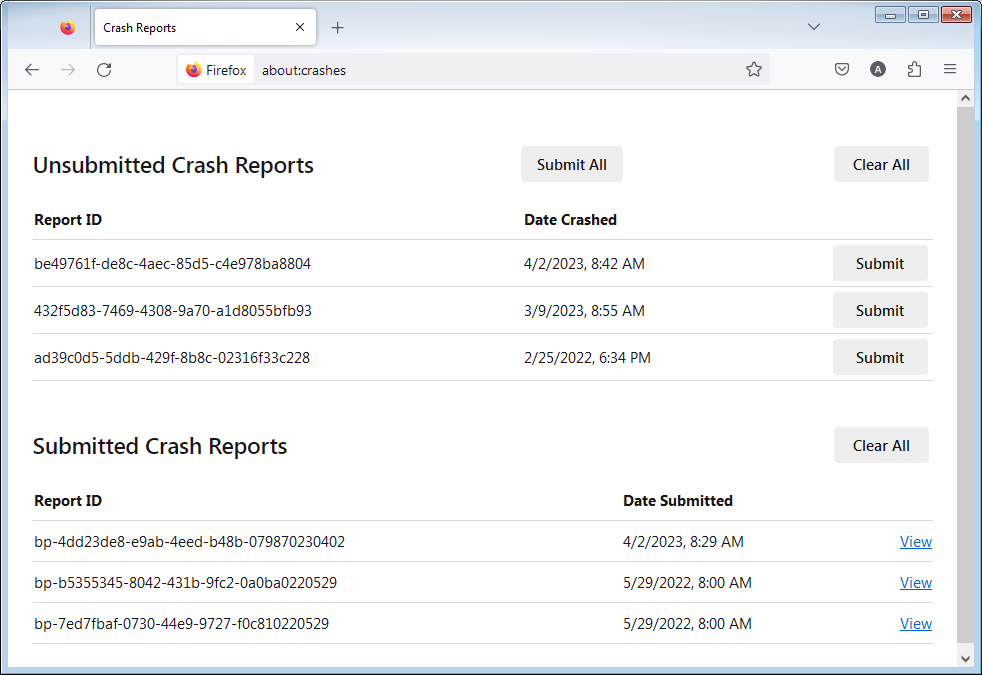
- Enter about:crashes in the Firefox address bar and press Enter. A list of Submitted (and Unsubmitted, if any) Crash Reports will appear, similar to the one shown below.
- Copy the 5 most recent Submitted Report IDs that start with bp- and then go back to your forum question and paste those IDs into the "Post a Reply" box.
Note: If a recent Report ID does not start with bp- click on it to submit the report.
(Please don't take a screenshot of your crashes, just copy and paste the IDs. The below image is just an example of what your Firefox screen should look like.)
Thank you for your help!
More information and further troubleshooting steps can be found in the Troubleshoot Firefox crashes (closing or quitting unexpectedly) article.
Sure thing. Here is the five most recent ones:
bp-d38b3c07-ae44-4364-a2af-8dabc0261114
bp-714f155f-0c1d-418c-8490-af3370261114
bp-48a97193-3221-42bc-8552-fad1f0261114
bp-0dd4e464-0762-4827-95c1-9a4930261114
bp-27efddc3-7959-4573-9ddf-b4d8d0261114
This is unfortunately faulty CPU bugzilla.mozilla.org/2052206 — see support.mozilla.org/questions/1582828 for some recommendations.