


Persistent tab crashes
Tabs will crash over and over again. I can barely look at any given page for longer than a minute or two. What happened?? Firefox was never like this before. It just crashed in the middle of me typing this LMAO. Using Brave in the meantime. This is ridiculous.
All Replies (14)
Hello,
Try Firefox Troubleshoot Mode to see if the problem goes away. Firefox Troubleshoot Mode (previously known as Firefox Safe Mode) is a special diagnostic mode that temporarily turns off hardware acceleration, disables add-ons (extensions and themes) and resets some settings. See the Use Troubleshoot Mode in Firefox article for details.
If Firefox is open, you can restart in Firefox Troubleshoot Mode from the Help menu:
- Click the menu button
 , click Help, select Troubleshoot Mode and click Restart in the "Restart Firefox in Troubleshoot Mode?" dialog that opens.
If Firefox is not running, you can start Firefox in Troubleshoot Mode as follows:
- On Windows: Hold the Shift key when you open the Firefox desktop or Start menu shortcut.
- On Mac: Hold the option key while starting Firefox.
- On Linux: Quit Firefox, go to your Terminal and run firefox -safe-mode
(you may need to specify the Firefox installation path e.g. /usr/lib/firefox)
When the Firefox Troubleshoot Mode window appears, select "Open".
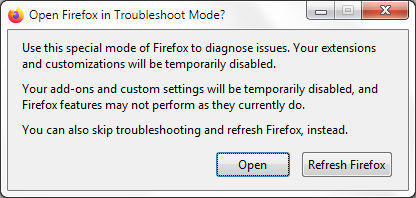
If the issue is not present in Firefox Troubleshoot Mode, your problem is probably caused by an extension, theme or hardware acceleration. Please follow the steps in the Troubleshoot extensions, themes and hardware acceleration issues to solve common Firefox problems article to find the cause.
To exit Firefox Troubleshoot Mode, just close Firefox and wait a few seconds before opening Firefox for normal use again. (If you can't exit Firefox Troubleshoot Mode, please see Firefox is stuck in Troubleshoot Mode).
When you figure out what's causing your issues, please let us know. It might help others with the same problem.
Thanks for the tip.
Unfortunately, that didn't work. I still had tabs crashing within seconds of restarting them.
Hi,
In order to assist you better, please follow the steps below to provide us crash IDs to help us learn more about your crash.
The crash report is several pages of data. We need the report numbers to see the whole report.
- Enter about:crashes in the Firefox address bar and press Enter. A list of Submitted (and Unsubmitted, if any) Crash Reports will appear, similar to the one shown below.
- Copy the 5 most recent Submitted Report IDs that start with bp- and then go back to your forum question and paste those IDs into the "Post a Reply" box.
Note: If a recent Report ID does not start with bp- click on it to submit the report.
(Please don't take a screenshot of your crashes, just copy and paste the IDs. The below image is just an example of what your Firefox screen should look like.)

Thank you for your help!
Hi,
Thank you for the follow up. Below are the 5 most recent reports. These all may or may not be crash reports from when I was using Firefox in Troubleshooting Mode.
bp-5fbd9fba-2f90-4e0c-b91f-b09530260524 bp-e18e38ee-6086-4c67-acf7-f10450260524 bp-4e6b9e5e-73e2-438b-95d4-320b70260524 bp-8e88b350-7536-4568-ad89-8a5640260524 bp-e10e6d78-cee4-428e-a913-b2c560260524
I know this question might sound crazy, but… what's the temperature where you are? Hasn't it gotten warmer recently?
(This matches the heatwaves from last year exactly: https://bugzilla.mozilla.org/show_bug.cgi?id=1975808 …)
Quoting from https://bugzilla.mozilla.org/show_bug.cgi?id=1975808#c8 …
"For users experiencing these crashes please check if you are running a Raptor Lake-based Intel machine. You can use a tool such as CPU-Z to identify your machine's CPU. If it reports your CPU as having Code Name: Raptor Lake, Model: 6, Ext. Model: B7 and Stepping: 1 then you have one of the affected CPUs. These CPUs have known bugs that cause normally functioning software to crash randomly. You might be able to mitigate the issue by updating your motherboard firmware, but generally speaking there is no solution to these crashes short of replacing the CPU. Intel has extended the warranty on these CPUs so you might get a replacement if you ask for one."
jbr said
I know this question might sound crazy, but… what's the temperature where you are? Hasn't it gotten warmer recently? (This matches the heatwaves from last year exactly: https://bugzilla.mozilla.org/show_bug.cgi?id=1975808 …) Quoting from https://bugzilla.mozilla.org/show_bug.cgi?id=1975808#c8 … "For users experiencing these crashes please check if you are running a Raptor Lake-based Intel machine. You can use a tool such as CPU-Z to identify your machine's CPU. If it reports your CPU as having Code Name: Raptor Lake, Model: 6, Ext. Model: B7 and Stepping: 1 then you have one of the affected CPUs. These CPUs have known bugs that cause normally functioning software to crash randomly. You might be able to mitigate the issue by updating your motherboard firmware, but generally speaking there is no solution to these crashes short of replacing the CPU. Intel has extended the warranty on these CPUs so you might get a replacement if you ask for one."
It's definitely been getting warmer the past couple weeks, but not drastically and suddenly so that I feel it explains the sudden instability of Firefox and Firefox only. I also didn't experience these issues last year despite having the hottest summer on record. Additionally, I always have my AC on blast when I'm at home and using my computer, though maybe that doesn't have much of an effect.
So I don't think it's temperature related, but is there a way for me to confirm whether I have a CPU-related issue on my hands?
I am also having this issue, mainly with Youtube's main page. I disabled an add-on and it worked for 1 refresh then started crashing again. I tried private window which disables all my add-ons and it still crashed. My crash report id: bp-a1bd9f67-c5a9-4a28-9d4c-bee490260524.
Thanks!
@Jonas, the bug timeline suggests using something as https://en.wikipedia.org/wiki/CPU-Z freeware for Windows to display the CPU details. The faulty one is confirmed to be "Raptor Lake, Model: 6, Ext. Model: B7"
@Esah, this is not the same issue, however check https://support.mozilla.org/questions/1583519 if rolling back changes anything? (And eventually join the discussion there? Thanks.)
Thank you! I did a google search and was able to find an old thread from 2021 about crashing, then checked the main page and found this one which sounded like what I was having. It looks like they have a fix ready to go.
Edit: Just did an update and it resolved it of course. Love the nightly updates when things break, they get fixed quickly!
Modified by Esah
For anyone else facing the mozilla::dom::Event_Binding::get_target crash, here's the list of affected CPU models:
https://en.wikipedia.org/wiki/Raptor_Lake#Instability_and_degradation_issue
This can also apply to similar mozilla::dom::Event::GetTarget or mozilla::dom::Event::WidgetEventPtr signatures on family 6 model 183 stepping 1.
Modified by jbr
I downloaded first-party software from Intel to manage the CPU and lower the speed (or something? I don't remember the terminology), in accordance with a thread I found on how to fix instability with Raptor Lake chips. For whatever reason (maybe I don't know how to use the software), I wasn't able to change it.
But on second thought, I'm not convinced this has to do with my CPU. As I researched others' issues with Raptor Lake instability, many people reported having persistent crashes with video games, which I presume are significantly more power-intensive than Firefox which is a web browser. Since my issues with Firefox have started, I have had 0 cases of crashes with video games, or with any other program for that matter. Putting aside weather and my CPU as possible culprits, are there any other explanations (and fixes!!!) for this? The ridiculous persistence and rate of crashes is driving me nuts, and making me feel that leaving my once-beloved Firefox is the only real fix. Thanks!
No, there are not.
All the crashes submitted are absolutely consistent, have been examined, and investigated as CPU bug: bugzilla.mozilla.org/2011915
(To explain: this is not a form of "instability" or something about load or performance — the code executed on the processor does the wrong thing instead of what it's supposed to do. This is caused by a degradation of the actual material, over time, from heat, and general manufacturing flaws. Once the specific chemistry/physics of the chip is degraded, usually no amount of firmware updates is able to work around it, even though there are attempts to reprogram things to avoid these failed locations.)
This particular crash is open, documented, tracked against bugzil.la/cpu-raptor-lake-bugs however has no signal whether actionable, and if any attempts to rewrite the code to work around the faulty silicon will be feasible or productive.
Modified by jbr
My advice would be: Start asking your supplier for a replacement unit, or how are your warranty conditions affected now given the scale of the issue, until the warranty extensions last. (At least you have paper trail it's actually affecting your system.)