


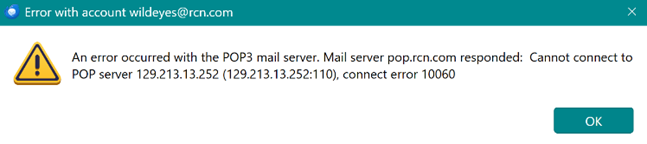
cannot get into my RCN email account. "Mail server pop.rcn.com ... Cannot connect to pop server... connect error 10060"

As of Oct 12 2026 I also have this issue. About a week before the 12th I was getting messages that I needed to sign into my RCN account which I would do and it just kept asking me. A few times each night to start then right before it shut me out I had over 50 of these messages just flooding my screen. I never did get a screen shot of that message, but did for the 2 error messages I got later once it shut me out.
I shut down my computer the night of the 11th then when I signed back in on the 12th I could not send or recieve any emails. SOmething similar had happened before, but when I shut down again it went away. This time it did not. I then tried to access my emails thru the webmail I can access, but that also had shut me out. I also tried my tablet, a borrowed smart phone, but I could not access anything for my emails. I troubleshooted with my email company and my internet company, but they found nothing.
Then I shut off the wi-fi on the smart phone and bin go I could access the webmail. But I still cannot find anything on what to do to fix this.
I use RCN for my email, Spectrum for my internet. It is a POP3. Running Thunderbird version 153.5 Oesr (32 bit) Meadow, which says it is up to date. I have norton 360 anti virus & do not use VPN. I disabled my Auto-protect and firewall on the Norton and that did not change anything.
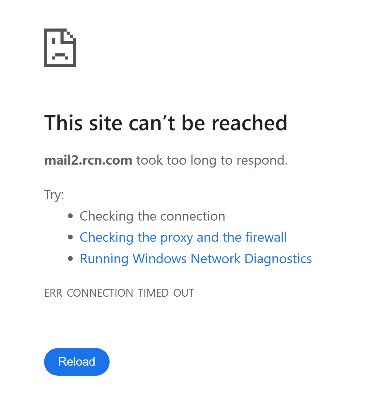
I have sent the error messages to RCN and also troubleshot with Microsoft and had some hints, but nothing has come of that yet. Here are the screen shots of the only 2 things I ould capture. The error message was when I was trying to access my email thru Thunderbird. And it came up every time I tried to send messages, not that does not show up anymore and nothing happens when I try and send anything. The second one was when I was trying to access the RCN webmail and it would not let me in on anything I used. Until I shout off the WI-Fi. Then the smart phone could access my webmail account.
Modified by Wayne Mery
All Replies (6)

Can you better describe what you mean by "shut you out"? Did you get some sort of notice that said "you cannot do that"?
If you were having email trouble with only your desktop computer I would first blame Norton. They are notorious for interfering with Thunderbird and other email programs. But since you say you are having trouble accessing the Internet with all the devices in your house, you have a problem with your Internet provider, Spectrum. You might ALSO have an email issue, but until you solve your network problems, any possible email issue cannot be addressed.
So I can get into my old emails on Thunderbird but I get no new emails nor can I send any. That error message I sent was what I get when I try and send an email. I get no other error messages anymore when I click on get messages. I just does not do anything. I contacted Spectrum and they restarted the system, they checked the system and checked the router and the modem and they said there had been no errors in the history at all and there was nothing on their end they could see as to why this was happening. The same thing with RCN, but they are looking into more things. One thing I found out is there is a serious issue with the latest Microsoft update. People cannot start their computers, emails are not working right and the tech guy for all of UMASS Amherst has over 40 computers that are dead in the water and he has been working all week and cannot get them to start. A friend told me about this after I mentioned to him I was having email issues as I needed to borrow his smart phone to see if I could access my emails another way. He also had his computer go dark and they cannot get it to start at all. Then I was talking to other people and they are having similar issues. Some cannot get theircomputers to turn on, one that eventually he did get it to start, but then no bluetooth would work at all. He had to go back to wired devices. And I had asked Microsoft if they had heard of any issues before I heard about this and they said no. But they did send me some info to have RCN try and see if it might help. So I went into check last night to see if I had gotten the latest update and they had tried 2 times, but they both failed. And that was on Oct 12. I went in again just now and it states that I need to reinstall my version of Windows to repair system files and components. I am going to try that and also when I am out today try and access my webmail by Wi-Fi at the library and see if I can get in. That will tell me if it is in my internet or not. I will let you know if it works. But if you have any other ideas with this new info let me know. But I suspect there are many other people who have been running into this update issue. It seems like the total shutdowns are on older computers. Mine is only 1 1/2 yrs old. The people who are having other issues or eventually got them started are ones with newer computers.
You are using pop, so your "old mail" are downloaded on your PC and don't need to be fetched from a server.
Sounds like a maybe a certificate issue, which could be a problem at your provider or caused by AV software. I don't see anything interesting in your second posting.
Have you resolved the issue?
The issue was not being able to read the emails I had already gotten. I could not get any or send any new ones after 10/11. I tried for days. So yes I need to FETCH my emails thru a server. I have no other way to get them without doing just that. The Microsoft update did finally go thru but did not help the issue. No one had any ideas. Then I did what I said I never would do (but I was desperate) as I could not get any of my work done. I asked AI. And for 4 hrs we tried everything under the sun and we got somewhere, but not fixed. Using a hot spot on the borrowed smart phone I finally 3 hrs in got my emails to come thru. And that proved that my account was being blocked by Spectrum, but no one there would help me. So AI said to complain to the FCC that Spectrum had blocked RCN and my email account and I had proof of that and low and behold 9 hr later miraculously my email account started to work and my emails started to come thru and is working right now with no issues. There had to be an easier way. But no one wanted to deal with it at the company.
Several things I see here.
You are connecting to Port 110 so in Thunderbird server settings your connection security should be set to none. or use Port 995 is using SSL/TLS. If connection security is none, it is unlikely that antivirus scanning is the cause of the timeout (Error 10060)
There are some issues that are more common than others.
Use of a VPN. This has become a new cottage industry with heavy corporate marketing, but a VPN is also a prime cause of issues when getting mail in a mail client. Mostly I wonder if they ever consider folk still use mail clients. But everything from Google issuing new password challenges frequently to the provider simply refusing connection from the VPN they are a mess that is under reported and under described in the marketing. Do you have a VPN, even as a component of another security product like antivirus?
Another is antivirus scanning. Even with the majority of the issues removed as there is no encrypted connection (No SSL/TLS) there is still the possibility that the antivirus is just plain slow and the connection times out waiting for it to do its job. This is especially the case if you have a very large email in the queue. Consider ceasing email scanning until the issue of getting mail is resolved. Personally I don't scan it at all. Ever
Yes that was one of the things that AI had me change to at first to secure port 465 then to port 995. We actually tried a few other things also. That got rid of the error message of being timed out, but did not fix the rest of the issue.
Anti virus was not the issue as I stated before, I totally disabled it and the firewall and that did not change it. And I do not think I scan the emails with the anti virus. And never had this issue before and I have not changed anything on my computer.
I do not use VPN or have it on anything.
But as I said it is now working with no issues. And the only other thing I did after was to file an FCC complaint.
This is what I wrote to the FCC and what seems to have gotten them to actually finally unblock it. It has been 4 days and I have had no more issues or error messages. And now I know what to do and that filing a complaint to the FCC can open up doors to getting issues rectified when you get no where with corporate places..
My Internet Service Provider (Spectrum) is is actively blacklisting the IP address for RCN's secure incoming and outgoing mail system and blocking secure incoming and outbound email traffic to my email provider (RCN/Astound Broadband). While connected to my home Spectrum Wi-Fi, my email program (Thunderbird) completely times out when trying to connect to the mail server 'mail.rcn.com' . This issue happens on multiple home devices but all work perfectly fine the moment I switch to a mobile cellular data hotspot or when using Wi-Fi at multiple other locations. Front-line Spectrum support refuses to escalate this routing block to network engineering. Spectrum is failing to provide unrestricted access to a legitimate, basic email service that I am paying for."