


Can receive Thunderbird email but cannot send or reply. Sudden change.

Error msg:
Sending of the message failed. The message could not be sent because connecting to Outgoing server (SMTP) outbound failed. The server may be unavailable or is refusing SMTP connections. Please verify that your Outgoing server (SMTP) settings are correct and try again.
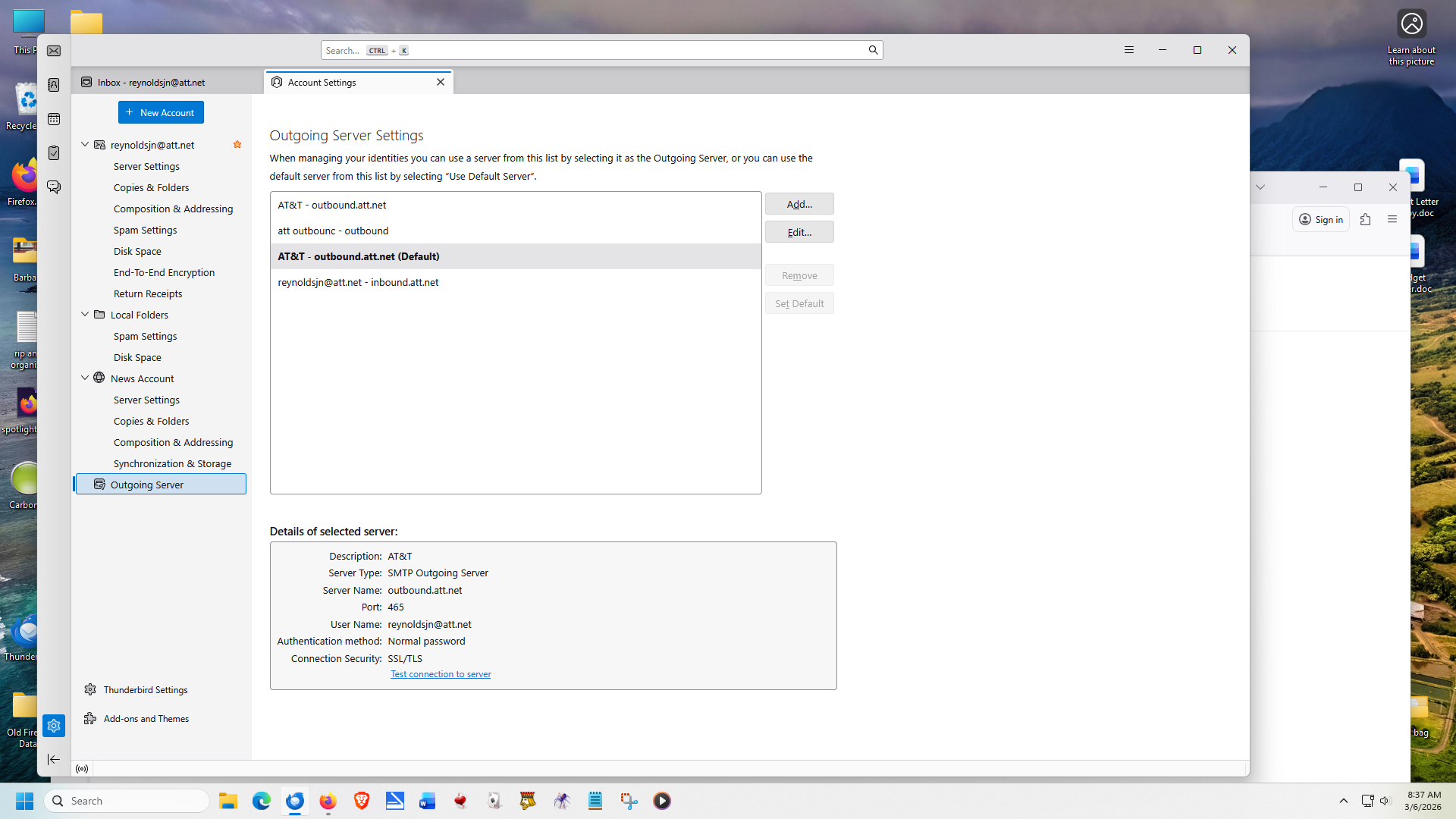
Attached screen shot.
Chosen solution
You have one account but several smtp servers, including one on the incoming inbound.att.net. Remove all but the Default one and see if sending works.
The problem might have been caused by the sending account using the wrong smtp (select the account on the left, note the selected smtp on the right for Outgoing Server (SMTP)).
Read this answer in context 👍 0All Replies (1)
Chosen Solution
You have one account but several smtp servers, including one on the incoming inbound.att.net. Remove all but the Default one and see if sending works.
The problem might have been caused by the sending account using the wrong smtp (select the account on the left, note the selected smtp on the right for Outgoing Server (SMTP)).