


Sidebar.revamp false is stuck in NOVA.

I cant stand the new sidebar and the revamp false has kept me in firefox. Now its stuck with padding on the outside, padding on the inside even with NOVA turned off. I have gone back to firefox 157 for now.
Is there anyone forking firefox away from all this curvy padded UI. This is very unpleasant.
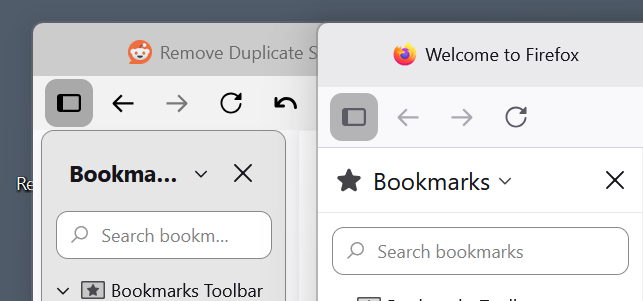
All Replies (3)
I meant to mention that I lost my compact theme when I had to install 157. It doesn't let you keep your exact profile setup exactly when you go backwards. Just in case you are looking at the picture thinking why is the one on the right so tall?
Izmjenjeno od strane grahamlane
I found a way to fix it. Using the profile folder I made a folder called chrome with a file called userChrome.css file with some ai help. It strips all the curvy stuff off . I am using the Proton theme, and turned off all the about:config NOVA stuff, sidebar.revamp false, and had to turn toolkit.legacyUserProfileCustomizations.stylesheets to true.
/* 1. STRIP NOVA VARIABES AT THE ROOT LEVEL */
- root {
   --border-radius-xsmall: 0px !important;
   --border-radius-small: 0px !important;
   --border-radius-medium: 0px !important;
   --border-radius-large: 0px !important;
   --border-radius-xlarge: 0px !important;
   --border-radius-circle: 0px !important;

   /* Sidebar-specific Nova variables */
   --sidebar-border-radius: 0px !important;
   --chrome-block-radius: 0px !important;
   --chrome-window-gap: 0px !important;
   --content-border-radius: 0px !important;
}
/* 2. UNIVERSAL CORNER FLATTENER */ /* Forces every UI component in the window tree to strictly drop curves */
- {
border-radius: 0px !important;
}
/* 3. FIX TEXT REDUCTION & COMPACT OVER-PADDING */
- sidebar-box,
- sidebar-header,
- sidebar-search-container,
.sidebar-placesTree,
- bookmarks-view,
- historyTree,
- history-panel,
treechildren {
font-size: 14px !important; /* Forces normal, readable sizing for lists and headers */
}
/* Clean up structural spacing bugs caused by Nova fallback wrappers */
- sidebar-box,
.sidebar-panel {
   padding: 0px !important;
   margin: 0px !important;
   border: none !important;
}
- sidebar-header {
   padding: 6px 8px !important;
   margin: 0px !important;
}
/* Fixes individual lines in Bookmarks and History so they are perfectly squared */ .sidebar-placesTreechildren::-moz-tree-row,
- historyTree treechildren::-moz-tree-row {
   padding-block: 3px !important;
   margin: 0px !important;
   border-radius: 0px !important;
}
There may be problems later, but for now, it works! No curves, no extra padding, normal text size is back. It also got rid of the pill shaped

Izmjenjeno od strane grahamlane
Hi
I recommend that you do not use either about:config or userChrome to change this as the prefs are likely to change in the future.