


Restoring Thunderbird after Windows Reinstall
My Windows 11 was recently reinstalled to factory settings, which uninstalled Thunderbird but saved my mobx files. I used Thunderbird exclusively to view older emails that are stored on my PC as mobx files. I do not use Thunderbird as an active email client. I reinstalled Thunderbird, but have been unable to get it to find my mobx files that are stored together in a folder.

Odabrano rješenje
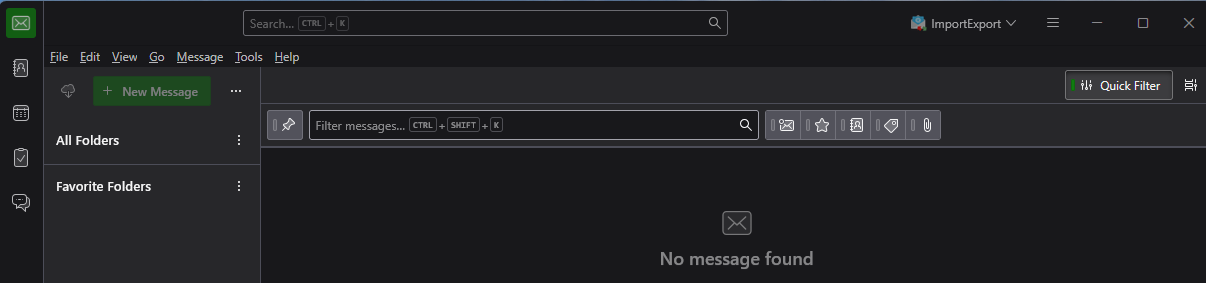
It seems that you do not have a Local Folders account. I just learned by creating a new profile without setting up an account that Thunderbird does not create the local folders account if no other account is set up. That surprised me.
So I suggest that you create a new profile and set up a dummy account. During the process, you will have to select "configure manually" and/or "advanced configuration" to prevent Thunderbird from trying to connect to the dummy account on a server. When you are done, you will have the dummy account and the local folders account. Then you can import your mbox files.
Then you may have to put Thunderbird in off-line mode so it does not try to connect to your dummy account all the time.
Create a new profile by "Help" (menu) > Troubleshooting information > about:profiles > Create new profile.
Then set the new profile as the default profile.
I have not encountered this situation before. Someone else may have better ideas. Nonetheless, this approach seems obvious to me.
All Replies (6)
You want to put the mbox files in the Local Folders pseudo-account. Your Local Folders pseudo-account seems to be hidden.
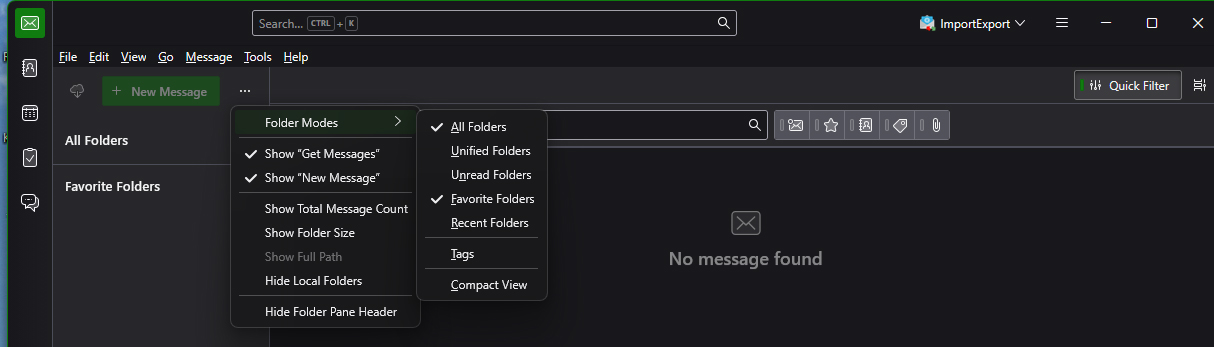
- Click on the three dots on the right of the "new message" button and uncheck "Hide local folders".
- Install the ImportExporttoolsNG add-on.
- Right click on the Local Folders account name in the folder pane.
- Select ImportExportTools NG > Import mbox files > All mbox files from directory.
Thank you for responding. When I looked at that drop-down, "Hide local folders" was not checked. Please see updated attached image.
Odabrano rješenje
It seems that you do not have a Local Folders account. I just learned by creating a new profile without setting up an account that Thunderbird does not create the local folders account if no other account is set up. That surprised me.
So I suggest that you create a new profile and set up a dummy account. During the process, you will have to select "configure manually" and/or "advanced configuration" to prevent Thunderbird from trying to connect to the dummy account on a server. When you are done, you will have the dummy account and the local folders account. Then you can import your mbox files.
Then you may have to put Thunderbird in off-line mode so it does not try to connect to your dummy account all the time.
Create a new profile by "Help" (menu) > Troubleshooting information > about:profiles > Create new profile.
Then set the new profile as the default profile.
I have not encountered this situation before. Someone else may have better ideas. Nonetheless, this approach seems obvious to me.
Thanks!
Apparently, there is a way to hide the dummy account, which cannot be deleted. It involves editing files in the file system.

You can try the following to see ( I tested in Thunderbird 152, but it should work with any other version )
Once your "dummy account" is created and your local directory is created , you can simply copy the inbox file from your actual account into your local directory without using any tools.
Example : you have account abc01, you can copy the actual inbox file from your abc01 into local directory as it or you can give it a different name like inbox_abc01. Restart Thunderbird and you'll see inbox_abc01 in Local Folders
Inbox file is an example but you can copy any other mbox file (file that actually contain your emails) into your local directory.
The dummy account can be simply deleted once the local directory is created.
Izmjenjeno od strane Michel T