


Cannot login to russian website gosuslugi.ru with saved password

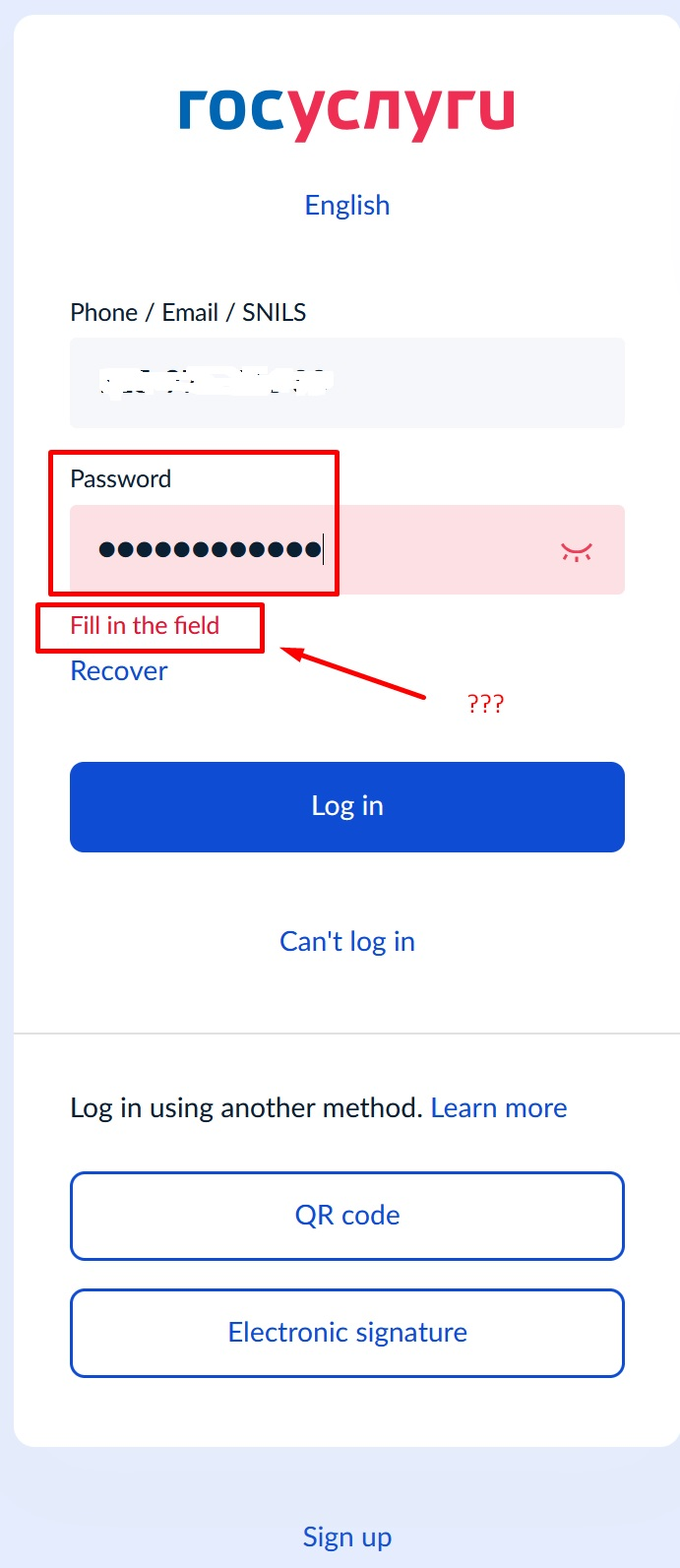
Dear Team, good day! I use russian website gosuslugi.ru periodically (not daily), and my password for this website is saved in Firefox Password Manager. Today I tried to log in to this website - but my Firefox for Windows (ver. 152.0.4 x64) showed me that I need to enter "Password" - even though it's already saved in Password Manager & 100% correct (I tried same password in Google Chrome on the same PC and in Firefox on my Samsung Galaxy S24 Ultra with Firefox browser - in both cases everything is OK). Im using Windows 10 22H2 x64, activated, no any problems with it. I tried clearing the gosuslugi.ru cache in my Firefox - but it didnt help. could you please suggest any solutions? screenshot attached.
All Replies (6)
If you tap into the password, add one "space" or a single letter or number, and then delete this extra character back to have your correct password in that filed now… does the site unblock you submitting it that way? (Some sites are coded in a way they need to "see" key presses to actually validate there was an input filled in.)
jbr said
If you tap into the password, add one "space" or a single letter or number, and then delete this extra character back to have your correct password in that filed now… does the site unblock you submitting it that way? (Some sites are coded in a way they need to "see" key presses to actually validate there was an input filled in.)
Good afternoon! Thank You so much for Your advise. I tried adding symbol & then deleting it - unfortunately in didnt help. I also tried entering my password manually - that didnt help either...
This is unfortunate:( To be completely sure please also "Clear cookies and site data" from the shield icon next to address bar when you're on that page, to make sure there's no old session interfering. You can maybe try the same in a new Private Window to rule out any stale script on their side?
If it's permanently broken, please submit the error state via "Report Broken Site" functionality in the browser menu, it captures some extra logs for that state.
jbr said
This is unfortunate:( To be completely sure please also "Clear cookies and site data" from the shield icon next to address bar when you're on that page, to make sure there's no old session interfering. You can maybe try the same in a new Private Window to rule out any stale script on their side? If it's permanently broken, please submit the error state via "Report Broken Site" functionality in the browser menu, it captures some extra logs for that state.
Thank You so much for Your efforts & advice in finding solution to my problem. Unfortunately, none of suggested solution helped - I tried clearing cookies & cache, logging in with Private Window etc... So I finally decided to submit a bug report through "Report Broken Site" as You recommended. I hope Mozilla technical support will check it & offer a solution... Thanks again!
While I don't have any valid credentials and can only enter bogus ones, I am able to submit that (and only get unauthorized status back) without the form blocking me on any missing input, so it "appears" to work in general.
Did you rule out any addon interfering by restarting into Troubleshoot Mode from Help menu to see the login behavior on more conservative configuration?
jbr said
While I don't have any valid credentials and can only enter bogus ones, I am able to submit that (and only get unauthorized status back) without the form blocking me on any missing input, so it "appears" to work in general. Did you rule out any addon interfering by restarting into Troubleshoot Mode from Help menu to see the login behavior on more conservative configuration?
After Your reply I tried this solution (Troubleshoot Mode) - but it still didnt work... So, perhaps Mozilla Support Team will check this out & provide some instructions or assistance... But from now on I'll be using different browser specifically for this website...
Thank You so much for Your help & efforts!