


Why does Firefox append ":garbagecharacters" whenever I click on a link, rendering it inoperable?

IF I click on a link in, e.g., a Disqus comment -- say, if I click on https://www.electoral-vote.com/evp2026/Items/Jul01-4.html THEN the Firefox response is to send me to, e.g., https://www.electoral-vote.com/evp2026/Items/Jul01-4.html:1K9Y2syRo30ousOmB06EENUd6jg Of course, the outcome is a "404 Not Found" error message. So exactly WHAT is the point of FF adding ":garbagecharacters" to the end of URLs, since doing so utterly *incapacitates* the functionality of "clicking on an embedded link" ?
Odabrano rješenje
Okay, I see the comment, the code for the link, and the result.
They show you the "human" URL, but under the hood they run this:
for some presumably outbound tracking purposes and only then redirect to the real site.
In my case, they manage to correctly strip whatever they add for tracking or identification and redirect me to the correct link (tried in Firefox, Nightly, and Chromium).
Why it breaks for you would be a question for Disqus, but I'd suggest trying 1. in a Private Window to eliminate previous session data, and 2. restarting into Troubleshoot Mode from Help menu to eliminate any "privacy" addon malforming the tracking parts or the URL redirect. Other than that I'd just say that it'll fix itself over time on its own, as if that's a bug in their code, they appear to serve correct version to me at this point when I request it fresh, so it should be rather isolated.
All Replies (5)
Can you share a page where you see this, so anyone can confirm where it's coming from?
If you click on a link here in Mozilla Support site like the related question in the sidebar, does it do the same?
If you restart into Troubleshoot Mode from Help menu, is there any change for you?
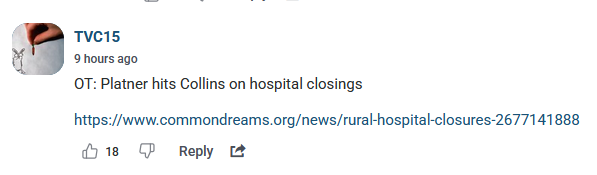
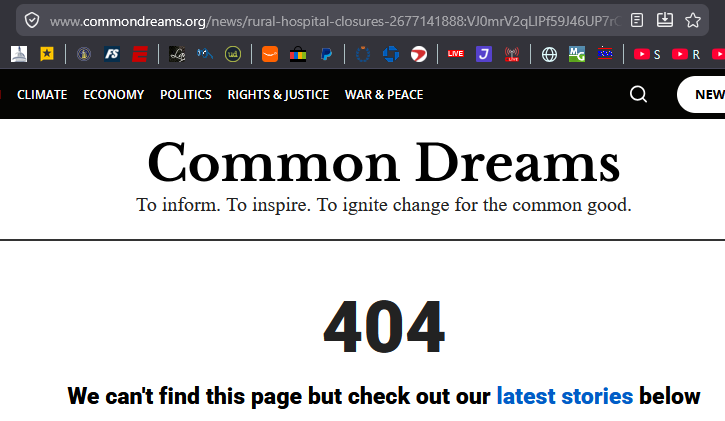
1. I overstated the case: [a] this malfunction occurs ONLY on the Disqus site (so maybe it's their problem) and [b] even on that site, it does NOT occur when clicking on e.g. an embedded video. 2. On <https://politicalwire.com/2026/07/01/trump-risks-forever-talks-with-iran/#disqus_thread>, there is a comment by "TVC15" that includes this link: https://www.commondreams.org/news/rural-hospital-closures-2677141888 (see 1st uploaded image). However, clicking on this link results in FF going to the [non-existent] location https://www.commondreams.org/news/rural-hospital-closures-2677141888:VJ0mrV2qLlPf59J46UP7rCeSA8I (note the appended ":garbagecharacters", the subject of my inquiry), which yields a "404 error" response (see 2nd uploaded image).
Odabrano rješenje
Okay, I see the comment, the code for the link, and the result.
They show you the "human" URL, but under the hood they run this:
for some presumably outbound tracking purposes and only then redirect to the real site.
In my case, they manage to correctly strip whatever they add for tracking or identification and redirect me to the correct link (tried in Firefox, Nightly, and Chromium).
Why it breaks for you would be a question for Disqus, but I'd suggest trying 1. in a Private Window to eliminate previous session data, and 2. restarting into Troubleshoot Mode from Help menu to eliminate any "privacy" addon malforming the tracking parts or the URL redirect. Other than that I'd just say that it'll fix itself over time on its own, as if that's a bug in their code, they appear to serve correct version to me at this point when I request it fresh, so it should be rather isolated.
Thanks for this account. If I interpret your remarks correctly, the ":garbagecharacters" are being appended by Disqus, not by FF -- which was always the probable explanation ! From my perspective, easier "solutions" are: [1] after being wrongly redirected, to simply remove the offending characters and hit Enter; or [2] to copy/paste the "human" URL into another tab. Won't hold my breath waiting for Disqus to fix this bug, w.r.t. which other Political Wire commenters have complained.
It is part of the Disqus data, it starts in the content of their embed (maybe a form of signature that the link was genuine? dunno). They clean it up for you when clicking it. This works for me. Your session with them might mean they serve you different results and hit a buggy code path on their end, or perhaps your ublock can interfere with their script, or attempt to strip the tracking on its own right away and fails. Hence the recommendations I mentioned. Might be a simple addon compatibility issue trying to touch Disqus internals, might be Disqus transient bug. (Works for me on a clean profile not using any addons.)