


Inbox area/list empty, but says I have messages

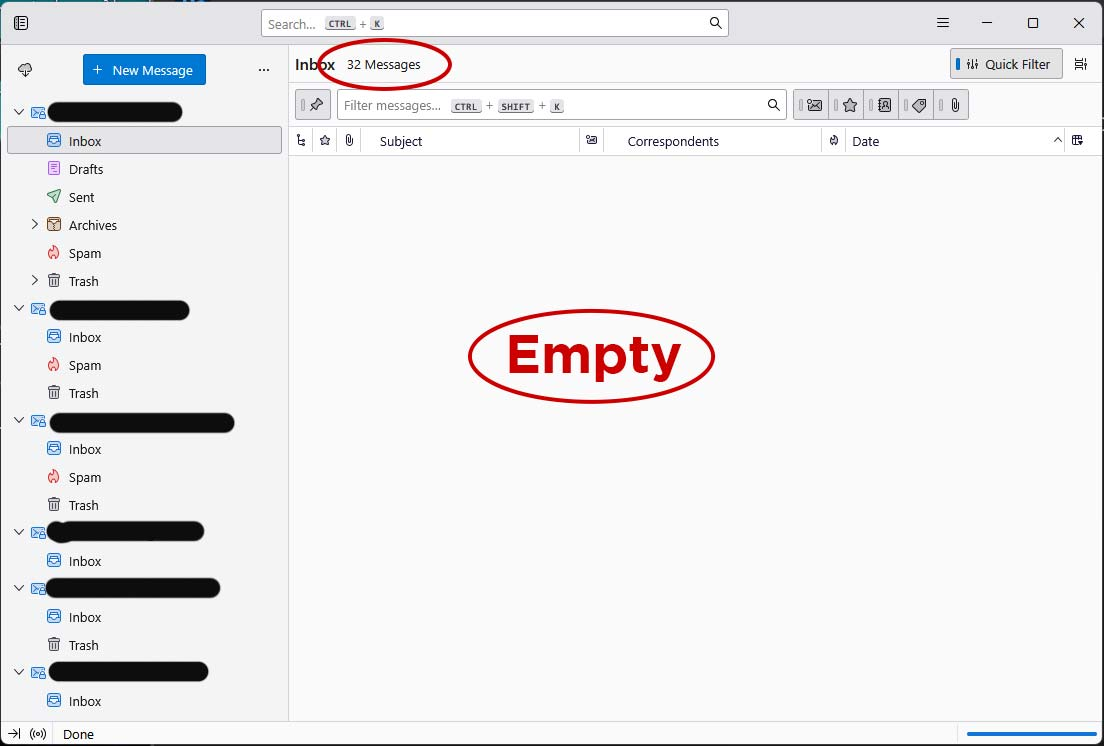
My emails were all working (accounts were setup fine). Then, recently, when I opened Thunderbird, the main area (where my messages are displayed) is empty. If I choose another folder, still empty. BUT, the folders all say that there are messages in them (see the attached screenshot)
I have tried the following... 1. Opening Thunderbird in Troublshooting mode: This works, and the messages appear. But I don't want to have to open troubleshooting mode every time. 2. I have ZERO extensions installed, so asking to disable them obviously wont do anything. 3. I have tried to repair the folders (I have tried to repair the default inbox folder, and then tried to repair them all ... nothing worked). 4. I have backed up my thunderbird files, and tried reinstalling Thunderbird. Still didn't work. 5. I tried these three steps ... https://www.mboxtooutlook.org/blog/thunderbird-inbox-missing-emails.html Didn't work either.
Any other suggestions?
Izabrano rješenje
Disable your Quick Filter toolbar by a simple click on the "Quick Filter" button in the upper right corner.
Pročitajte ovaj odgovor sa objašnjenjem 👍 0All Replies (2)
Odabrano rješenje
Disable your Quick Filter toolbar by a simple click on the "Quick Filter" button in the upper right corner.
Well.... all my troubleshooting for that. Ug. Thanks, that def "fixed" it.
Not sure when that was clicked, and unless you know the program (and actually USE the filters) then a user might not know the filter could result in that happening ... While it was def user error, Thunderbird might want to make it more clear when the filter is clicked and there are zero results (i.e. instead of a blank screen, a message that says, "no results. check the filters above." ... or default to regular filters when the program restarts ... or even REINSTALLS)