


How to get replies under the original emails, I believe this is called threads?

Just looking to have replies under the original emails, I believe this is called threads?
All Replies (15)

I went to Settings/Appearance/Sorting and Threading and Threaded is already selected, yet my emails are not being threaded. Any further ideas? On on an 2020 M1 MacBook Pro running Sonoma 14.8.3.
That answers my original question, because I do not keep my inbox emails in folders. So, if that setting is only for folders, it is what it is. Thanks for the response.
No matter what settings I select and/or change (even restarting Thunderbird) doesn't give me my Inbox with the Threads. Possibly, it may have something to do with being on an Apple machine (it's the same on my M1 MacBook Pro as it is on my 2018 Intel Mac Mini, both systems are running Sonoma.
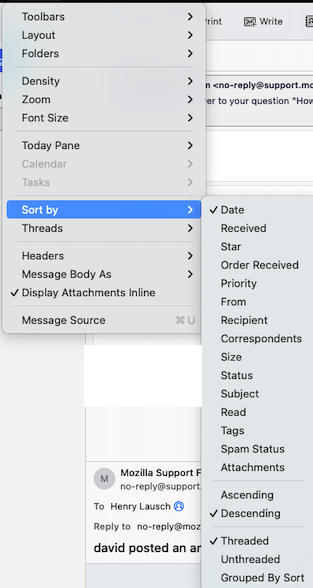
- highlight the folder - click View>sort by and tick 'threaded (if menu bar not visible, press alt key)
- highlight the folder - click View>sort by and tick 'threaded (if menu bar not visible, press alt key)
That is the setting I have already (see screenshot).
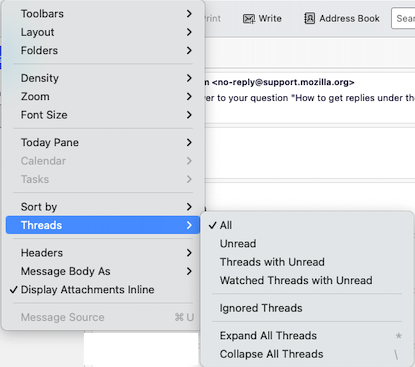
Have you also set view>threads>expand all threads? No matter how many times I click on "expand all threads", next time I drop the menu item down it the "All" is checked (see screenshot).
Homer712 said
Just looking to have replies under the original emails, I believe this is called threads?
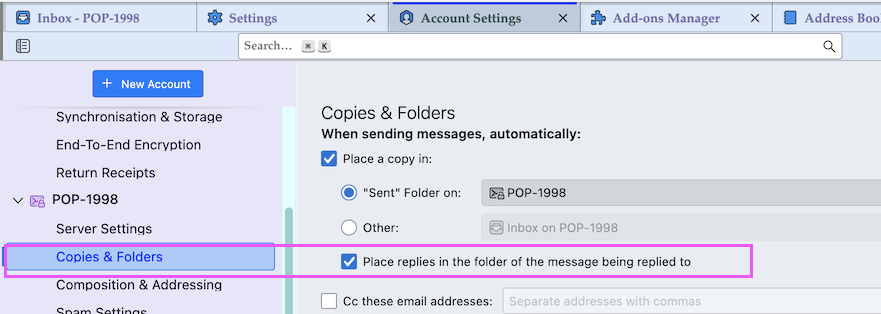
Do you want your replies under the received messages, or the replies of other senders? If it's the former, that is usually called 'conversation mode'. Right-click a message, Open, Open Message in Conversation. Or, check the box 'Place replies in the folder...' in the Copies & Folders section of Account Settings.
david said
I believe those settings are for new folders, not existing ones.
True, but there is another choice there I failed to mention: Propagate threading and sorting settings to: All existing folders/Choose folder.
Do you want your replies under the received messages, or the replies of other senders? If it's the former, that is usually called 'conversation mode'. Right-click a message, Open, Open Message in Conversation. Or, check the box 'Place replies in the folder...' in the Copies & Folders section of Account Settings.
This didn’t work.
True, but there is another choice there I failed to mention: Propagate threading and sorting settings to: All existing folders/Choose folder.
Nor did this.
I now need to get back to where I was before making all these changes. I’ve looked in the user profile and there’s a file called “prefs.js” (/Users/homer/Library/Thunderbird/Profiles/uf1ofj9l.default-release/prefs.js). I’ve got backups, if I replace this file from a backup, will I then be back to before I posted this issue.
Everyone here was helpful, thank you all, but apparently none of the suggestions have worked.

Homer712 said
I now need to get back to where I was before making all these changes. I’ve looked in the user profile and there’s a file called “prefs.js” (/Users/homer/Library/Thunderbird/Profiles/uf1ofj9l.default-release/prefs.js). I’ve got backups, if I replace this file from a backup, will I then be back to before I posted this issue.
I am a long time Mac und Thunderbird user, I read the whole discussion but I still wonder what you want to accomplish. I think that sfhowes was right when he wrote that you want your replies under the received messages, that is both, received messages and your replies, displayed in the same thread in Inbox. But you told him that this didn't work This is possible, he told you how to do it, I just tested it and it works for me (see images)
Closing Thunderbird and replacing your actual prefs.js file in the Thunderbird profile folder with a prefs.js file from one of your profile backups will probably do what you want to accomplish. But you have to be aware that prefs modifications made in the meantime will no longer be working...

Izmjenjeno od strane Mapenzi