


help with thunderbird crashing with overclocked Raptor CPU, Intel family 6 model 183 stepping 1. Cause: overclocking

I've always experience occasional TB crashes. According to my log history there was 1 in July, 3 in Aug, 2 in Sep, 2 in Oct, and 6 in Nov. I never really paid attention since the reboot was quick. But now in December I am losing work and it is a major problem. I've had 30 crashes in Dec and 21 in the past week. I have only 3 add ons and they have not changed, and a Copernic connector. I disable the Copernic connector and it didn't help. I have the same 140.6 on my Surface Go with the same add ons, except for Copernic and it runs fine. On both PCs I use Malewarebytes and WinDef. I have put exclusions for them in their setups. Even with MBAM completely disabled I've still had crashes.
I cleared the Cache and no help. I've even had occasional crashes in Troubleshooting mode. Here are my last 5 crash IDs
bp-070bf941-4e8b-41a3-8b84-3e3440251224 bp-a936f7c2-9ee3-4c38-b304-dab830251224 bp-8be9cf9e-8f2f-49bb-95cf-47e780251224 bp-12f8fc2c-c505-40f0-8c67-44b730251224 bp-9013fb78-086c-4327-9de8-62db30251223
Interestingly I’m also experiencing crashes with Firefox, especially ChatGPT. I cleared the ChatGPT history and that helped but did not solve the problem. I cleared the Firefox cache and in troubleshoot mode still have issues.
Otherwise my win11 PC seems to be working fine. I’ve run chkdsk and all is ok. Also scannow is ok.
Is my next step a profile rebuild?
Izmjenjeno od strane Wayne Mery
Izabrano rješenje
The issues appears to be with my computer. Reducing clock speeds solves the problem. Working with AVA Direct and Segar the issue appears to be with my CPU. Looks like I will be replacing my motherboard. I will keep you posted.
Pročitajte ovaj odgovor sa objašnjenjem 👍 0All Replies (20)
PS - i've had bluescreen crashes in april, jul, and sep. I got a recent update for my Samsung SSD firmware, one of the issue being bluescreen crashes. I suppose that can corrupt profiles.
I've been running TB on this machine for 2 years and had imported its profile from my last PC where it had run for at least 4 years. Profile size is 14 GB.
If I have to make a new profile, I presume it is almost like installing TBird anew? if I go that route, suggestions would be welcome.
Your crashes include @ PtrInfo::WasTraversed and @ morkParser::ReadAlias.
The CPU is listted as Intel family 6 model 183 stepping 1, which is Raptor Lake well known to be buggy.
State your firmware date and version, and make sure it is up to date.
I guess I will have to check with AVA. Here is what I have. I will also check for bios update. Thank you. System Model V370SNx Processor Intel(R) Core(TM) i9-14900HX, 2200 Mhz, 24 Core(s), 32 Logical Processor(s) BIOS Version/Date INSYDE Corp. 1.07.01, 5/21/2024 BaseBoard Product V370SNx
Does it make sense that if this is a CPU problem it is not only manifesting itself after 2 years of use?
I don't know what to tell you, other than there are/should be newer bios than 2024.
See google search - https://www.google.com/search?q=is+there+bios+newer+than+2024+for+i9+Intel+family+6+model+183+stepping+1&client=firefox-b-1-d&hs=v3MU&sca_esv=4d92ce857de34db6&ei=SzNMadXwJJ2i5NoPrtL24A8&ved=0ahUKEwiVwtHN79aRAxUdEVkFHS6pHfwQ4dUDCBE&uact=5&oq=is+there+bios+newer+than+2024+for+i9+Intel+family+6+model+183+stepping+1&gs_lp=Egxnd3Mtd2l6LXNlcnAiSGlzIHRoZXJlIGJpb3MgbmV3ZXIgdGhhbiAyMDI0IGZvciBpOSBJbnRlbCBmYW1pbHkgNiBtb2RlbCAxODMgc3RlcHBpbmcgMUjOSFCuD1jdQnADeAGQAQGYAeIBoAG1FKoBBzE0LjEwLjG4AQPIAQD4AQGYAhCgAuYLwgIKEAAYsAMY1gQYR8ICCBAAGIAEGKIEwgIFEAAY7wXCAgQQIRgKmAMAiAYBkAYIkgcDNy45oAezVLIHAzQuObgHqAvCBwowLjMuMTEuMS4xyAdYgAgA&sclient=gws-wiz-serp
Izmjenjeno od strane Wayne Mery
Wayne, thanx much. This isn't great news but better than losing my profile. I will let you know what I find. I'm contacting my vendor AVADirect.
Wayne - you are brilliant, but problem still not solved. Per your suspicions about the Raptor Lake issues I as after much work able to access updates to my BIOS and chipset (INF, MEI, and IO). I also ran OCCT and MEMTEST86 tests. All updates went well and no failures on the tests. Yet again while reading an email a few minutes ago TBird crashed. Here is the current crash report - bp-beb552e1-3f8a-4bcf-898f-c01880251226
Gemini suggested turning off hardware acceleration or that there might be some corruption in my TB such as xul.dll. I have experienced some bluescreens in the past few months. Do you think a reinstall would be helpful? I do have the 64bit current version. Also if I do the uninstall do I need to move my profile in advance so that I preserve settings and emails, or do you think the profile might be the problem.
Thanx again.
Note - before the updates I was also getting Firefox crashes. So far it is ok.
update, Firefox just also crashed. Here is its crash report. 389e4d7e-b0d5-4949-b71b-8ff7e7df515f
New update. I guess I should have waited before posting. Just want to save you some work. Still don't know if things are ok, but in event viewer I found a number of Errors with the same code: 0xc0000005 which ChatGPT said was an access violation and indicated system corruption. Indeed I was unable to run scan now in PowerShell from within Windows so Chat directed me how to do this all off line and run DISM and Scannow to fix the file structure. It seems as though during the BIOS and Chipset updates files became corrupted. Currently all looks good so I am watching and waiting and will report back. Thank you.
Odabrano rješenje
The issues appears to be with my computer. Reducing clock speeds solves the problem. Working with AVA Direct and Segar the issue appears to be with my CPU. Looks like I will be replacing my motherboard. I will keep you posted.
eberger5 said
update, Firefox just also crashed. Here is its crash report. 389e4d7e-b0d5-4949-b71b-8ff7e7df515f
This one is unsubmitted. Can you click the submit link and repost the link which contains "bp-"?
there were a number of crashes that had not been submitted. I just submitted all of them.
Wayne, I'm unclear if you are asking for something else or just saying you will get the URL from the reports. I'm not sure how to get the URLs. The crashes occurred early in January.
Help > (more) Troubleshooting Information at "Crash Reports for the Last 3 Days" gets you to crash reports in both Thunderbird and Firefox, but you may need to open "All Crash Reports" to see the older ones.
For submitted crashes, then click on "View" takes you to the actual crash report. For example https://crash-stats.mozilla.org/report/index/4f4f6ff2-d891-49ba-a956-2841e0260122
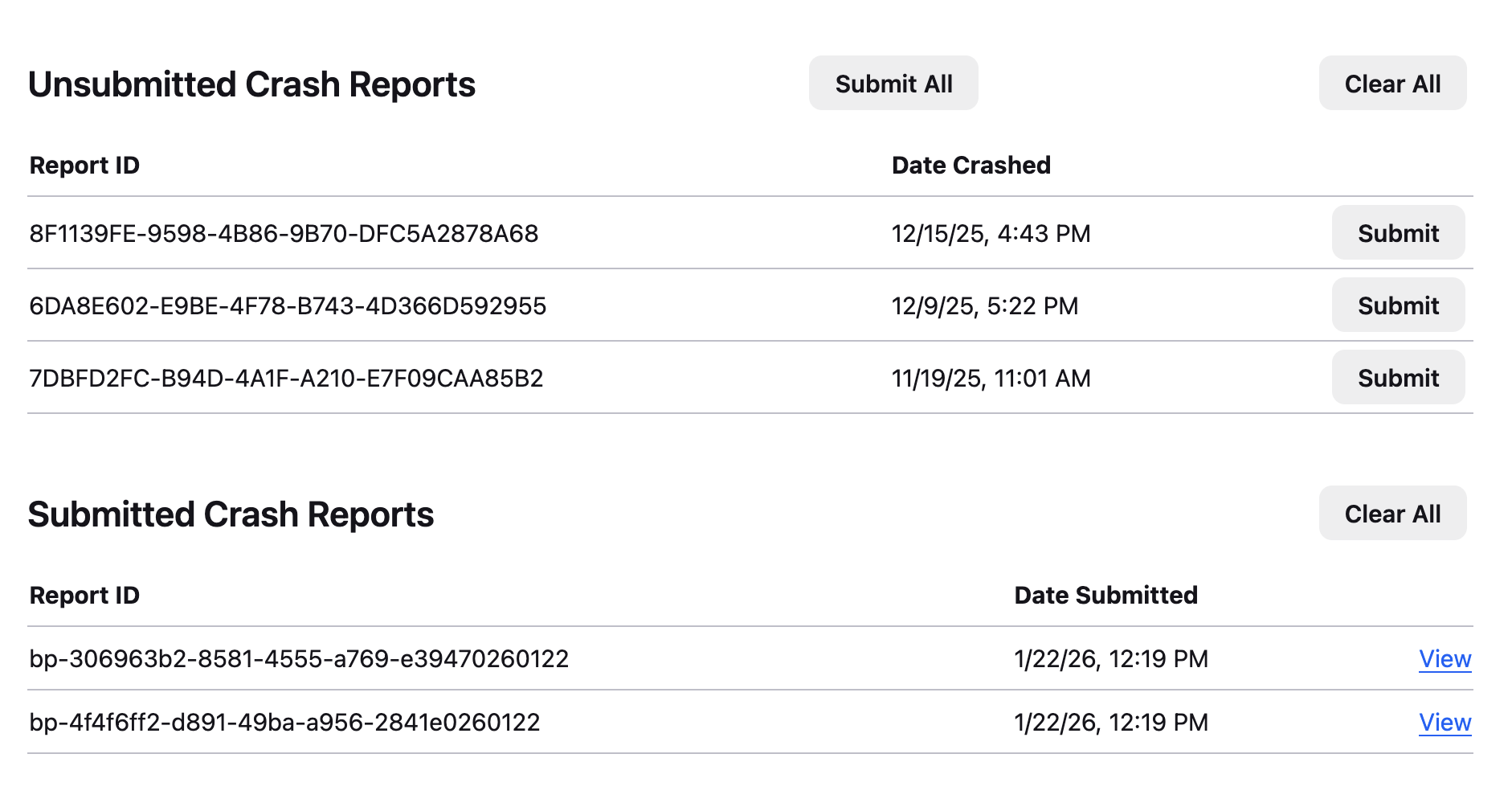
sorry to be dim. i had gone to that page and tried a few of the tabs (Details, Crash Annotations, Bugzilla, etc.), after I hit "view" and didn't find a URL. Do not you have all the same info now that I have hit submit?
It's simply the link that's at the top of your browser window :)
Or post the text of the string in the form bp-070bf941-4e8b-41a3-8b84-3e3440251224, as you previously did.
ok. there are many crash reports. Here are some from back in December: bp-f4defe46-9f00-4dbd-b27d-f7b840251227 bp-2f69bf2f-86fc-41f0-96c7-006bf0251226 bp-c9273676-7543-4e9d-b5d8-3eeac0251226
and here are the three latest before I reduced the clock speed and solved that problem. bp-1cc03aac-e866-4c40-bc06-d84b90260122 bp-9208d996-3cf6-4b4a-99a1-d31330260122 bp-c0d76ed8-6e98-4c97-85ba-7bae40260122
Say, why did some of my crash reports automatically submit and others required me to hit the submit button? Is that because I had so many?
Hope this is what you wanted. Thank you again.
Great. That's what I was looking for.
> Say, why did some of my crash reports automatically submit and others required me to hit the submit button? Is that because I had so many?
I don't think it was because there were so many. If these were tabs that crashed and not the full browser then I think the crash information is gathered automatically but they will not be submitted unless you gave permission. Unfortunately I don't have further insight.
thanx much. if you have any further insights let me know, and I will keep you posted on my PC saga