


Group Tab "save and close group", where are the Group Tab saved to, and where do I open them from?

Using Firefox 145.0 (64-bit), "Firefox is up to date" on PC with Windows 11 Pro.
I was so pleased when Firefox's Group Tabs arrived. I often have about 12 tabs open to do Railway research. So I thought, Group Tab, great idea. Save a group of tabs as one tab. Instead of creating a Bookmark Folder and each time opening all bookmarks from said folder, what better way to do than opening one tab. Or so I thought. I also created a "SHIP" tab for my hobby in the shipping industry, so I could have two group tabs that could be collapsed making the tab bar tidier. I saved an closed each group tab then closed down my PC. Next on restarting, Firefox starts up automatically as chosen by me. Both RAIL & SHIP tabs reappeared without me doing anything. Great! However yesterday, I inadvertently opened another Firefox window, forgot it was opened. So when I shut down my PC, I closed the Firefox browser and then discovered the over Firefox window I had opened. Closed it shut down my computer. Of course when I opened my PC today, Firefox started automatically, but with the tab that I had open in the last Firefox window. No problem I thought, I will just open the saved Group Tabs. It was a problem, where are the Group Tabs saved? Could I find the location? NO! I looked in Bookmarks, all the various History lists, even the down arrow to list all tabs. Nothing, the Group Tabs are none existent. I have checked on the "about:config" section for Group Tabs and everything is enabled "true". So where are the Group Tabs saved? I have been with Firefox for around 14 years, often citing it as the best browser. But over the last five years I find myself using Chrome more and more. Chrome has Group Tabs which do not not need the users to save them, they are saved automatically, and are easily found on opening the Chrome browser. Why doesn't Firefox have this?
All Replies (6)
- You can do undo "Recently closed windows" in History.
- Saved tab groups are available from Tab overview menu (
 )
)
1. Recently Closed Windows held no information whatsoever on the closed Tab Groups.
2, "even the down arrow to list all tabs" as mentioned in my original post. The down arrow had no reference to any Tab Groups.

There is a button called “List all tabs” in the toolbar. Clicking it will display your tab groups that were saved and closed. I hope this helps.
As a side note, I also hope Firefox could place saved and closed tab groups next to the bookmarks for better visibility, similar to how Chrome does it.

Sihan, I have no idea where you have "List all tabs" from, but my tool bar or overflow toolbar does not have such a tool. There is only the down arrow at the end of the tabs line that lists all tabs. I am using Firefox on PC version 146.0 (64 bit version). I have saved and closed two group tabs several times now, and every time they get lost and I cannot retrieve them from anywhere. They do not even get saved so that I can open then on another computer using my login, nor when I close the computer I saved them on, as on starting up my PC, Firefox opens automatically with the last shown tabs, the saved and closed Group tabs are nowhere. As soon as I "save and close" the group tabs, they are lost.
They're not in: 1/ Recently closed windows" in History 2/ The down arrow to list all tabs "Tab overview menu"
It would be a good option if provided, to be able to save a group tab as a bookmark, so all tabs within the group are saved(bookmarked) as a group. Or be able to open a tab group by opening a saved Bookmark folder and all bookmarks within that folder, naming the Group Tab as the folder's name. For sometime now I open "all tabs" from a bookmark folder each time I start. I thought Group Tabs would make this easier, but Group Tabs are a waste of time in Firefox, unlike Chrome which save automatically and are there no matter how many times I close & open my computer.
This frustration is now causing me to abandon Firefox more and more for Chrome, because the number of other issues I have been coming up with, blank webpages in Firefox, which open okay in Chrome, streaming issues, streaming of Twitch live content where by the stream lags behind realtime whereas Chrome has no issues.

The down arrow icon is essentially the same as the "List all tabs" icon as mentioned by @Sihan.
When the icon is at the end of the tabs, it's a down arrow. (Screenshot 1) When the icon is placed in the toolbar, it's a square with a curved line below (looks like a tab partially covering the one below) (Screenshot 2) It can also be in the overflow menu. (Screenshot 3)
I just created a new profile and "saved and closed" three tab groups, I could not reproduce the issue of them being lost in that new profile nor in my current profile.
Since you could not find the Tab Groups in the down arrow, I would suggest you to read this comment: https://old.reddit.com/r/firefox/comments/1l9oc6l/how_do_i_restore_a_old_tab_group_i_saved_and/mxemtmm/ It may recover lost tabs and tab groups.

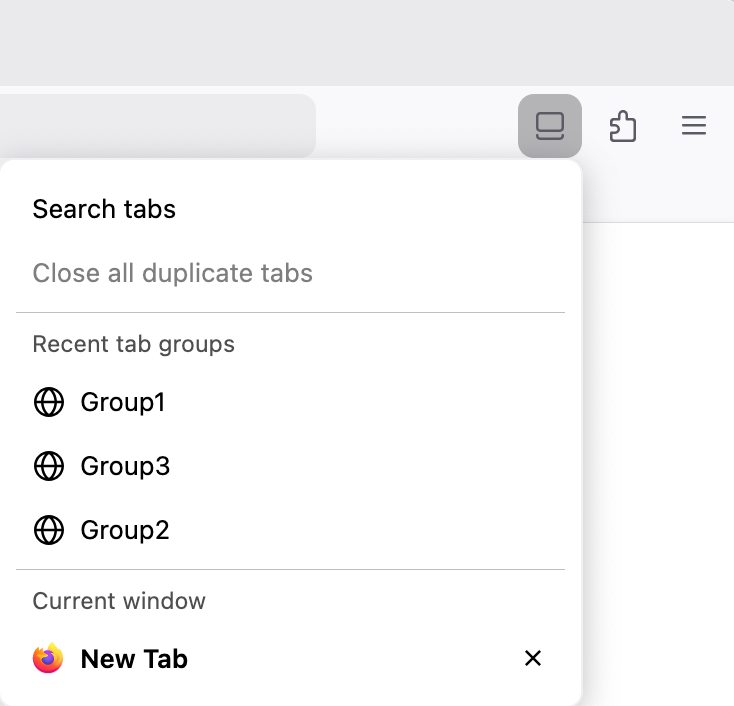

Izmjenjeno od strane Mark
raylongdog said
Sihan, I have no idea where you have "List all tabs" from, but my tool bar or overflow toolbar does not have such a tool. There is only the down arrow at the end of the tabs line that lists all tabs. I am using Firefox on PC version 146.0 (64 bit version).
I'm running 146.1 64-bit. On the List all tabs dropdown, at the bottom of the Recent tab groups area, I have a Show all command that opens a list of what looks like all the tab groups I've ever created. The open groups have square icons whose color matches the group button. The closed (and saved?) tab groups have the generic globe icon.