


Large (file size > 14 MB) PDFs display as blank pages in Firefox 111

Large PDFs previously displayed correctly. Any suggestions? Note: downloading the same PDF and viewing with Acrobat works just fine.
Izabrano rješenje
Thanks. I guess I'll need to try to reduce some file sizes. That'll make for faster load times, anyway.
Pročitajte ovaj odgovor sa objašnjenjem 👍 0All Replies (12)
Can you link this exemplary PDF?
Here is a link to the example file that gives a blank display: http://www.wvgs.wvnet.edu/www/presentations/2015/2015_WVGES_GSA_Poster_Fossils_Mapping_McDowell.pdf
By changing Firefox setting to "open PDF with Acrobat," I am able to display large PDF files. However, I can't expect users of our Agency website to have Acrobat installed or to have to modify their Firefox browser settings just to accomodate our website's needs.
That PDF opens fine for me, but it takes quite some time (over one minute) to render the file and display it at an acceptable resolution (I see a spinning loader in the page selector if I zoom out from the actual size).
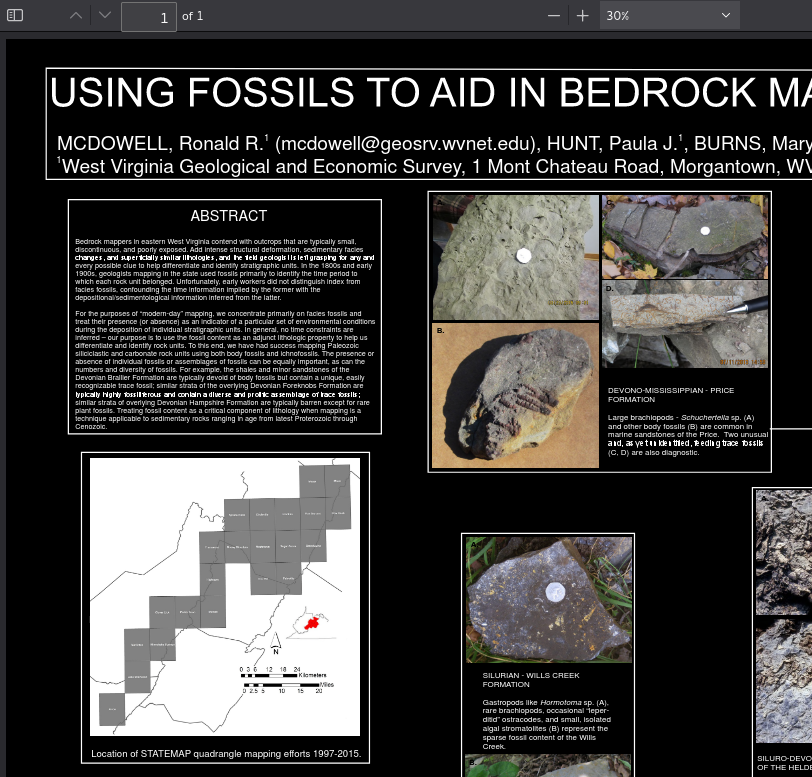
Unfortunately, the attached image "cor-el" included is not correctly rendering the original file. I have been able to duplicate the blank display on a significantly faster computer with enhanced graphics capabilities. I've attached a screen shot of how the file is actually supposed to display and did in previous versions of Firefox.
He has a dark theme, and for me it opens after a minute exactly like on your screen.
Are you able to test it in the Nightly version? https://www.mozilla.org/en-US/firefox/all/#product-desktop-nightly
Installed Nightly and double-checked settings to "display PDF in Firefox." Attempted to load example file - long load time but did get correctly rendered image. For comparison, changed display setting in Firefox 111 back to "display PDF in Firefox." Attempted to load example - long load time then blank image as reported initially.
It must have been a bug in 111, then. In this situation we can't do much about it, as it is fixed in 113.
How long before v. 113 is released as "official" Firefox? I'm resisting having to resize all of our website entries to allow users with Firefox 111 to view them correctly.
It's 10 days to 112 plus 4 weeks to 113.
Odabrano rješenje
Thanks. I guess I'll need to try to reduce some file sizes. That'll make for faster load times, anyway.
This question has been locked because the original author has deleted their account. While you can no longer post new replies, the existing content remains available for reference.