


How to do tis shortcut?
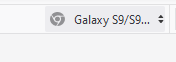
Hello, I trying to do this shortcut When you go to site and you click ctrl+shift+m its change to mobile version, I am trying to do a shortcut to change a phone version you can see in photo. There is shortcut to change it? there is a way to add shortcut to change it? thanks!
Hello, I trying to do this shortcut
When you go to site and you click ctrl+shift+m
its change to mobile version, I am trying to do a shortcut to change a phone version
you can see in photo.
There is shortcut to change it? there is a way to add shortcut to change it?
thanks!
All Replies (1)
I don't think there is a direct shortcut to reach the Responsive button, so you need to use workarounds and keyboard navigation.I can access this menu if I start with the location bar (Ctrl+L) and then press the Tab key a few times until Responsive gets selected. Then you can open the menu via Tab or Enter and select the device.