


Windows 10 reached EOS (end of support) on October 14, 2025. For more information, see this article.

সহায়তা খুঁজুন

Avoid support scams. We will never ask you to call or text a phone number or share personal information. Please report suspicious activity using the “Report Abuse” option.

আরও জানুন

Firefox Update Popup

  • 1 উত্তর
  • 0 এই সমস্যাটি আছে
  • 11 দেখুন
  • শেষ জবাব দ্বারা TyDraniu

more options

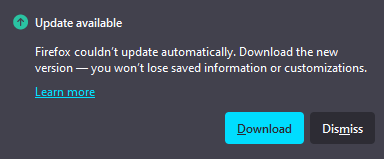
Mozilla support articles frequently state that Firefox does not use popups for browser updates. However, I periodically receive popups from the toolbar stating that Firefox couldn't update automatically. The attached picture is an example from the web but looks just like the popups I receive. The issue typically either resolves itself or I download from the Firefox website and reinstall. In a rush/moment of weakness, I recently clicked the link in the popup. It took me directly to the Firefox website where I regrettably downloaded and updated the browser. I've since run multiple Norton and Malwarebytes scans, which have found no issues. It may be a difference in the definition of popups (from the toolbar vs within a browser page)... Is this a legitimate update message from Firefox? If it is not, are there any other steps I should take (e.g., reinstall Firefox)? I appreciate your help!
Mozilla support articles frequently state that Firefox does not use popups for browser updates. However, I periodically receive popups from the toolbar stating that Firefox couldn't update automatically. The attached picture is an example from the web but looks just like the popups I receive. The issue typically either resolves itself or I download from the Firefox website and reinstall. In a rush/moment of weakness, I recently clicked the link in the popup. It took me directly to the Firefox website where I regrettably downloaded and updated the browser. I've since run multiple Norton and Malwarebytes scans, which have found no issues. It may be a difference in the definition of popups (from the toolbar vs within a browser page)... Is this a legitimate update message from Firefox? If it is not, are there any other steps I should take (e.g., reinstall Firefox)? I appreciate your help!
স্ক্রিনশটসমূহ সংযুক্ত হয়েছে

All Replies (1)

more options

Yes, it's a legitimate popup. It happens when the update is interrupted somehow. You don't have to do anything.

একটি প্রশ্ন জিজ্ঞাসা করুন

You must log in to your account to reply to posts. Please start a new question, if you do not have an account yet.