


Solved
The address bar/tool bar height is too narrow. It's hard to read. There needs to be a way to change it

The address bar/tool bar height is too narrow. It's hard to read. There needs to be a way to change it At the same time change to font size to something a bit larger
The address bar/tool bar height is too narrow. It's hard to read. There needs to be a way to change it
At the same time change to font size to something a bit larger
Избрано решение
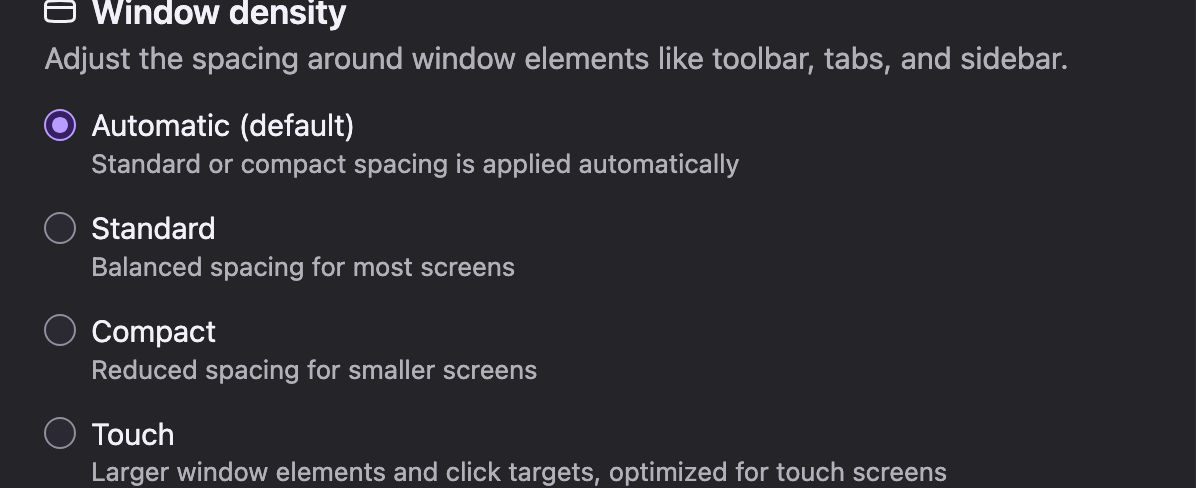
Apologies - it's "touch" here is a screenshot
Всички отговори (4)
Hey there, try go to your settings-->appearance and then click tough. It should make the elements bigger. Let me know if it worked for you.
I don't see "tough" anywhere
Избрано решение
Apologies - it's "touch" here is a screenshot
- Window density -> Touch