Windows 10 reached EOS (end of support) on October 14, 2025. If you are on Windows 10, see this article.

Търсене в помощните статии

Избягвайте измамите при поддръжката. Никога няма да ви помолим да се обадите или изпратите SMS на телефонен номер или да споделите лична информация. Моля, докладвайте подозрителна активност на "Докладване за злоупотреба".

Научете повече
Solved Архивирани

Extension is working in only certain tabs

MrQuackDuck replied
MrQuackDuck

I am developing an extension that will fix YouTube spacebar issue (after recent YouTube update after Alt Tabbing from other window, spacebar is not working to Pause/Play videos).

The problem is that my extension is not working anywhere except on https://www.mozilla.org.

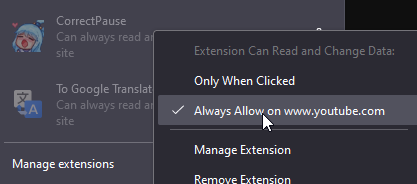
I've already added "*://*.youtube.com/*" to "host_permissions" in my manifest.json file and it's displayed as "Can always read and change data on this site" on YouTube, but it does nothing. On https://www.mozilla.org my extension is activating properly (writes test message in console).

I added my extension on "about:debugging". Can it be related with that? Appreciate any help!
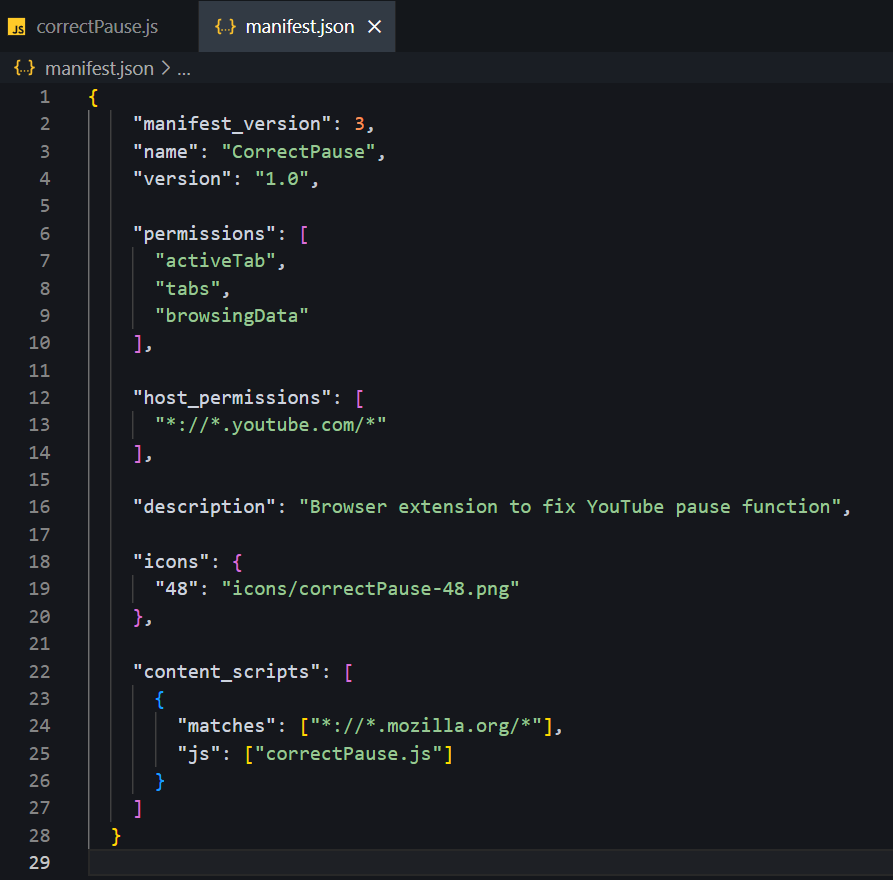
I am developing an extension that will fix YouTube spacebar issue ''(after recent YouTube update after Alt Tabbing from other window, spacebar is not working to Pause/Play videos)''. The problem is that my extension is not working anywhere except on '''https://www.mozilla.org'''. I've already added "*://*.youtube.com/*" to "host_permissions" in my '''manifest.json''' file and it's displayed as '''"Can always read and change data on this site"''' on YouTube, but it does nothing. On '''https://www.mozilla.org''' my extension is activating properly (writes test message in console). I added my extension on "about:debugging". Can it be related with that? Appreciate any help!
Прикачени екранни снимки

Всички отговори (1)

Избрано решение

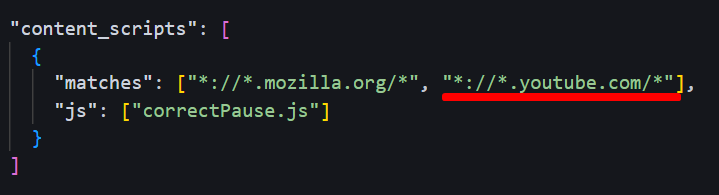
I just figured it out! I needed to add "*://*.youtube.com/*" to "matches" "content_scripts". (Image below)