


How do I stop firefox from putting visited pages on shortcuts bar?

Hiya,
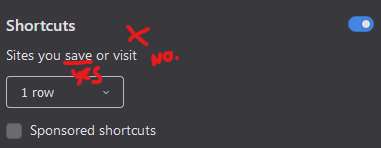
New Tab / Home Page > The handy "Shortcuts" Bar >
How do I make it so it's only sites I WANT there, aka sites I've saved? I'm tired of it just filling this bar up with random pages I visit once or twice.
I want it to just be shortcuts I CHOOSE.
I KNOW that I can keep clicking 'dismiss' on the unwanted shortcuts, BUT I SHOULDN'T HAVE TO.
TIA
Hiya,
New Tab / Home Page >
The handy "Shortcuts" Bar >
How do I make it so it's only sites I WANT there, aka sites I've saved?
I'm tired of it just filling this bar up with random pages I visit once or twice.
I want it to just be shortcuts I CHOOSE.
I KNOW that I can keep clicking 'dismiss' on the unwanted shortcuts, BUT I SHOULDN'T HAVE TO.
TIA

Всички отговори (1)
You can hover a tile to make the three dots appear and open Edit in its drop-down menu to add your custom websites or bookmarks.