


Windows 10 reached EOS (end of support) on October 14, 2025. For more information, see this article.

Търсене в помощните статии

Избягвайте измамите при поддръжката. Никога няма да ви помолим да се обадите или изпратите SMS на телефонен номер или да споделите лична информация. Моля, докладвайте подозрителна активност на "Докладване за злоупотреба".

Научете повече

Instagram.com doesn't load - gets stuck in loop and eventually fails

  • 3 отговора
  • 1 има този проблем
  • 42 изгледи
  • Последен отговор от FredMcD

more options

Trying to access instagram.com but it gets stuck in a loop on terms and conditions screen, and eventually fails. Screenshot is attached.

Macbook Pro late 2013, OS Mojave 10.14.6
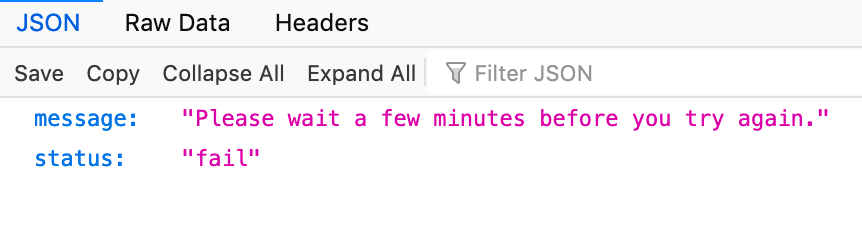
Trying to access instagram.com but it gets stuck in a loop on terms and conditions screen, and eventually fails. Screenshot is attached. Macbook Pro late 2013, OS Mojave 10.14.6
Прикачени екранни снимки

Избрано решение

Many site issues can be caused by corrupt cookies or cache.

Warning ! ! This will log you out of sites you're logged in to. You may also lose any settings for that website.

If there is still a problem, Start Firefox in Safe Mode {web link} by holding down the <Shift> (Mac=Options) key, and then starting Firefox.

A small dialog should appear. Click Start In Safe Mode (not Refresh). Did this help?

While you are in safe mode;

Try disabling graphics hardware acceleration in Firefox. Since this feature was added to Firefox it has gradually improved but there are still a few glitches.

How to disable Hardware Acceleration {web link}

Прочетете този отговор в контекста 👍 1

Всички отговори (3)

more options

Избрано решение

Many site issues can be caused by corrupt cookies or cache.

Warning ! ! This will log you out of sites you're logged in to. You may also lose any settings for that website.

If there is still a problem, Start Firefox in Safe Mode {web link} by holding down the <Shift> (Mac=Options) key, and then starting Firefox.

A small dialog should appear. Click Start In Safe Mode (not Refresh). Did this help?

While you are in safe mode;

Try disabling graphics hardware acceleration in Firefox. Since this feature was added to Firefox it has gradually improved but there are still a few glitches.

How to disable Hardware Acceleration {web link}

more options

Thanks Fred - cleared instagram cookies & it worked

more options

Glad to help. Safe Surfing.