


Lost adressbook

Hello My previous computer has crashed. C:/ is not available any more. In my previous computer, I had two hard drives: a C:/-drive (an SSD) where Windows and other software were installed, The second hard drive was a conventional drive (D:/) where I stored all my files, documents, images, and so on. On this d:/ I also had several programs installed including Thunderbird. On that previous computer, I saved and organized my emails into subfolders within Thunderbird.
Is it possible to recover my address book in Thunderbird? Is it possible to find/recover my saved emails? Could they perhaps be saved somewhere on my previous C: or D: drives?
I have an old copy of my C: and D: from 2025 I have also a complete copy of my D: from my old computer.
I have now bought a new computer and installed Thunderbird. I would be very grateful if this could be resolved. Kind regards Anders Quant
All Replies (12)
If you're not comfortable plowing through windows file explorer, I suggest one my favorite free utilities. it's called 'everything' and is at https://www.voidtools.com/ Its strength is it ability to find darn near any file within microseconds. Once started, enter abook.sqlite as that is the name of the thunderbird addressbook.(There is another file, history.sqlite, that contains the collected addresses.) Anyway, once you find abook.sqlite, you will be inside a thunderbird profile. If you stored your accounts within the profile, they would either be in the imapmail folder or mail folder, both of which are in the same folder as abook.sqlite. Now, since you stated your accounts were on the D drive, that indicates you made some custom adjustments. But this info may get you started. Good luck and post back on this thread as you make progress.
Hello Many thanks! My problem with the lost email addresses is essentially resolved. I have managed to recover most of the email addresses that I had "lost." The SQLite file was about a year old. Now for the second problem that remains: I would be very happy if it were possible to restore my previous emails, as well as the folder structure I had created under "Local Folders." I would be very grateful for any help with this, if it is possible. Best regards, Anders Quant
Assuming you found the abook.sqlite file, can you post a screenshot of where you found it? I'm asking for a screenhot from within windows file explorer. That will be a good first step. thank you.
If that fails, another option is to use the Everything utility and search for .msf that search generates lots of 'weeds' to search through, but it will likely find every message folder on the drive. That search is four characters: a period followed by msf
Hi, I’m having trouble with the power supply for my external hard drive, which contains a copy of my C: drive from 2025. I’ll get back to you as soon as I’ve sorted it out. Best regards, Anders
Ok, fingers crossed. Good luck. :)
Hi again I have taken a screenshot showing where I found the file `abook.sqlite`. Please note that I searched for the file on a hard drive containing a backup of my entire C: drive, created on 2025-10-13. I am attaching a JPG file: "Screenshot abook.sqlite.jpg". Regarding the folder structure I had in Thunderbird on my old computer, I have found a number of .msf files—which I recognize as my previous folders—within the backup I had on my C: drive. How do I do about importing/installing them into Thunderbird on my new computer? Still very grateful for your help. Best regards, Anders Quant
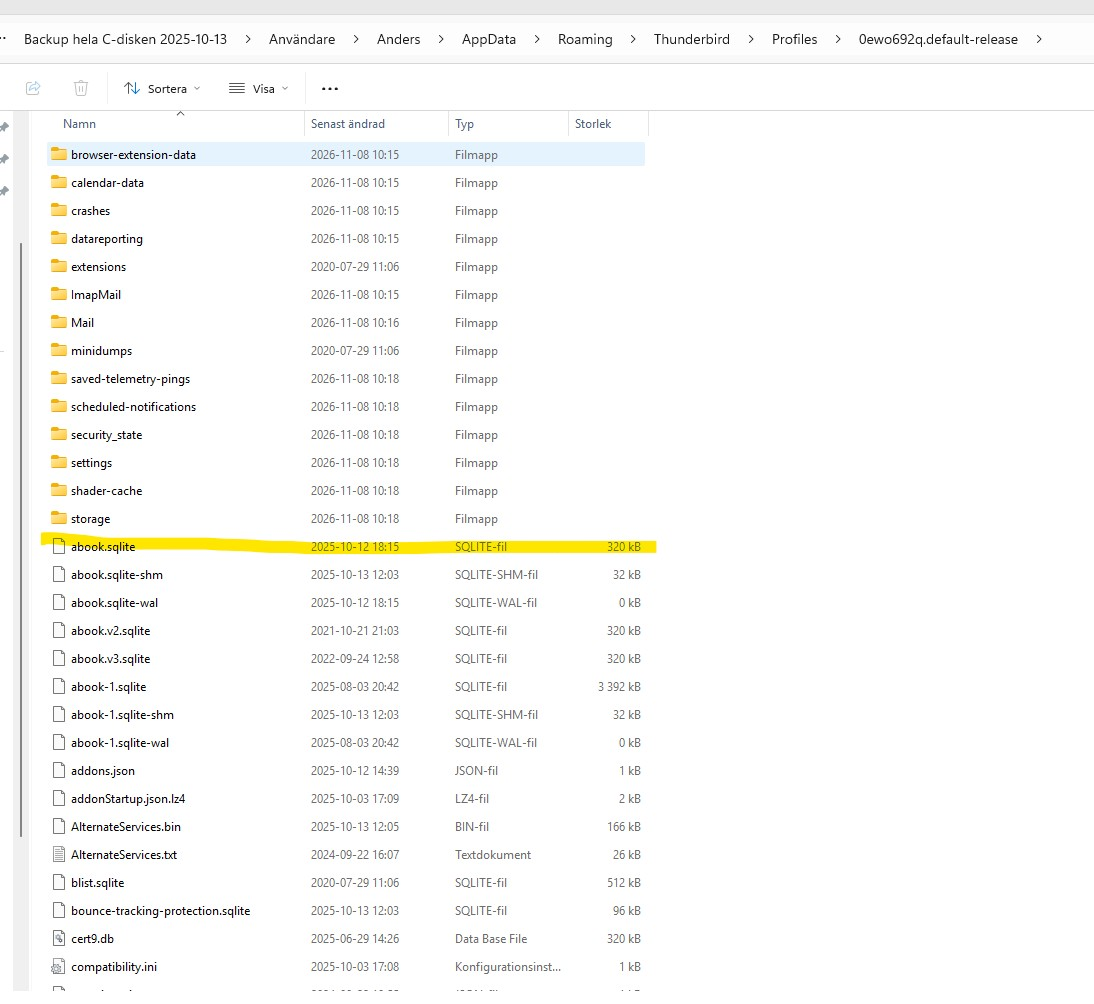
As I had hoped, you found the entire profile, addressbook, accounts and messages. Since you only want the messages, do this:
- install the addon 'importexporttools NG'
- highlight Local Folders
- now, rightclick and select importexport option to import mbox
- next, locate the message folder, either in the mail or imapmail folder. there will probaby be two of each, such as inbox, inbox,msf. Ignore the msf as that is just the index and thundebird will rebuild it.
- repeat the process for every instance where there is an msf and matching entry
- there, you're done. you have salvaged them . Time for a beer, wine, diet coke, or whatever is your pleasure
Hello again, David. I’m not exactly an experienced computer user, so I could use a bit more help :-) My goal is to recover (as best as possible) my old emails, including the folder structure I used to have. Here are a few questions, numbered to correspond with your previous reply: 1. How do I find the 'ImportExportTools NG' add-on, and where should I install it? 2. OK. 3. Please see the attached JPG file, "Screenshot Local folder." Is this what you mean? 4. Using the "Everything" tool, I found a folder called "ImapMail" in the backup of my old C: drive. Could this be the right folder? When I open it, it contains the following: A folder named "mailin.telia.com" and a file named "mailin.telia.com.msf." For the contents of the "mailin.telia.com" folder, please see the attached file, "mailin.telia.com.jpg." Should I be importing any of these files?
I’m really looking forward to having a beer or a glass of good wine once this is all sorted out :-) Thanks for your help and for your patience with me. /Anders
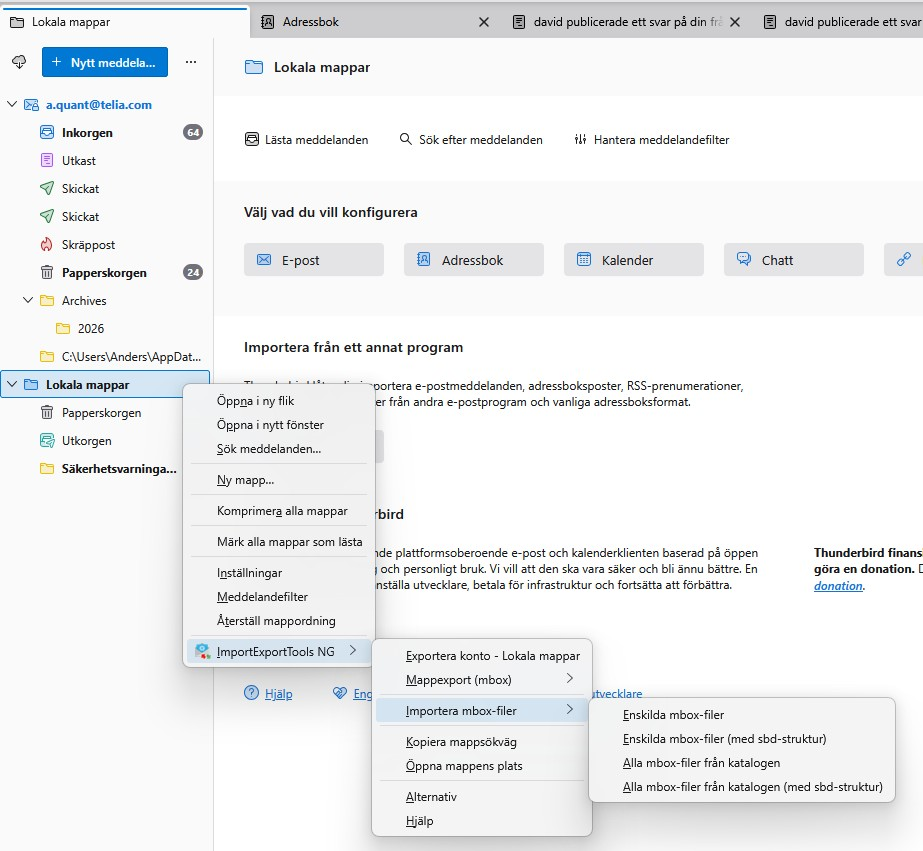
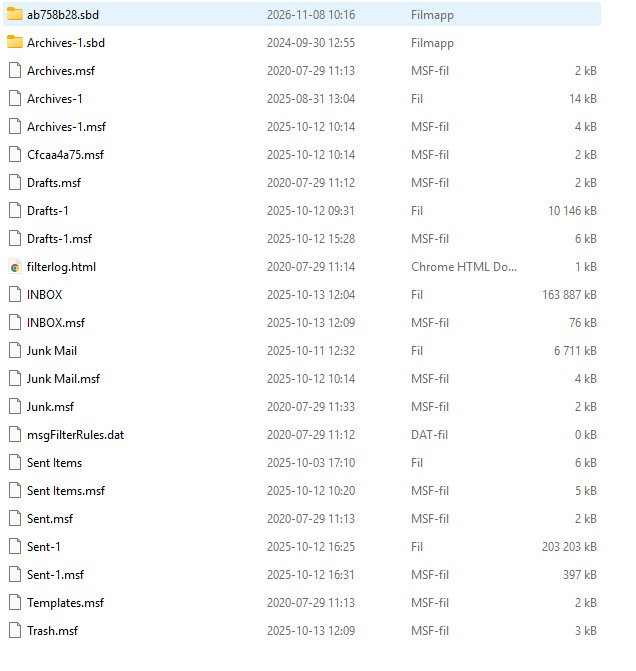
Yes, that is the folder to contain messages that are not part of an active account. And you had found the imapmail and mail folder in your prior screenshot. To install an addoo, click the hamburger menu and then the extensions menu entry. from there, either the addon name in the search box to get it. Yes, that is exactly what I described, multiple files of same name where one has msf suffix and one does not. You want the ones without the msf. Repeat the import process for each one.
Look also in the folders ending in .sbd as there may be more. if the file is tiny there may be nothing there
Actually, what you're describing is the imapmail folder. If you have access to the account, then they're already there. You would only need these steps if you no longer had access to the account. Please clarify the issue.