


Windows 10 reached EOS (end of support) on October 14, 2025. If you are on Windows 10, see this article.

Search Support

Avoid support scams. We will never ask you to call or text a phone number or share personal information. Please report suspicious activity using the “Report Abuse” option.

Learn More
Open

When relaunching FF all windows are invisible and inaccessible

jbr replied
Saint.112

Hi folks My configuration: MacOS Tahoe FF 15.4.0 When I relaunched FF after restarting the Mac, in the Windows menu all the pages from the previous session were listed but none appeared when I tried selecting them. They must be hidden somewhere. I tried several work-arounds. The one that gives a result is by selecting in the View menu the Enter Full Screen item, then try to go back to a normal view which is a pain in the neck. Is there a clean method to make all those windows come back to their normal position and if possible preventing FF from doing this in the first place? TIA Nick

Hi folks My configuration: MacOS Tahoe FF 15.4.0 When I relaunched FF after restarting the Mac, in the Windows menu all the pages from the previous session were listed but none appeared when I tried selecting them. They must be hidden somewhere. I tried several work-arounds. The one that gives a result is by selecting in the View menu the Enter Full Screen item, then try to go back to a normal view which is a pain in the neck. Is there a clean method to make all those windows come back to their normal position and if possible preventing FF from doing this in the first place? TIA Nick

All Replies (1)

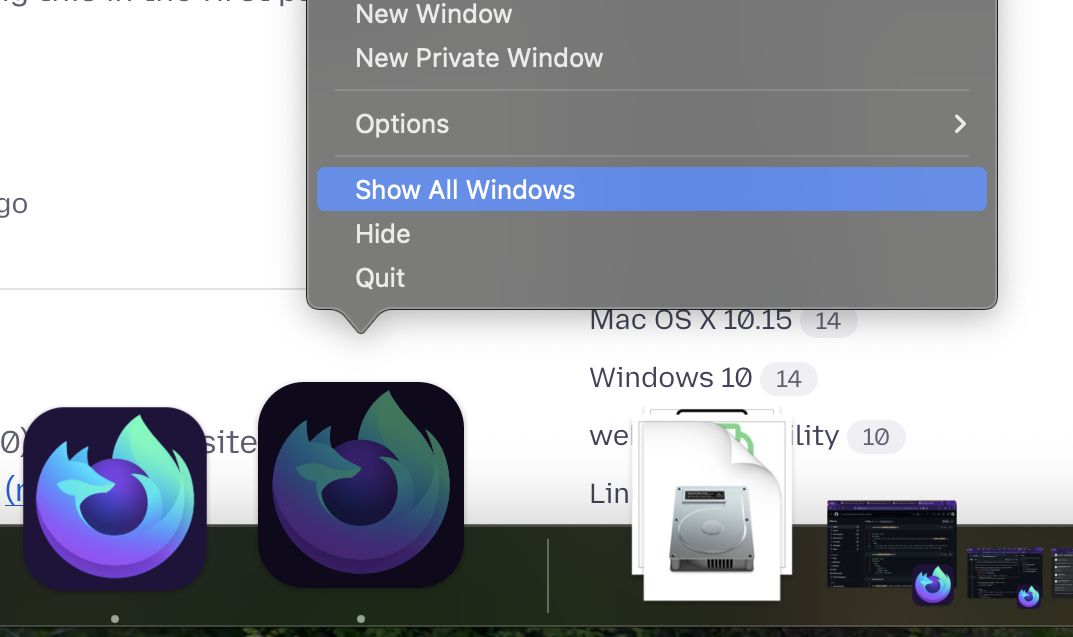
The window spaces/layout should be generally remembered by macOS, so they might get misplaced somewhere. If you try the system features like "show all windows" (right clicking the running app icon) and selecting one of the exposé previews, do they come back to foreground?
Sual ver

You must log in to your account to reply to posts. Please start a new question, if you do not have an account yet.