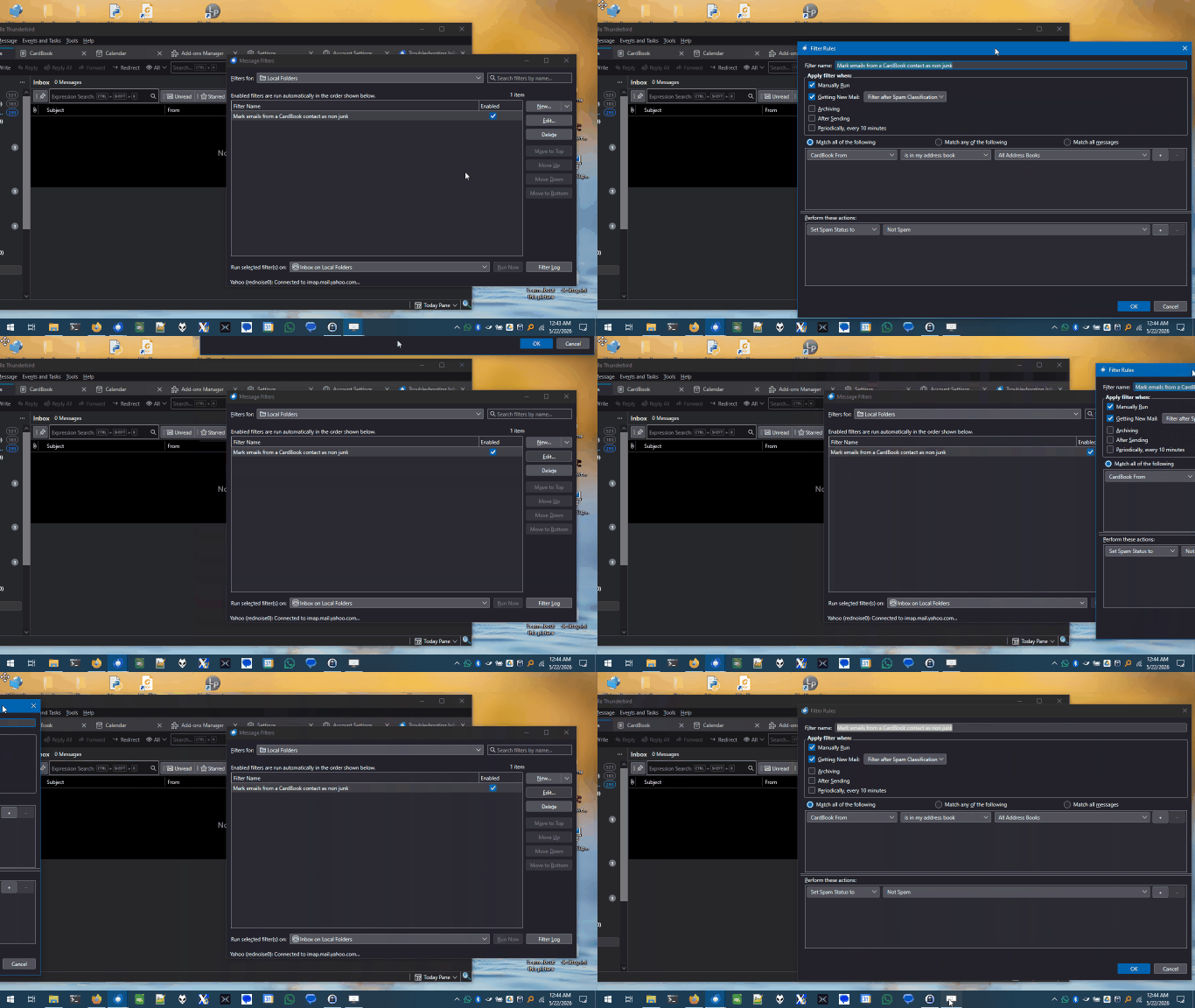
Thunderbird version 140.11.0esr (64-bit): I can't make new message filters

The oversized menu box cuts off the the "Save" key and I can't re-size the Message Filter/New Filter box nor can I slide it up for access to the button on the very bottom. Windows 10 Home, Version 22H2, Installed on 9/14/2021, OS Build 19045.6466.
I've tried a dozen fixes suggested by Duck AI and none had any effect on the Filter box. Here’s a concise list from Duck AI of every fix I tried:
   Hold Shift while opening the Filter menu (compact popup).
   Shorten long filter names (Tools > Message Filters).
   Change system UI scale (Windows Display scaling).
   Toggle toolbars / layout to reclaim space (View > Toolbars / Layout).
   Use Tools > Message Filters dialog (resizable) instead of the menu.
   Add userChrome.css rules (multiple variants) in profile/chrome/userChrome.css to force max-height, scrollbars, reduced font/padding:
       Generic menupopup rule (max-height: 420px, font-size: 11px).
       Targeted rule including .filter-menu-popup and #createFilterFromPopup (max-height: 300–520px, font-size: 10–11px).
       Final variant replacing values with 360px (no effect).
   Attempted diagnostics via screenshots and Developer Toolbox (Ctrl+Shift+I) — determined screenshots showed Filters dialog, not popup.
   Determined the "Create Filter From" list is likely a native Windows popup (userChrome.css cannot style).
   Workarounds proposed:
       Use the resizable Message Filters dialog to create filters manually.
       AutoHotkey script (Ctrl+Alt+F) to open New Filter and pre-fill From/To/Subject from the selected message (provided full script).
Chosen solution
You must be doing something different that I am, or there's something peculiar about your laptop. The attached animations shows me moving the window all over the screen and even offscreen. However, it turns out that this feature of Windows has a quirk: after you use Alt+Space, M, arrow keys to move the window, then hit Esc or Enter to stop moving, if you've moved the windows upwards, it snaps back down. If you have moved it left or right or down, it stays put, but up it snaps back. That makes it not so useful for getting at buttons along the bottom of the window.
Another way to get at the buttons is using the Tab key. Tab will cycle you through all the controls in order, including eventually the OK button. Shift+Tab will take you backwards.
Read this answer in context 👍 0All Replies (5)

Try hitting <Alt> + <Spacebar> to bring up the upper-left Window context menu, then hit M for "Move". You can then move the dialog box around with the arrow keys and scoot it up enough to get at the buttons. This will work even if you can't see the context menu.
Alt/Spacebar brought up a 4-crossed arrows cursor, but when I tried to use it on the edge to re-size the Filter box it just went away. So, nothing.
Don't use the mouse, use the arrow keys. You don't need to point to anything. You can't resize this window, you can only move it to where the buttons are accessible. You will find this with many applications that aren't well-designed with small screens in mind, not just Thunderbird. Unfortunate... but we can deal with it.
Modified by Lin
It only moves the edges of the Filter screen so far and then stops at the same place I started with, in other words, it makes no difference. BTW, this is on a full size laptop, not a miniscreen.
Seçilmiş Həll
You must be doing something different that I am, or there's something peculiar about your laptop. The attached animations shows me moving the window all over the screen and even offscreen. However, it turns out that this feature of Windows has a quirk: after you use Alt+Space, M, arrow keys to move the window, then hit Esc or Enter to stop moving, if you've moved the windows upwards, it snaps back down. If you have moved it left or right or down, it stays put, but up it snaps back. That makes it not so useful for getting at buttons along the bottom of the window.
Another way to get at the buttons is using the Tab key. Tab will cycle you through all the controls in order, including eventually the OK button. Shift+Tab will take you backwards.