


How do I create a mailing list in Thunderbird 140.11.0esr?

A message posted here in 2015 describes the process but it doesn't work for me. File>New does not offer me 'Mailing List'. Where do I go to find it?
Chosen solution
It's possible (but not easy) to put a contact into an address book by accident if you were fumbling the keys or mouse in a certain order. When the message pane is in focus and you click on the From address, or you were to Tab over to it and it Enter, you get a context menu, one of the choices being "Add to Address Book". I actually never knew this until just today when I found a web site that instructs blind folks how to use Thunderbird!
I must say that I don't wonder that people find Thunderbird's Address Book confusing. It has some limitations that I suppose are due to valid technical reasons, but that doesn't make it any less frustrating. It can do most of the things you would expect an address book to do, but I find that I have to force myself to think like it does rather than the other way around.
There is a help article on this site about Address Books and Mailing Lists, but it is very out-of-date and has some inaccurate information and references to interface elements that no longer exist.
Read this answer in context 👍 1All Replies (11)

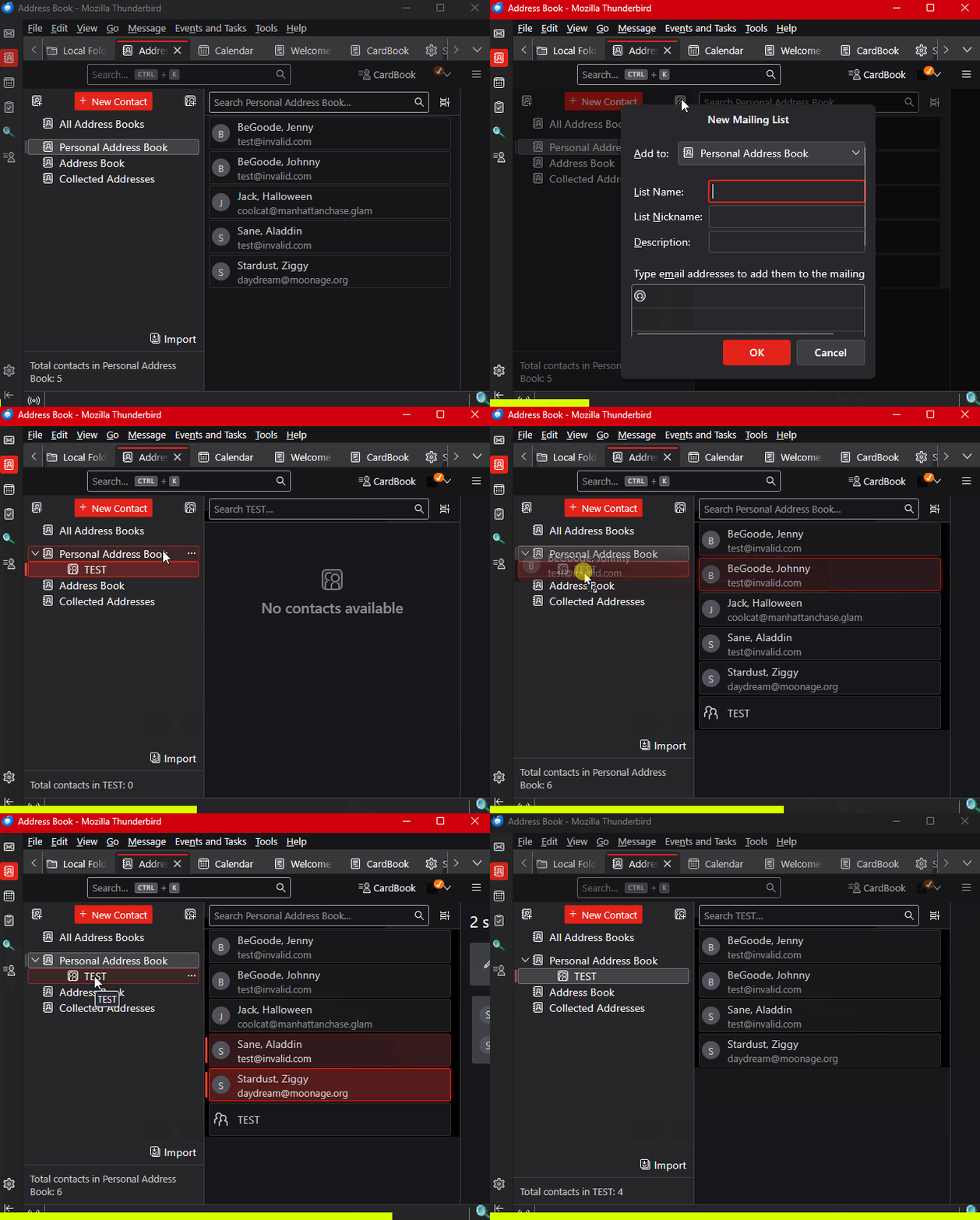
See the attached animation. Basically, you create a Mailing list in one of your local Address Lists, then you can drag and drop contacts from the Address List into the Mailing List.
Note that you can't create an Address List in a Google Contacts Address Book (I don't know about other online address books), only on a local one. But you can drag contacts from a Google list to your local Address List.
Thanks for your advise. However, I cannot relate your animation to my address book presentation - see attached snip.
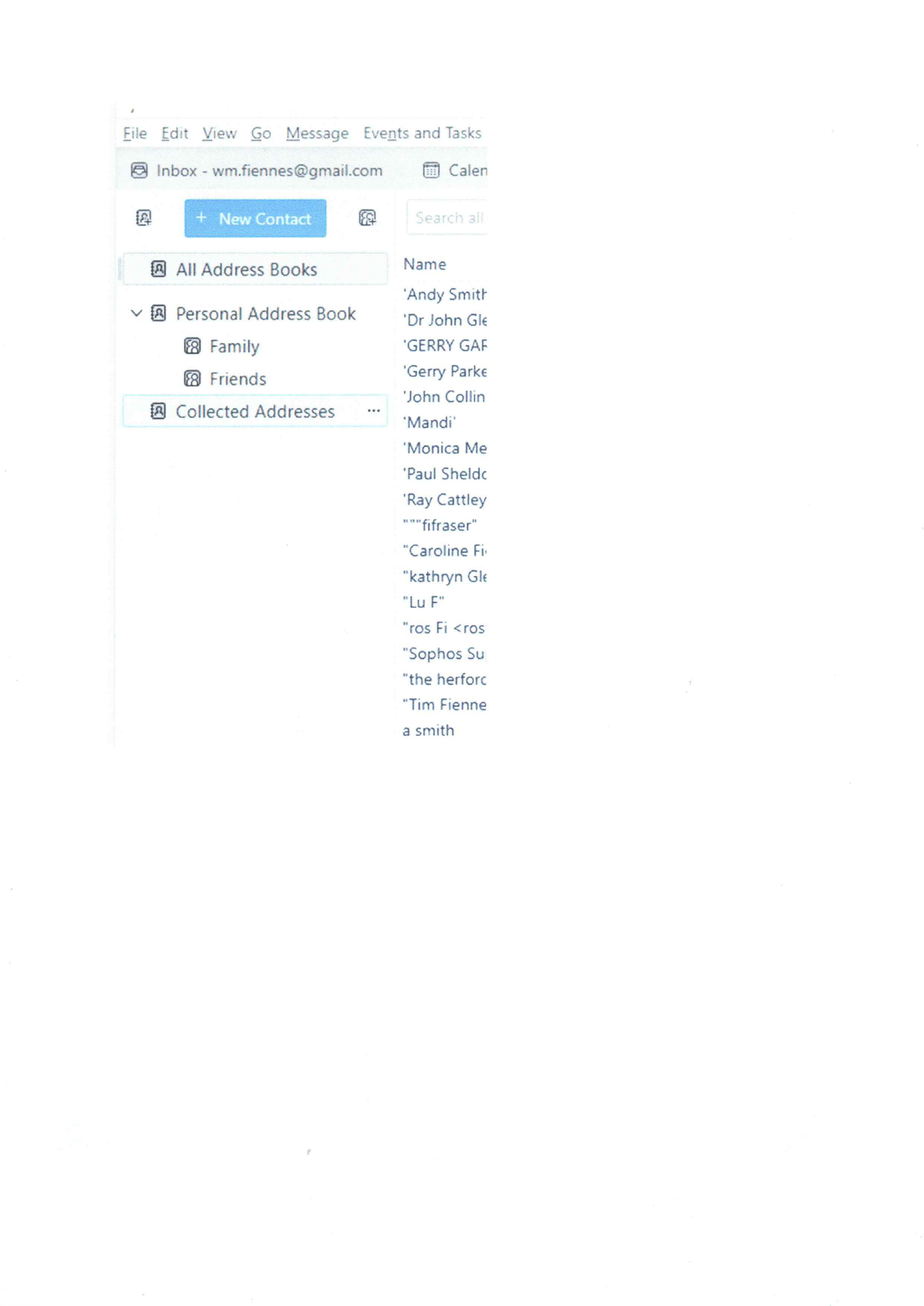
I don't understand. Yours looks just like mine except for the color theme. Also, I see that you have already created some Mailing Lists, so you must have known how to do it at one time.
Maybe I don't understand your question.
Apologies, I was confused by the very different presentations. I may be wrong, because it would have been many years ago, but I do not remember creating any Mailing Lists. Could these have been part of the package by default when I adopted Thunderbird?
I have now succesfully created a mailing list or two, thank you, but want to populate these from 'All Address Books' where the majority of my address book is to be found. This does not seem to be possible. Is there a way around this?
Can you tell me what the 'Collected Addresses' address book is? How is it populated?

... but want to populate these from 'All Address Books' where the majority of my address book is to be found.
As you can see from Lin's animation, a mailing list is tied to a specific address book. Hence you need to populate a mailing list from the address book it was created in. 'All Address Books' is literally what the name suggests - a link showing contacts from all address books. However, it isn't an address book itself. I.e. you cannot create a mailing list tied to 'All Address Books' .
Note, if you use Gmail, and you created an online address book for your Google Contacts, you cannot create a mailing list tied to that address book either.
Can you tell me what the 'Collected Addresses' address book is?
The Collected Addresses address book is a built-in, automated repository designed to catch and save contact details on the fly.
By default, every time you send an email to a recipient whose email address isn't already stored in your main Personal Address Book, Thunderbird automatically extracts their name and email address and saves it into Collected Addresses.
It ensures that if you ever need to email that person again, their address will automatically populate in the composition window via auto-complete - even if you never explicitly saved them as a contact.
Thanks, once again. I am not very tech savvy, being a simple user rather than an expert hence my rather basic questions.
Having changed my email address I want to advise all those in my address book of this fact. I have many more email addresses in 'All Address Books' than anywhere else which is why I had tried to create a mailing list here, although when I total 'Personal Address Book' and 'Collected addresses' it is the same as 'All AB', which when I now think about it makes sense. So I think I have answered my own question!
Although never having consciously populated any address book, what determines which addresses go to my Personal Address Book'?
Consciously or not, you put those contacts into the 'Personal Address Book'.
To make creating a mailing list a little easier, you can also drag and drop contacts from the 'Collected addresses' address book to the 'Personal Address Book'.
One last question ( I hope) so as to get my full understanding. If I have not consciously put a contact in my Personal Address Book, is there another route it could have got there? For example, if I sent a message to a new email contact, will it go to Personal address Book, although you have already said in this situation it would go to Collected Addresses.
I don't normally look in my Address Book; it's only because of my present situation that I am in there now. So I can't see how I would have created contacts in my PAB.
If I have not consciously put a contact in my Personal Address Book, is there another route it could have got there?
None that I'm aware of.
Seçilmiş Həll
It's possible (but not easy) to put a contact into an address book by accident if you were fumbling the keys or mouse in a certain order. When the message pane is in focus and you click on the From address, or you were to Tab over to it and it Enter, you get a context menu, one of the choices being "Add to Address Book". I actually never knew this until just today when I found a web site that instructs blind folks how to use Thunderbird!
I must say that I don't wonder that people find Thunderbird's Address Book confusing. It has some limitations that I suppose are due to valid technical reasons, but that doesn't make it any less frustrating. It can do most of the things you would expect an address book to do, but I find that I have to force myself to think like it does rather than the other way around.
There is a help article on this site about Address Books and Mailing Lists, but it is very out-of-date and has some inaccurate information and references to interface elements that no longer exist.
Thank you both. After a steep learning curve I have reached the objective and successfully created a Mailing List and emailed accordingly.