


"allow audio and video autoplay" exception doesn't transparently work on all sites

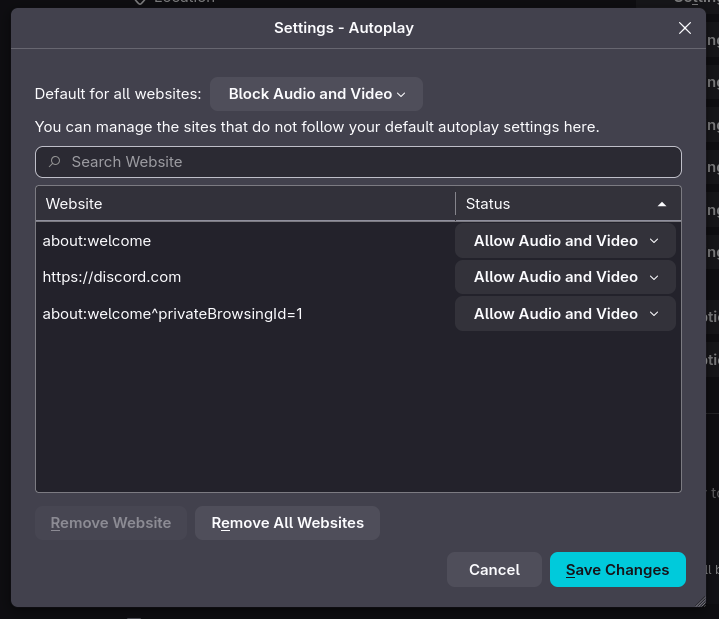
In Firefox, I have audio and video autoplay blocked globally, and added an exception for one particular website (Discord). However, Discord now only autoplays videos once, but doesn't loop them as it should (they implemented GIFs as videos, but now they don't loop).
Of course this could be interpreted as a bug in Discord's web client. However, there shouldn't be a difference between a website that got an exception and autoplay being globally allowed. Therefore i suspect that there is a bug in firefox where some property, state, or hint is set differently depending on whether a page has been added to exceptions or autoplay is allowed globally.
Is there anything i can do to work around this? I really want an autoplay exception to actually work as expected (the website doesn't need to know that it's special)
All Replies (5)
Examples please. What OS? What Desktop? X11 or Wayland? Does it happen with Firefox in Troubleshoot Mode? https://support.mozilla.org/en-US/kb/diagnose-firefox-issues-using-troubleshoot-mode#search
Try downloading Firefox from Mozilla. Download, unzip, and run firefox-bin from the folder and see if you have the same issue. https://www.mozilla.org/en-US/firefox/all/#product-desktop-release
FF version: 146.0.1 (64-bit) (flatpak) OS: Debian Forky DE: Gnome 49.2 Wayland GPU: AMD (vainfo down below)
When running in troubleshoot mode it happens as well. While doing this i noticed error messages on the console whenever i encounter a "gif" (video) in discord that only plays once and then stops (when it should've kept playing):
[Child 661, MediaDecoderStateMachine #2] WARNING: Decoder=7fada3a98400 Decode error: NS_ERROR_DOM_MEDIA_FATAL_ERR (0x806e0005): file /builds/worker/checkouts/gecko/dom/media/MediaDecoderStateMachineBase.cpp:168
This message repeats 10 times (identically)
Here's my vainfo output:
 Trying display: wayland
 libva info: VA-API version 1.23.0
 libva info: Trying to open /usr/lib/x86_64-linux-gnu/dri/radeonsi_drv_video.so
 libva info: Found init function __vaDriverInit_1_22
 libva info: va_openDriver() returns 0
 vainfo: VA-API version: 1.23 (libva 2.22.0)
 vainfo: Driver version: Mesa Gallium driver 25.2.8-2+b2 for AMD Radeon RX 7900 XTX (radeonsi, navi31, LLVM 19.1.7, DRM 3.64, 6.17.13+deb14-amd64)
 vainfo: Supported profile and entrypoints
     VAProfileH264ConstrainedBaseline:	VAEntrypointVLD
     VAProfileH264ConstrainedBaseline:	VAEntrypointEncSlice
     VAProfileH264Main               :	VAEntrypointVLD
     VAProfileH264Main               :	VAEntrypointEncSlice
     VAProfileH264High               :	VAEntrypointVLD
     VAProfileH264High               :	VAEntrypointEncSlice
     VAProfileHEVCMain               :	VAEntrypointVLD
     VAProfileHEVCMain               :	VAEntrypointEncSlice
     VAProfileHEVCMain10             :	VAEntrypointVLD
     VAProfileHEVCMain10             :	VAEntrypointEncSlice
     VAProfileJPEGBaseline           :	VAEntrypointVLD
     VAProfileVP9Profile0            :	VAEntrypointVLD
     VAProfileVP9Profile2            :	VAEntrypointVLD
     VAProfileAV1Profile0            :	VAEntrypointVLD
     VAProfileAV1Profile0            :	VAEntrypointEncSlice
     VAProfileNone                   :	VAEntrypointVideoProc
This bug does not happen in the exact same FF version downloaded from https://www.mozilla.org/en-US/firefox/all/#product-desktop-release
It does also happen in the FF from the Debian repository.
So something about the Debian version and the Flatpak version is special in a bad way.
Needless to say i would like my browser to be updated by one of my package managers (apt / flatpak), and the flatpak version (which i've been using daily and discovered the bug in) is supplied by Mozilla. Should i report this bug somewhere else?