


I noticed that all mail was also being stored in my 'important' folder. I cleared it out, and now many of my emails that were stored in named folders have disappeared. How do I get my lost emails back?

1. Why were all my emails being duplicated in my 'important' folder, and how can I change that? 2. How can I retrieve the emails I recently deleted from my 'important' folder?
All Replies (5)
tim.p.cruise said
1. Why were all my emails being duplicated in my 'important' folder, and how can I change that?
Difficult to tell without observing what you are doing with your mouse... In the context menu do you use "Copy to" or "Move to"?
tim.p.cruise said
2. How can I retrieve the emails I recently deleted from my 'important' folder?
If those deleted messages are no longer stored in the corresponding Trash (Deleted) folder, you may install the add-on "Undelete" https://www.ggbs.de/extensions/Undelete.html and use the "Undelete" order in the context menu on your folder "Important"
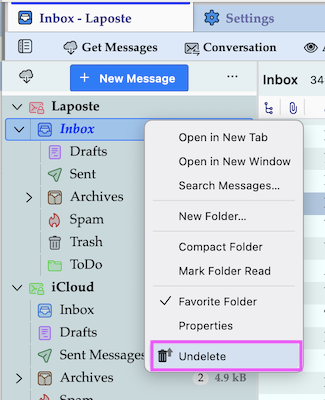
1. Re: using the context menu, I don't use it. The messages seem to automatically go into my 'important' folder whenever they hit my inbox. Then, if I want to store a message in another folder, I drag & drop it from my inbox to that folder. 2. I downloaded the "undelete" xpi extension, but I don't know which app to use to open and save it. My options are Notepad, Irfanview 64-bit, PicoPDF PDF Editor, Windows Media Player Legacy, and Word. 3. Assuming I can open the file, where do I save it? In desktop, or somewhere else?
In thunderbird, click the hamburger menu in upper right, click 'addons' menu entry, then click the gear wheel and then click 'install from file'
A tip: I assume you use gmail. A thorough review of https://support.mozilla.org/en-US/kb/thunderbird-and-gmail will help you understand why deleting messages in one folder cause them to disappear from other folders as well. This is a gmail thing, not a thunderbird thing.
tim.p.cruise said
1. Re: using the context menu, I don't use it. The messages seem to automatically go into my 'important' folder whenever they hit my inbox.
I think that you have created a message filter.