


Why does Thunderbird refuse to use my profile at startup

I use Thunderbird on multiple computers, sharing an NAS. One is Windows 10, one is Linux Mint. Both have Thunderbird 153.3.1esr installed. The email Profile and email file storage is on the NAS. The "home" folders on both machines have a profile.ini file that points to that shared profile. This worked fine for many years.
For perhaps 6 months i've only accessed email from Windows. Now i'm trying again to access from LinuxMint. It no longer works.
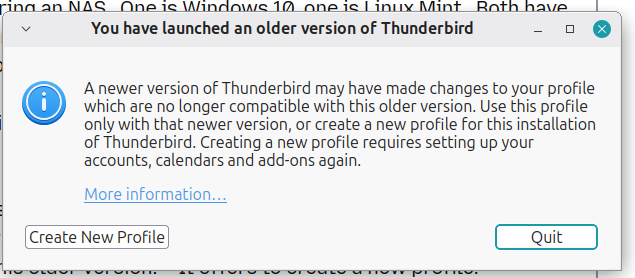
From Linux, at startup, Thunderbird complains that i'm trying to open my profile from "an older version of Thunderbird". A popup dialog claims "A newer version of Thunderbird may have made changes to your profile which are no longer compatible with this older version. " It offers to create a new profile.
First, the same version last edited the profile as is reading it. Second, i don't want to create a new profile, as the existing one has multiple email accounts at multiple domains, with multiple sigatures, and custom storage paths, etc. I tried profile manager, but it just takes me back to this dialog.
How do i get Thunderbird to use my existing shared email storage ?
All Replies (3)
You cannot mix versions. And mixing OS on the same profile isn't supported - it may work sometimes, or not.
First, thanks for the help. i am up and running again (although not 100% satisfied with how)
I had read the link Matt provided. But he caused me to read it again. This time i noted the --allow-downgrade switch. Although i was NOT downgrading (same version on Windows and Linux), it offered a chance to avoid the erroneous exit. So i tried it. It worked.
Again in Wayne's reply, i AM NOT mixing versions. His comment about OS mixing is clear, and definative. But i hope the developers realize what a SIGNIFICANT LIMITATION this is.
I see Thunderbird's handling of Profiles as a weakness. My profile directory is 1 GB. It seems to contain almost 50 versions of pref.js. It mixes all kinds of information. IMHO there should be a clear separation between configuration info and state info. When i move to a new system (potentially a new OS), there is configuration info i NEED to take with me - Local Store of messages, account configs, address book, maybe calendar config, user settings. Then there is state info which does not need to be transportable - caches, telemetry histories, etc.
I see my usage as entirely reasonable and probably common. Multiple networked computers sharing a file system, where the computers have different OSes. It is desirable that my email functionality is independent of which computer i'm using today (never using multiple at once). In recognition of Matt's reply, i have now created separate Windows and Linux versions of my Profile. i see this as a kludge i must manage (unfortunately), and as a workaround of Thunderbird's deficient capability. I hope the Thunderbird team will consider tackling OS independence of the configuration file stores.