


followed pc txfer instructions - no joy

I have followed the instructions to txfer the profile to new PC W.11 - from W.10. T'bird says: "Your Thunderbird profile cannot be loaded. It may be missing or inaccessible."
I have the old folder from 'roaming' pasted in correctly - did it twice. No change.
I also have all my message folder ready on the new PC. These are held in a better location for bak up. When I moved to the last machine - nine years ago - I had exactly the same problem!
As new install will not load the profile I cannot get into it to tell it anything.
Suggestions welcome. SCA
All Replies (9)
There appears to have been a misstep. Please tell in detail how you did this. Thanks.
Hello, thank you. I followed your previous given numbered points list - twice! Sequence was; A) OLD: Back up 'mail' folder to USB B) NEW: Downloaded T'bird System shows 156.0 C) OLD: Opened and copied the T'bird sub-dir from Roaming to USB D) NEW: Started and cleared new sign up. E) Closed. Deleted newly created T'bird folder in Roaming = "Your Thunderbird profile cannot be loaded. It may be missing or inaccessible." Realised this might be incorrect. Then repeated the process just overwriting the two files. Same error msg.
May have to deinstall / Reinstall?? Many thanks. SCA
Your timing may have been minor.
- be sure thunderbird is not running
- if there is a thunderbird folder at appdata\roaming then delete it
- paste your thunderbird folder there and restart thunderbird. let me know. somehow, in your copy, the profiles.ini file got deleted. thunderbird opens that file first and it tells where the profile is.
Thank you for your continued help. Carefully followed - same result.
Should I uninstall/reinstall the Bird??? Many thanks, SCA
Did you download from thunderbird.net? If you downloaded from Microsoft, that solution won't work. Did you copy the Thunderbird folder completely? you should be able to see the profiles.ini file in that folder. It has the name of the profile. Reinstalling thunderbird isn't the issue if installed from thunderbird.net
Yes. Went to Mozilla Org as I was also getting a new Firefox. Yes both Profiles and Installs .ini files are there. I can send if you like.
Perhaps a clean install is for the best? Grateful thanks. SCA,
perhaps a screenshot of the thunderbird profile, a screenshot of the profiles folder, and a screenshot of the contents of the profiles.ini file. Thanks
The Tbird profile is in: Users > 'myname' > AppData > Roaming
Thank you for your patience. SCA
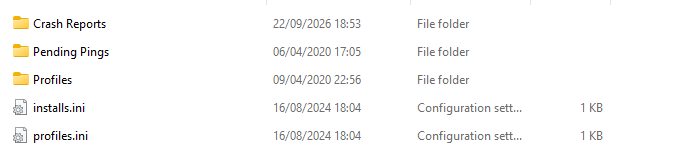
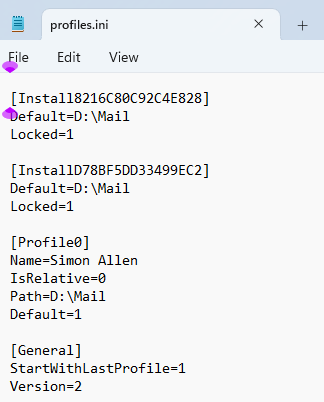
That shows that the profile Thunderbird is expecting is on drive D. It also appears that this was a custom setup. My suggestion is this:
- browse the appdata\thunderbird\profiles folder to confirm the profile you want
- then, use the profile manager to create the appropriate profiles.ini to launch that profile. Instructions for that are at https://support.mozilla.org/en-US/kb/profile-manager-create-and-remove-thunderbird-profiles
Another, possibly easier approach, would be this:
- copy your appdata\roaming\thunderbird folder elsewhere and then delete the one at appdata\roaming
- reinstall thunderbird, which will create a basic profile
- exit thunderbird
- now, browse the profiles.ini file to see the name of the profile set as default
- copy the actual profile you want within the backup you just did (just the profile itself, not the thunderbird folder), and place in the appdata\roaming\thunderbird\profiles folder
- finally, delete the basic profile and rename yours to the same name.
- restart thunderbird