


Windows 10 reached EOS (end of support) on October 14, 2025. If you are on Windows 10, see this article.

ابحث في الدعم

Avoid support scams. We will never ask you to call or text a phone number or share personal information. Please report suspicious activity using the “Report Abuse” option.

Learn More
Open

How can I fix a corrupted Sent folder

david replied
pete.lowry

Shortly after my most recent update, my Sent folder became corrupted. Rather than containing recently sent messages, it contained older messages from another folder, and when I send a new message now, it is not added to the Sent folder. When I tried to send a message, I received an error notification indicating that the message could not be archived because the folder did not have enough memory. I deleted everything from the Sent folder and then compressed it, but that did not solve the issue. I then closed Thunderbird, manually deleted the Sent folder from Mail/Local Folders; the Sent file was regenerated when I started the program again but with the same issue. I then backed up my profile, removed Thunderbird and reinstalled it, and then copied my profile over without the Sent folder. But when I opened the program, the issue still persisted.

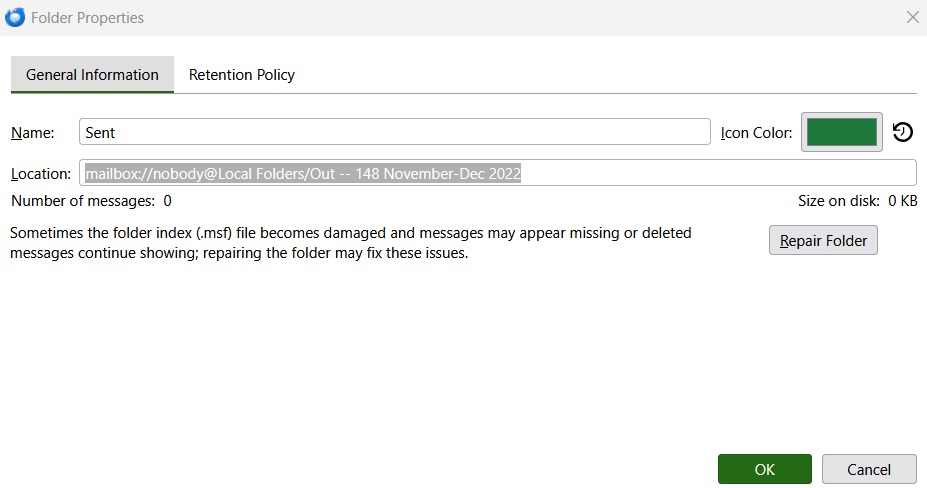
The folder properties for the Sent folder indicates:

Name: Sent Location: mailbox://nobody@Local Folders/Out -- 148 November-Dec 2022

The location is obviously incorrect as it does not point to the Sent folder, but rather to another folder I use to store older message. I see no way to change the location, and the Repair Folder option does not solve the issue.

I would be very grateful for any suggestions.
Shortly after my most recent update, my Sent folder became corrupted. Rather than containing recently sent messages, it contained older messages from another folder, and when I send a new message now, it is not added to the Sent folder. When I tried to send a message, I received an error notification indicating that the message could not be archived because the folder did not have enough memory. I deleted everything from the Sent folder and then compressed it, but that did not solve the issue. I then closed Thunderbird, manually deleted the Sent folder from Mail/Local Folders; the Sent file was regenerated when I started the program again but with the same issue. I then backed up my profile, removed Thunderbird and reinstalled it, and then copied my profile over without the Sent folder. But when I opened the program, the issue still persisted. The folder properties for the Sent folder indicates: Name: Sent Location: mailbox://nobody@Local Folders/Out -- 148 November-Dec 2022 The location is obviously incorrect as it does not point to the Sent folder, but rather to another folder I use to store older message. I see no way to change the location, and the Repair Folder option does not solve the issue. I would be very grateful for any suggestions.
Attached screenshots

All Replies (1)

I would access the account online via the email provider's website to see if the problem may be somehow associated with the folder on the server.

اطرح سؤالا

You must log in to your account to reply to posts. Please start a new question, if you do not have an account yet.