


There's a frightening ambiguity in the "add new account" page please help

Hello. I am trying to add a new provider, which means adding a new account. When I click "Add new account" it takes me to a page that asks me to enter my existing account. Does this mean the currently running account or the new account?
All Replies (26)

45rpm said
It took me to a page that says "Set up your Existing Email Address", which isn't really what it means, it means set up my new email address, which I'm told I have running but I haven't tried yet. If I put my new mail address in here, is it going to overwrite my current presence or add a second account to it? When I open Thunderbird will I be asked somehow which account I want to connect to? Or does everything just come in?
Wxie answered one of these questions earlier:
I think the existing account in the "Set up your existing email address" means that you should already have a working email address to add a new account in Thunderbird. Thunderbird will not create an new email address for you, it just uses your existing email to setup a so-called account in its user interface so that you can use it.
Mapenzi answered one of these questions earlier:
Setting up a new email account doesn't wipe out already existing other email accounts.
One difficulty may arise from the use of the term "account". You must first have an account with an e-mail service provider, e.g., Google, Microsoft, Yahoo, Apple, your internet service provider. Then you set up that account in Thunderbird. When you do that successfully, Thunderbird fetches mail from the service provider and sends mail through the service provider.
So "Set up your existing email address" really is accurate.
No, you will not be asked which account you want to connect to. Thunderbird will connect to all the accounts that you have set up.
Thanks. I'm kinda panic afraid of losing all my data, so I might be a little verklempt here and there,
Here's the picture that is crystallizing in my mind. I "add" another provider, in this case mailbox.org. So now nothing has changed except now I get emails via two addresses. I just let the first provider fade away, and now nothing has changed except I now get my emails through mailbox instead of $$$pectrum.
Am I getting this right?
Modified by 45rpm
45rpm said
UPDATE: I just hauled off and put my new email address in the "Existing Email Address" box, and after a couple of steps, Firefox opened with a left-hand column folder for my old account and a folder for my new account, which is satisfactory. I suppose I can copy all my old material into corresponding folders under the new account, and I'll be whole. And this gives me a transition period, which is nice.
I am glad that eventually it worked for you! I guess that you are using the Thunderbird 140.xx.xesr version. Indeed in this version, when you click File > New > Email Account... this opens a box with the a bit ambiguous wording "Set Up Your Existing Email Address" box (see first image)
In the Thunderbird release versions this box has recently been replaced with the "Account Hub" window simply prompting to "Add your email address" (second image)
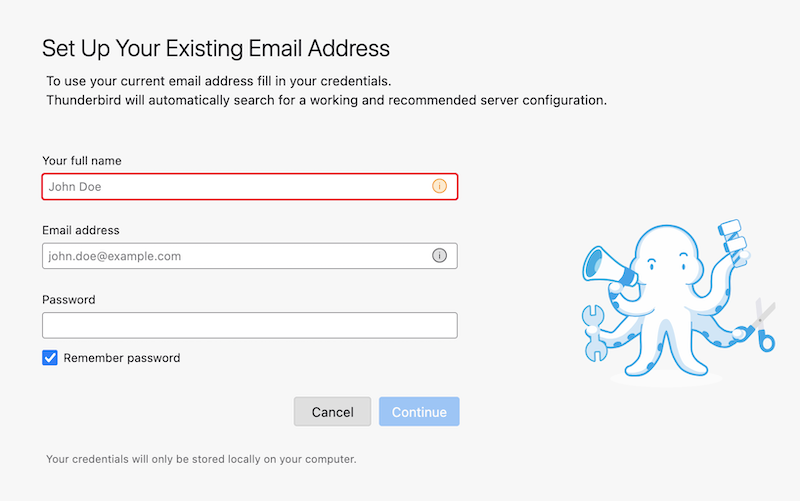
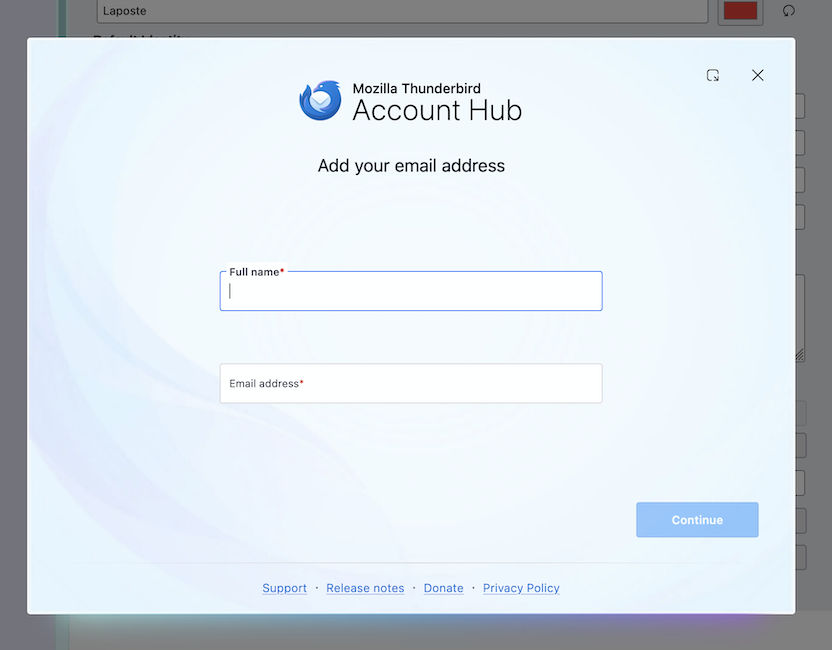
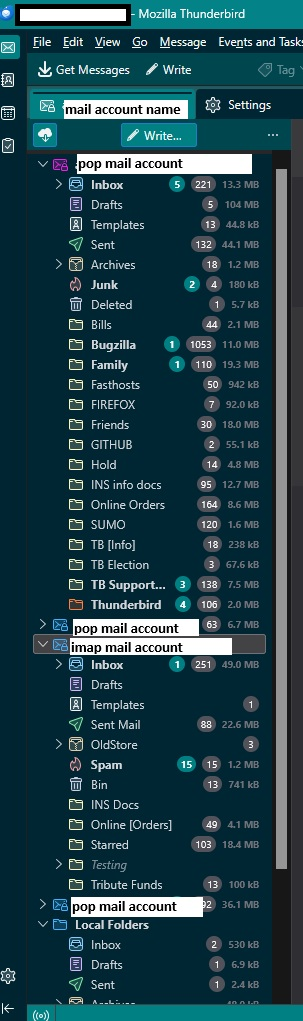
This whole thing would be way more clear if any of the instructions showed a screenshot of the left-hand menu displaying folders under a heading for the old provider and folders under a heading for the new provider. Nobody knows whether the new provider would co-exist or just trash everything and overwrite itself.
New versions of everything are always worse.
Modified by 45rpm
If you have a mail account in Thunderbird for an email address and it used Pop protocol to download emails then all those emails were downloaded and stored on your computer. Pop accesses server Inbox and downloads to your computer there is no synchronising with server.
Do not delete that Pop mail account in Thunderbird because it is your store of emails regardless of whether that email address continues to exist with old provider or not.
You have got a new provider and they have provided you with a new email address. You can access that particular email address by logging on directly to the new providers website and logging on to the webmail account via a browser. That means you now have a new 'existing mail account' with the new provider. I suggest you logon to that new webmail account to see emails. I would suggest you send an email to a friend and ask them to send you an email to the new email address. This proves: A) you know the new password for that email address B) Inbox would have at least one message - useful later on when creating account in Thunderbird. C) Sent would have an email - useful later on if in Thunderbird you create an Imap account rather than a POP account
Whilst in this webmail account, you need to check the settings. Some servers need you to enable IMAP or POP . Some auto allow IMAP but you would have select POP if that is preferred. So make sure you have that sorted.
It would be helpful to tell us the name of the provider and what comes after the @ in the new email address because then we would be able to understand which server you are using.
In Thunderbird you can add as many 'mail accounts' as you like. No mail account is lost or overwritten providing you do not delete it.
Each mail account will be for a separate email address. Those email addresses can be with same provider or different providers eg: gmail, comcast, gmx, yahoo etc
When you have a new 'existing email address' with a provider, you can use Thunderbird to access the server that stores the emails for that new 'existing email address'.
- Menu app icon (icon has 3 lines) > New Account > Email
- You enter your name
- You enter the new email address
- You click on the 'Continue' button
Thunderbird knows a lot of server settings and it will try to locate the correct server settings. Note: by default Thunderbird tends to locate the IMAP serve settings, so once this has occurred - if you want to use the POP then you need to change the Protocol choice from IMAP to POP at that point, so it rechecks for the Pop server settings.
Once mail account has been created it will appear in the 'Account Settings'. You need to check that everything is ok. You will also now see that new mail account listed in the left Folder Pane. So now there will be two mail accounts in the left pane and each will have it's own set of folders.
If you are using an IMAP account for the new mail account, then it works very different to a POP account. IMAP accounts synchronise all imap folders with all server folders. IMAP accounts can only display whatever is on the server. It's like a mirror image of the server.
If you need to discuss the difference between POP and IMAP then ask a new question on that topic. But here is a link which should help: https://support.mozilla.org/en-US/kb/difference-between-imap-and-pop3
re :This whole thing would be way more clear if any of the instructions showed a screenshot of the left-hand menu displaying folders under a heading for the old provider and folders under a heading for the new provider. Nobody knows whether the new provider would co-exist or just trash everything and overwrite itself.
Perhaps assumptions have been made regarding creating mail accounts.
But it is generally known that Thunderbird can display many accounts/ email addresses in the one view. It's one of the main reasons for using an email client.
I'm adding an image showing my Folder Pane. Do not be confused regarding the colours you see. I've created a 'userChrome.css' file with some code and it modifies the colours. It clearly shows I have several email addresses /mail accounts, most are pop but I do have an imap account as well. The 'Local Folders' account is a default account created by Thunderbird. It's a place where you can store emails and it also has the Outbox folder which is used by all mail accounts when you use 'Send Later' option.
Modified by Toad-Hall
"But it is generally known that Thunderbird can display many accounts/ email addresses in the one view."
I think that if you went into a public place and went around asking people if they knew that Thunderbird could display multiple addresses in its display, you wouldn't get very many people saying yes. I've been messing with computers since the 286 and I never heard about it.
If I use my old account to send a test message to my new account, it goes through. It takes a while, but it does. I tried to move my ebay email contact to the new address and it didn't work. That's the only thing I've tried so far but I have work to do and I shouldn't even be here now....