


Join us to show up for other Firefox users 🦊. Earn fun badges and Mozilla swag vouchers! Find out more: https://mzl.la/askafox150

Windows 10 reached EOS (end of support) on October 14, 2025. If you are on Windows 10, see this article.

ابحث في الدعم

Avoid support scams. We will never ask you to call or text a phone number or share personal information. Please report suspicious activity using the “Report Abuse” option.

Learn More

Lost access to many mail folders and emails on my Windows 10 laptop!

  • 2 (ردّان اثنان)
  • 2 have this problem
  • 33 views
  • آخر ردّ كتبه AdmiralR
  • Open

Since April 9, 6:14 PM CDT, most folders (e.g., Drafts, Templates, Sent) on my primary laptop in my primary POP email account, [edited]@bdcusa.com, have disappeared; and ALL SUBfolders in my Inbox have disappeared. Over 185,000 emails have vanished overnight!

On my primary laptop, I'm using Thunderbird 149.0.1 (64-bit) on the release update channel, still running 64-bit Windows 10 Professional, and have nothing backed up to the cloud.

Fortunately, on my secondary laptop, I'm using Thunderbird 115.18.0 (32-bit) on the esr update channel, running 32-bit Windows 7 Professional. I say, "fortunately," because ALL folders and emails are still there, so I know they haven't been vaporized!

How do I return all folders and emails for this email account to visibility and access on my primary laptop? Detailed directions appreciated.
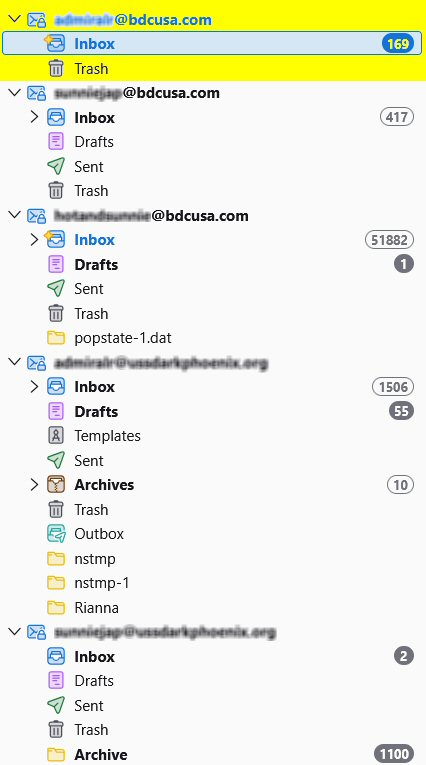
Since April 9, 6:14 PM CDT, most folders (e.g., Drafts, Templates, Sent) on my primary laptop in my primary POP email account, [edited]@bdcusa.com, have disappeared; and ALL SUBfolders in my Inbox have disappeared. Over 185,000 emails have vanished overnight! On my primary laptop, I'm using Thunderbird 149.0.1 (64-bit) on the '''release''' update channel, still running 64-bit Windows 10 Professional, and have nothing backed up to the cloud. Fortunately, on my secondary laptop, I'm using Thunderbird 115.18.0 (32-bit) on the '''esr''' update channel, running 32-bit Windows 7 Professional. I say, "fortunately," because ALL folders and emails are still there, so I know they haven't been vaporized! How do I return all folders and emails for this email account to visibility and access on my primary laptop? Detailed directions appreciated.
Attached screenshots

Modified by christ1

All Replies (2)

hmmm...

Modified by Jackson Kasi

It's now been 2 weeks without a useful answer, much less a solution. So let me ask a "workaround" question:

How could I easily, efficiently, and safely copy the contents of entire folders from one computer to a destination computer without damaging/deleting items already in those folders on the destination computer?

Thank you.

اطرح سؤالا

You must log in to your account to reply to posts. Please start a new question, if you do not have an account yet.