


Join us to show up for other Firefox users 🦊. Earn fun badges and Mozilla swag vouchers! Find out more: https://mzl.la/askafox150

Windows 10 reached EOS (end of support) on October 14, 2025. If you are on Windows 10, see this article.

ابحث في الدعم

Avoid support scams. We will never ask you to call or text a phone number or share personal information. Please report suspicious activity using the “Report Abuse” option.

Learn More

Can't see tabs, bookmark toolbar in wrong place

  • ما من ردود
  • 0 have this problem
  • 39 views
  • Open

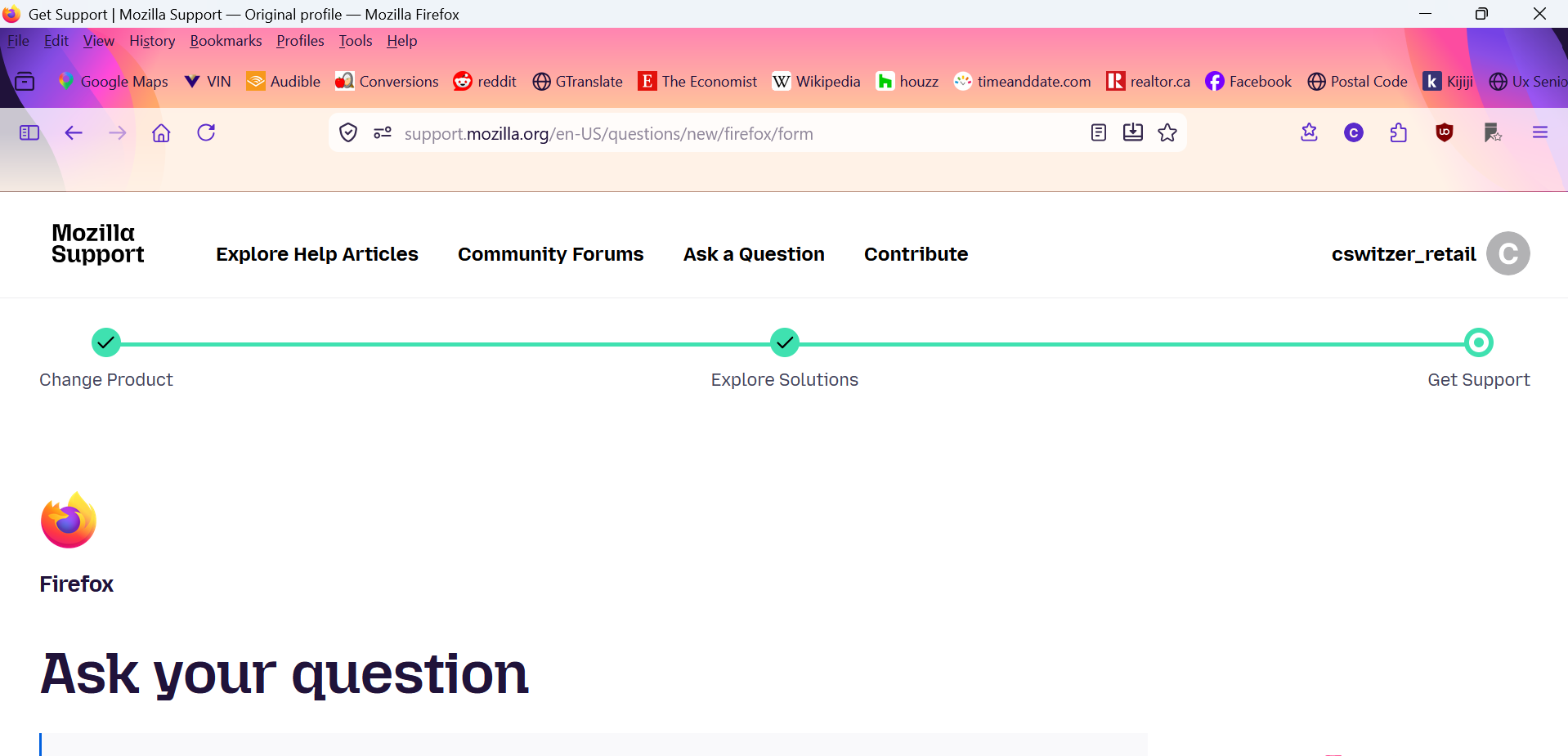
I just got a new laptop and installed Firefox 149 on it, but I can't get it looking and working like I want it to. It syncs with my desktop Firefox for my bookmarks and history, but the Bookmark Toolbar is in the wrong place, above the address and menu bar.

Most annoying is that I can't see my tabs......I can scroll through them with Ctl-Tab, but I can't see them laid out at the top of the screen, and I can't manually choose or close any tab. My bookmark toolbar looks like where I expect the tabs to be.......I thought that Firefox was automatically opening all the bookmarks in my toolbar into tabs, but if that were the case I would scroll through them with Ctl-Tab, which I cannot. That appears to be the toolbar, not open tabs.

So......the toolbar is above the menu bar, not below it, and my tabs aren't visible. My bookmark toolbar setting is set to "always show",
I just got a new laptop and installed Firefox 149 on it, but I can't get it looking and working like I want it to. It syncs with my desktop Firefox for my bookmarks and history, but the Bookmark Toolbar is in the wrong place, above the address and menu bar. Most annoying is that I can't see my tabs......I can scroll through them with Ctl-Tab, but I can't see them laid out at the top of the screen, and I can't manually choose or close any tab. My bookmark toolbar looks like where I expect the tabs to be.......I thought that Firefox was automatically opening all the bookmarks in my toolbar into tabs, but if that were the case I would scroll through them with Ctl-Tab, which I cannot. That appears to be the toolbar, not open tabs. So......the toolbar is above the menu bar, not below it, and my tabs aren't visible. My bookmark toolbar setting is set to "always show",
Attached screenshots

You must log in to your account to reply to posts. Please start a new question, if you do not have an account yet.