


How to disable various Firefox popup suggestions or usage hints

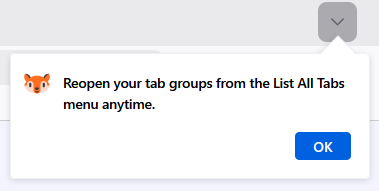
How can I disable various Firefox usage hints? I've uploaded an example of one of these hints associated with the List all Tabs button. This hint pops up every time I start Firefox. There are other hints like the attached that appear from time to time.
This doesn't appear to be a bug. During a recent Firefox update, I believe I either checked a box to show me these hints or I failed to uncheck the appropriate box. I haven't figured out how to discontinue these hints (via Internet search, Firefox support search, or me poking around in Firefox settings).
I'm running desktop Firefox on Windows 11 Home, version 10.0.26200 build 26200.
Thanks.
How can I disable various Firefox usage hints? I've uploaded an example of one of these hints associated with the List all Tabs button. This hint pops up every time I start Firefox. There are other hints like the attached that appear from time to time.
This doesn't appear to be a bug. During a recent Firefox update, I believe I either checked a box to show me these hints or I failed to uncheck the appropriate box. I haven't figured out how to discontinue these hints (via Internet search, Firefox support search, or me poking around in Firefox settings).
I'm running desktop Firefox on Windows 11 Home, version 10.0.26200 build 26200.
Thanks.
الحل المُختار
That did the trick. Thanks TyDraniu
Read this answer in context 👍 0