FireFox asks for an applicaiton to open https on websites

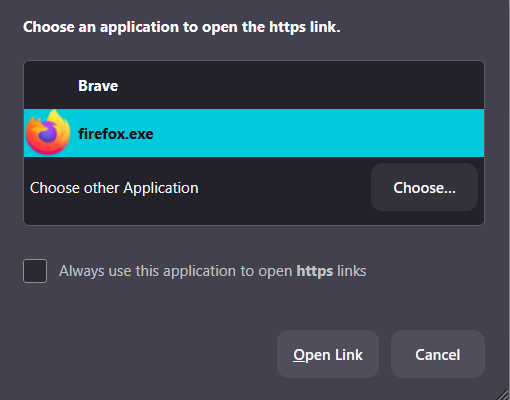
This is a brand new problem, for me. It just started today when using FireFox. On nearly all websites, including Mozilla support, when I click on an embedded link on a site, firefox asks me to select an app to open the https. Even if I tell it to let firefox open all https, it still asks me everytime. to make it better, it still doesn't always let me open the link and I go through the same thing when I click the link again.
This also happens when clicking on the search box in *any* search engine, e.g. Google, Startpage
See the image below.
I've attempted to change all cookie & tracking settings, no help. I even uninstalled and reinstalled Firefox.
This is making FireFox useless.
I had to use my default browser, Brave, just to submit this question. I only use FireFox for social media accounts, sites I need to link to my sm accounts and the occasional web search. For example, linking my Etsy shop to facebook. When I clicked the link "link to facebook" is when I noticed this problem.
الحل المُختار
OUTSTANDING!!! Now mark this resolved and have a nice day.
Read this answer in context 👍 0All Replies (3)
Steps to replicate the issue. What version of Firefox? Windows home or pro? What security software are you running?
I (accidently) figured it out. I came across a page that mentioned network protocols, so I went into about:config, search for protocols and selected show only modified. Two of the protocol handlers had been modified. One was network.protocol.-handler.expose-all, the other I don't remember but they were the only 2 modified. I clicked on reset and went back to the pages that I was having problems with (nearly all) and they worked fine. I also went back in and changed all of the privacy security settings back to what they were (I had changed most trying to figure this out) e..g Enhanced Tracking Protection and double checked that everything still worked. So far, no further problems.
I have no idea how or when those got changed. I wasn't having any issues until I did an update on firefox on 1-16-26. But all better now.
Thanks anyway for trying to help.
الحل المُختار
OUTSTANDING!!! Now mark this resolved and have a nice day.