


Seeing messages left to move or to delete

I used to be able to see a running account of the number of messages left to move or to delete.
If this is still available, how do I turn it on?
Thanks.
الحل المُختار
Click on the three-dot button on your folder pane header.
If the folder pane header is not visible: View (menu) > Folders > Folder pane header
Access the view menu either through the application menu or the three-lined button on the right of the unified toolbar.
Read this answer in context 👍 0All Replies (8)
seriously I have little idea what you are talking about, but I assume it has something to do with your list of mails in the inbox.
Is it possible that you have turned on one of the options in the quick search toolbar that limits what you can see.

When I delete 140 messages, Thunderbird used to show how many messages it had not deleted yet.
The same for moving messages from the Inbox to another group.
Modified by Googlethunderbird.
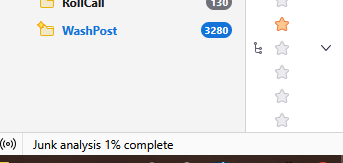
It used to be at the bottom left of the screen.
Now it only shows Moving Messages to Trash.

It used to give a running total of messages left to delete like this screen shows percent of junk analysis complete.

الحل المُختار
Click on the three-dot button on your folder pane header.
If the folder pane header is not visible: View (menu) > Folders > Folder pane header
Access the view menu either through the application menu or the three-lined button on the right of the unified toolbar.