


I have several email accounts that I use Thunderbird to manage, and in one of them, there is only the Inbox folder and the Drafts folder.

My gmail account in Thunderbird has only two folders, the Inbox and the Drafts folder. so when I delete a message, it lines out the message in the inbox with a single line strikeout and then in order to get it out of the Inbox I have to leave the Inbox and then when I come back to it the message is actually gone from the inbox. When I am using my laptop rather than my desktop computer, all of the folders are there and the messages, when deleted go to the "Trash" folder and are removed from the Inbox. I have been looking for a way to get all of those folders that are normally a part of the other accounts that I have on Thunderbird without success. Is there anyone here that knows how to restore those additional folders to the Gmail account that does not currently display them?
All Replies (7)
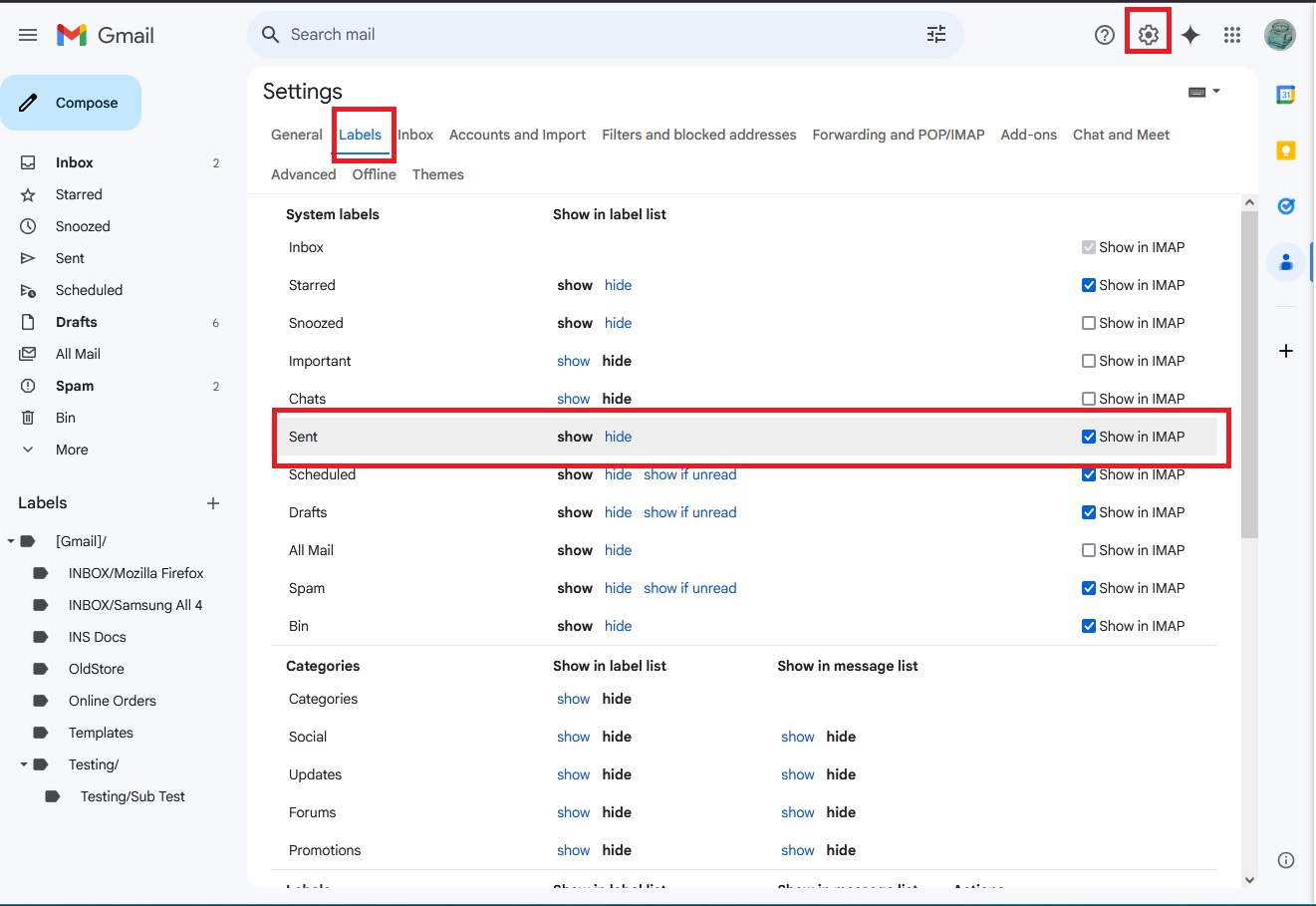
Logon to gmail webmail account and make sure the Labels have the 'Show in imap' selected.
In Thunderbird
- Right click on mail account name in Folder Pane and select 'Subscribe'
- click on Refresh
- Select folders
- if you are using a version that still has the 'Subscribe' button visible - click on it
- Click on Ok'
Well, I tried to get to webmail, but I was not successful at finding the "show in imap" button that you are referring to, and there are several buttons that say show/hide, but I couldn't see one that said show in imap, so the other part, in Thunderbird would work if I could get the folders to show in the "refresh" box after clicking on subscribe, but right now it only shows the draft folder. I just don't know where to look when I attempt to access my webmail account in Gmail, there is so much there that I don't even know where to start. If you could point me in the right direction I would sure appreciate it a lot!
You really do need to check this in webmail because subscribe will not do as expected if there is something not selected in webmail. Hence, this has to be checked out first.
There are two ways to see your Labels tab: In webmail account: Method 1: (quick method) In left pane, just below the list of main default Labels, there should be a 'More' option
- click on 'More' to reveal additional options
- select 'Manage Labels'
Method :2
- Click on 'Settings (gear icon top right)
- then select 'See more settings'
- Select the 'Labels' tab
The top of list are 'System Labels' and these are the default ones created by Gmail. 'Inbox' is selected by default. These are the ones you need to have selected 'show in imap', although I would advise do not need to select all of them.
Do select: 'Sent', 'Drafts', 'Spam' and 'Trash' (some people see 'Bin')
Below them will be 'Categories' Gmail does not allow them to be shown in Imap accounts, so they will not have a 'Show in Imap'. That is normal.
At the bottom will be any Label/folder you created. They should also have the 'show in Imap option. Obviously, if you created them then you want to see them, so select the 'Show in Imap'.
Images below as a guide - in this instance I've just highlighted the 'Sent' label. I had to add another image that showed the bottom section containing Labels/Folders I had created.
Please Note: If your browser window is not wide enough then the 'show in Imap' options may be hidden. You would need to either make window wider OR scroll to bottom in order to see the horizontal scrollbar.

I have tried to set the imap buttons that you refer too without any luck, when I go to "subscribe after checking all of the buttons that I think are what I want I still only get the inbox and default and none of the folders that I want, like the trash folders so that it can move deleted messages immediately upon deleting them. I took a screenshot of the Gmail account that I have so you can see what I have selected to see if that helps define my problem.
It is attached to this reply, take a look and tell me what you think, and just so you know, I really appreciate the help with this issue, it is driving me around the bend... Thanks, a lot!!!!

OK, this image should be one that is useful and shows the way I have the buttons selected, hopefully it will give you a clue about what I am doing wrong. Thanks for your help, this is really a pain in the backside and I do really appreciate that you are willing to help.
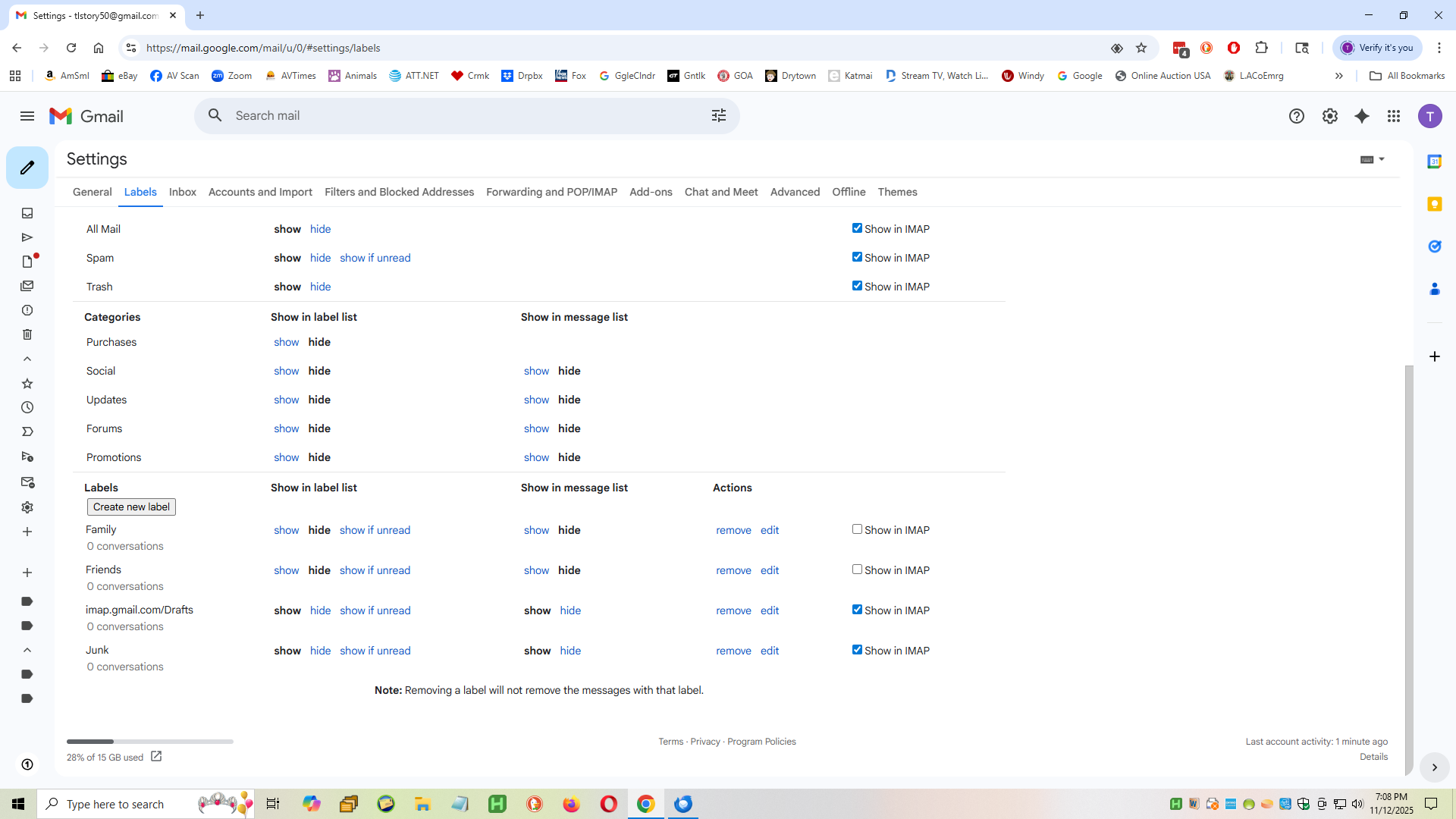
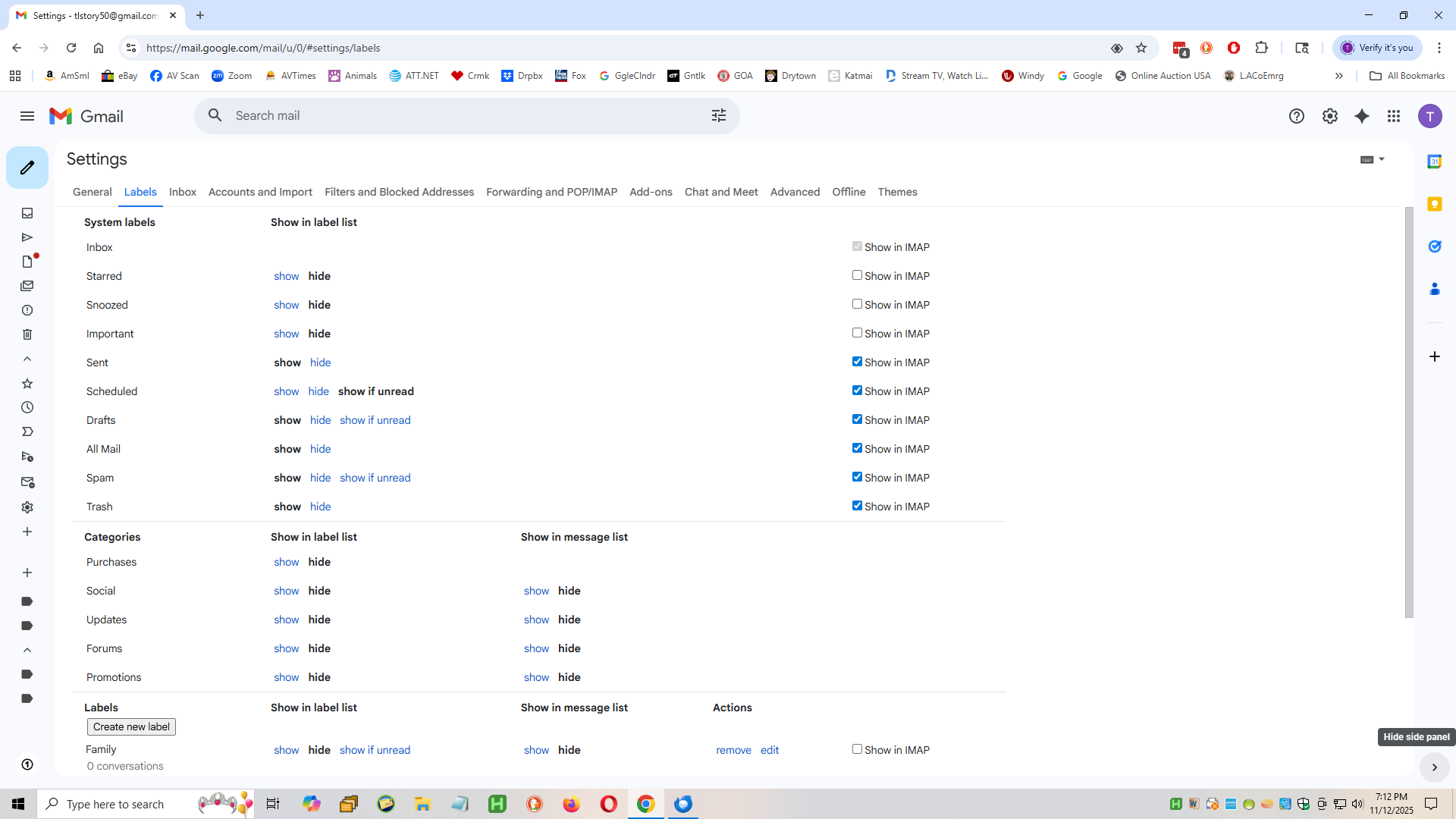
All looks ok, but I'm surprised you have not selected 'Show in Imap' for the labels you created: 'Family' and 'Friends' I also noted that you have chosen not to display them in your webmail left pane Folder/Label list. Maybe they are not used at this point in time.
That confirms gmail is set up ok in webmail account.
In Thunderbird
- In Account Settings
- Select 'Server SEttings' for the account
- Click on 'Advanced' button
- Uncheck 'Show only subscribed folders'
- Click on 'OK'
In Folder Pane
- Right click on mail account name in Folder Pane and select 'Subscribe'
- click on Refresh and Hopefully all folders should display
- Select folders (only select the 'All Mail' if you really want to see it)
- if you are using a version that still has the 'Subscribe' button visible - click on it
- Click on Ok'
Note: 'All Mail' is just a duplicate of everything. Never delete anything from 'All Mail' as you will discover those emails will also get deleted from any other folder the email is stored.
In Account Settings
- Select 'Server Settings'
- When I delete a message:
- Select 'Move it to this folder' and choose the Trash/Bin or whatever server calls it on gmail account.
- Select 'Copies & Folders'
As you use IMAP - Note: Gmail will automatically put anything you send into the server 'Sent' folder, so you should get it automatically. They do advise not to select 'Place a copy in', but if you select it and get duplicates then you know you just need to uncheck that option.
- I would recommend for each option select 'Other' and choose correct folder on gmail account
- Do the same in 'Junk Settings'