Search e-mails

The new Thunderbird has changed the way to search e-mails. The "old" system was flawless and handy; the new system is totally worthless. How can I go back to the old system in use before October 2023??
In the previous (and all previous versions of Thunderbird) I could search by FROM, SUBJECT, etc. The latest version (which was Automatically loaded on my computer -- without my permission), the search is useless -- it produces giberish.
Modified by jlincoln
All Replies (3)
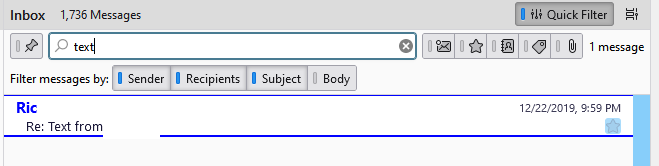
Classic Search is still there, Ctrl+Shift+F, as well as the Quick Filter Bar, Ctrl+Shift+K.
الحل المُختار
Thank you VERY MUCH sfhowes. I just tried your suggestion and, you are right, the classic search is still there. I am very grateful to you for telling me that. I used the Ctrl+Shift+F and it works just like it used to. I am not sure what the "Quick Filter Bar" is -- but the Ctrl+Shift+F works fine. Sincere thanks, John L.
Quick Filter is a simpler version of Classic Search that works on the current folder (see picture).