


Thunderbird Responding When Autosaving Draft

Thunderbird frequently goes 'not responding' when autosaving as a draft. I'll be merrily typing away, then as it autosaves to draft, then words stop being processed, then Thunderbird goes to 'not responding' for a short while. It then responds, and part of what I was typing when it seized up appears, but not all of it (I assume, but can't say for certain, that the text that I type before it goes 'not responding' appears, but none after that).
I've looked online, but I can't find this problem elsewhere.
I've got a high spec laptop, so that's not the issue. (i7 Processor, 8GB RAM, 1TB HDD, 2GB dedicated graphics RAM, etc - Windows 8.1.)
Any advice would be most appreciated! :)
Thanks! Sam
الحل المُختار
I double checked, and it is correct, as you mentioned above.
It took me a while to actually get it to work, and this was one of the things I made sure was correct!
I'll post on here when I've reinstalled. In the meantime, I'm dropping the autosave time down (or up... dependent on how you look at it!). :)
Read this answer in context 👍 0All Replies (10)
Thanks for that advice. I've changed it over. I'll give you a shout if it still locks up, otherwise I'll mark it a solved. Thanks! :)
This hasn't actually fixed it. It doesn't seem to be doing it as much (although it could just be that I've not been sending as many emails...), but it is still doing it a reasonable amount. It also does a similar thing when sending emails, but not always - in fact, not normally. Any other thoughts? Sam
Modified by ultimatecheese
I've tried that for a few days, but it's still doing it... (I've tried compacting and disabling that part of the antivirus.) It's starting to get quite annoying! Any further ideas? =P
(Also, I clicked on this question today to post this response, and it said "thank you for choosing a solution - I didn't do this (at least not intentionally - apologies if you thought this was fixed because of that!)
Hmm... I've tried that for a while, but it still happens!
Should I just pack up my filters, then reinstall Thunderbird? (Nothing else that I need to back up, is there...?)
Thanks, Sam
Maybe it would help us if you show the help/ Trouble shooting information. Use the "copy to clipboard - button" and paste in here.
Ah, I didn't know about that. Just got it now.
Application Basics
   Name: Thunderbird
   Version: 31.4.0
   User Agent: Mozilla/5.0 (Windows NT 6.3; WOW64; rv:31.0) Gecko/20100101 Thunderbird/31.4.0
   Profile Folder: Show Folder
             (Local drive)
   Application Build ID: 20150109111741
   Enabled Plugins: about:plugins
   Build Configuration: about:buildconfig
   Memory Use: about:memory
 Mail and News Accounts
   account1:
     INCOMING: account1, , (imap) imap.googlemail.com:993, SSL, passwordCleartext
     OUTGOING: smtp.googlemail.com:465, SSL, passwordCleartext, true
   account2:
     INCOMING: account2, , (none) Local Folders, plain, passwordCleartext
   account6:
     INCOMING: account6, , (imap) imap.hermes.cam.ac.uk:143, alwaysSTARTTLS, passwordCleartext
     OUTGOING: smtp.hermes.cam.ac.uk:587, alwaysSTARTTLS, passwordCleartext, true
Crash Reports
 Extensions
   Thunderbird Message Filter Import/Export Enhanced, 1.0.3, true, hdiakos@csd.uoc.gr
Important Modified Preferences
Name: Value
     browser.cache.disk.capacity: 358400
     browser.cache.disk.smart_size_cached_value: 358400
     browser.cache.disk.smart_size.first_run: false
     browser.cache.disk.smart_size.use_old_max: false
     extensions.lastAppVersion: 31.4.0
     font.internaluseonly.changed: true
     font.name.monospace.el: Consolas
     font.name.monospace.tr: Consolas
     font.name.monospace.x-baltic: Consolas
     font.name.monospace.x-central-euro: Consolas
     font.name.monospace.x-cyrillic: Consolas
     font.name.monospace.x-unicode: Consolas
     font.name.monospace.x-western: Consolas
     font.name.sans-serif.el: Calibri
     font.name.sans-serif.tr: Calibri
     font.name.sans-serif.x-baltic: Calibri
     font.name.sans-serif.x-central-euro: Calibri
     font.name.sans-serif.x-cyrillic: Calibri
     font.name.sans-serif.x-unicode: Calibri
     font.name.sans-serif.x-western: Calibri
     font.name.serif.el: Cambria
     font.name.serif.tr: Cambria
     font.name.serif.x-baltic: Cambria
     font.name.serif.x-central-euro: Cambria
     font.name.serif.x-cyrillic: Cambria
     font.name.serif.x-unicode: Cambria
     font.name.serif.x-western: Cambria
     font.size.fixed.el: 14
     font.size.fixed.tr: 14
     font.size.fixed.x-baltic: 14
     font.size.fixed.x-central-euro: 14
     font.size.fixed.x-cyrillic: 14
     font.size.fixed.x-unicode: 14
     font.size.fixed.x-western: 14
     font.size.variable.el: 17
     font.size.variable.tr: 17
     font.size.variable.x-baltic: 17
     font.size.variable.x-central-euro: 17
     font.size.variable.x-cyrillic: 17
     font.size.variable.x-unicode: 17
     font.size.variable.x-western: 17
     gfx.direct3d.last_used_feature_level_idx: 0
     mail.openMessageBehavior.version: 1
     mail.winsearch.enable: true
     mail.winsearch.firstRunDone: true
     mail.winsearch.global_reindex_time: 1420548466
     mailnews.database.global.datastore.id: 8fb876a5-9f9c-4492-8d5d-3d82791ee3a
     mailnews.database.global.views.conversation.columns: {"threadCol":{"visible":true,"ordinal":"1"},"flaggedCol":{"visible":true,"ordinal":"3"},"attachmentCol":{"visible":false…
     network.cookie.prefsMigrated: true
     places.database.lastMaintenance: 1424508637
     places.history.expiration.transient_current_max_pages: 104858
     plugin.importedState: true
Graphics
     Adapter Description: Intel(R) HD Graphics 4600
     Vendor ID: 0x8086
     Device ID: 0x0416
     Adapter RAM: Unknown
     Adapter Drivers: igdumdim64 igd10iumd64 igd10iumd64 igdumdim32 igd10iumd32 igd10iumd32
     Driver Version: 10.18.10.3308
     Driver Date: 9-16-2013
     Adapter Description (GPU #2): NVIDIA GeForce GT 750M
     Vendor ID (GPU #2): 0x10de
     Device ID (GPU #2): 0x0fe4
     Adapter RAM (GPU #2): 2048
     Adapter Drivers (GPU #2): nvd3dumx,nvwgf2umx,nvwgf2umx nvd3dum,nvwgf2um,nvwgf2um
     Driver Version (GPU #2): 9.18.13.3165
     Driver Date (GPU #2): 10-23-2013
     Direct2D Enabled: true
     DirectWrite Enabled: true (6.3.9600.17415)
     ClearType Parameters: ClearType parameters not found
     WebGL Renderer: false
     GPU Accelerated Windows: 2/2 Direct3D 10
     AzureCanvasBackend: direct2d
     AzureSkiaAccelerated: 0
     AzureFallbackCanvasBackend: cairo
     AzureContentBackend: direct2d
JavaScript
Incremental GC: 1
Accessibility
   Activated: 1
   Prevent Accessibility: 0
Library Versions
     Expected minimum version
     Version in use
     NSPR
     4.10.6
     4.10.6
     NSS
     3.16.2.3 Basic ECC
     3.16.2.3 Basic ECC
     NSS Util
     3.16.2.3
     3.16.2.3
     NSS SSL
     3.16.2.3 Basic ECC
     3.16.2.3 Basic ECC
     NSS S/MIME
     3.16.2.3 Basic ECC
     3.16.2.3 Basic ECC
Thanks! :)
One thing that has slowed down things is old nvidia drivers. I know thats not your problem, but update it anyway if you can. It helped me.
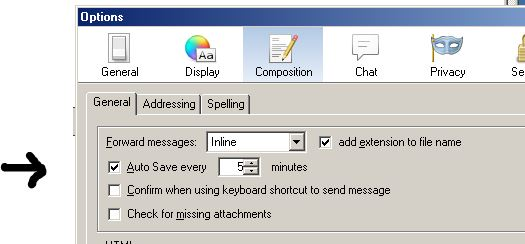
You can change settings in option/composition about if and when you save drafts
Oh yeah, they are old. It's a laptop that I bought as a full thing, so I didn't set stuff up on it. I'll update the drivers shortly.
I like having frequent autosave in case it crashes... but I guess if it means I have t wait 20 seconds every time it autosaves, better less frequent!
Thanks for the advice, but I still can't work out why it's happening! I'll try a reinstall when I get the time then let you guys know. :)
الحل المُختار
I double checked, and it is correct, as you mentioned above.
It took me a while to actually get it to work, and this was one of the things I made sure was correct!
I'll post on here when I've reinstalled. In the meantime, I'm dropping the autosave time down (or up... dependent on how you look at it!). :)
So, just an update. I've extended the time between saves for drafts, so it basically just isn't saving drafts automatically. As such, it doesn't seize up. Occasionally it does when click send, but not often.
Thanks everyone for their help. :)