


I deleted thunderbird mail and reinstalled it. My folders will not open but the messages appear in Quick Filter. I can send mail out ok

I deleted thunderbird mail and reinstalled it. My folders on the left will not open, but the messages appear in Quick Filter. I can send mail out ok. I do not want to use Quick Filter to access the mail folders. I tried doing the repair on each folder and did not help. I'm older 89 and not very computer savvy. I do not even have a cell phone. I would really appreciate it if anyone can help me with this. Thank you very much. Bob
被選擇的解決方法
By default you do not need to activate the Quick Filter to open a folder and read your messages. Make a test in Thunderbird 'troubleshoot mode' : hold the shift key when launching TB.... If your issue is the same in troubleshoot mode please show us a screen shot like the one I posted in my first reply.
從原來的回覆中察看解決方案 👍 0所有回覆 (6)
By chance did you disable the "Folder Pane" in View > Layout > Folder Pane?
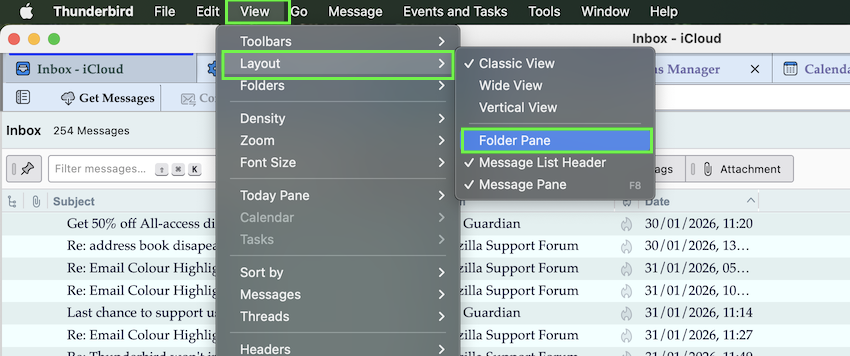
HI, thanks for your reply.
The four items in Lay Out that have a check mark are:
(Classic View) (Folder Pane) (Message List Header) (Show Today Pane)
The others there have no check mark
選擇的解決方法
By default you do not need to activate the Quick Filter to open a folder and read your messages. Make a test in Thunderbird 'troubleshoot mode' : hold the shift key when launching TB.... If your issue is the same in troubleshoot mode please show us a screen shot like the one I posted in my first reply.
由 Mapenzi 於 修改