


Thunderbird has not loaded since 12/4/25

When I open the Thunderbird desktop app we receive this popup error message:
"Unable to establish TLS connection to POP3 server. The server may be down or may be incorrectly configured. Please verify the correct configuration in the Server Settings for your mail server in the Account Settings window and try again."
I have not found any configuration under the account settings to help with this, but if anyone has any suggestions to walk me through this to establish a connection again that would be most appreciated.
Additionally, when I try to send an email I receive the message: "Login to server smtp.cybermesa.com with username centinela failed."
After closing the error message box I received another error message: "Sending of the message failed. The message could not be sent because the connection to Outgoing server (SMTP) smtp.cybermesa.com timed out. Try again."
Is our issue then with Cybermesa and not Thunderbird? Or Is something wrong with Thunderbird due to our initial error message we received? Any suggestions is much appreciated.
所有回覆 (5)
What are your settings? According to their site, they should be:
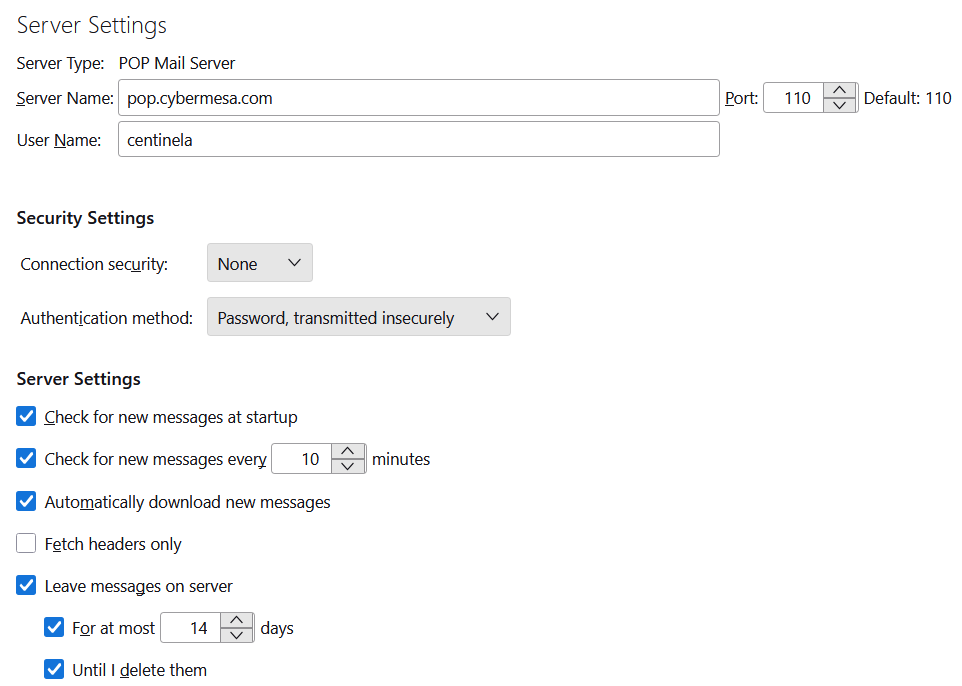
incoming POP server: pop.cybermesa.com, port 110, security = None, authentication = password, transmitted insecurely, User Name = part of address before @
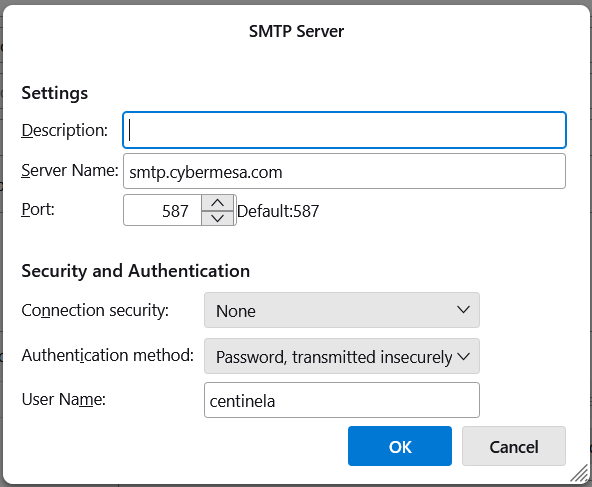
outgoing SMTP server: smtp.cybermesa.com, port 587, security = None, authentication = password, transmitted insecurely, User Name = part of address before @
I don't think there should be a TLS error when the connection security is 'none'.
Thank you for responding! I switched the the connection security back to 'none' and Thunderbird will still not link up with Cybermesa. I logged into the Cybermesa website to check if our password was correct and it logged in that way. When I tried putting the password into the pop-up through Thunderbird it still would not load.
Are you using a VPN or antivirus that isn't Windows Security?
Post a list or screenshots of your incoming and outgoing settings.
Currently we have McAfee software installed on our Windows system. I am attaching our current settings for Thunderbird.
McAfee is well-known to causes issues. I suggest you remove (not disable) it, at least temporarily, or run Windows in safe mode to bypass startup apps like antivirus. If TB works in Windows safe mode, you can either disable McAfee's action on TB (e.g. exclude the TB profile folder), or remove it permanently and use the built-in Windows Security (recommended).