

此討論串已被封存。
如果您有需要幫助,請新增一個新問題

封存
Firefox android keeps switching to desktop view

I have a Samsung fold phone, and particularly when I select open link in new tab, or I open a new tab and navigate, the flip flip "website for computers" or whatever the English term is gets flipped on. Why does it keep changing without my permission? How do I lock it in off position until I want to change it?
I have a Samsung fold phone, and particularly when I select open link in new tab, or I open a new tab and navigate, the flip flip "website for computers" or whatever the English term is gets flipped on. Why does it keep changing without my permission? How do I lock it in off position until I want to change it?
所有回覆 (3)
Starting with Firefox for Android version 133, tablets and foldable phones automatically display all websites in desktop mode by default.
If you prefer the mobile view for all sites, follow these steps to turn off desktop mode by default:
- Open Firefox on your Android phone.
- Tap the menu button
 .
.
- Select Settings -> Site settings > tap Request desktop view.
- Choose Off to disable desktop mode for all sites.
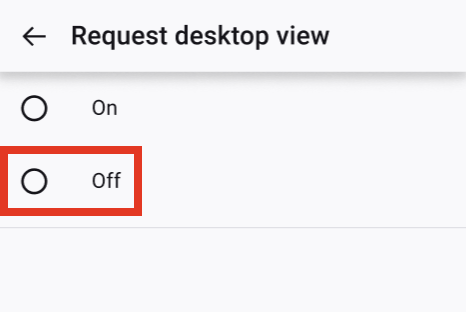
But it's already off?

It shouldn't behave like this, or there's unknown logic behind it. Can you report a bug on bugzilla? Thanks!