


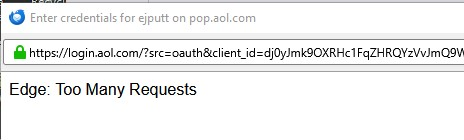
popup for credentials showing EDGE: Too many requests (bug1997062)

Yesterday I changed my AOL password online. Now Thunderbird email no longer works. I get a popup labelled "enter credentials for user on pop.aol.com". Within the popup window it says "Edge: Too Many Requests"
Settings have not changed and worked prior to password change. I believe if the popup window was working correctly I could enter my new password and all would be fine.
pop.aol.com 995 SSL/TLS OAuth2
smtp.aol.com 465 SSL/TLS OAuth2
Thanks,
Ed
由 Wayne Mery 於 修改
被選擇的解決方法
First create an app PW - see https://help.aol.com/articles/Create-and-manage-app-password.
Then try pressing F5 and accept the form resending notification several times until the login page loads. Once it loads, proceed to log in using the app PW. If the 'too many requests' appears again, just repeat the refresh process until it lets you in.
從原來的回覆中察看解決方案 👍 0所有回覆 (3)

選擇的解決方法
First create an app PW - see https://help.aol.com/articles/Create-and-manage-app-password.
Then try pressing F5 and accept the form resending notification several times until the login page loads. Once it loads, proceed to log in using the app PW. If the 'too many requests' appears again, just repeat the refresh process until it lets you in.
Thanks, I resolved it by creating a new email account using imap instead of pop and using "Normal" password instead of "Oauth2" with an app password generated in the AOL web site. I have a laptop to fix as well so I may try the F5 solution to see if it works there but then it would still be a pop service instead of imap which may not be ideal.
Ed
For others coming here, this has fixed it for many:
First, generate an app PW - see https://help.yahoo.com/kb/SLN15241.html.
Then go to TB menu > Account Settings > Server Settings and set the following:
- Server Name: export.imap.mail.yahoo.com - Port: 993 - Connection Security: SSL/TLS - Authentication method: Normal password
On the left column, scroll down and click 'Outgoing Server' and edit the Yahoo entry:
- Server Name: smtp.mail.yahoo.com - Port: 465 or 587 - Connection Security: SSL/TLS - Authentication method: Normal password
Finally, go to TB menu > Settings > Privacy & Security > Passwords
- click the 'Saved Passwords' button and edit the Yahoo entry to add your new app PW
After that's done, try logging in.
BTW, this fix is mentioned in the related [bug](https://bugzilla.mozilla.org/show_bug.cgi?id=1997062).