


Double draft folders

I would like help removing one of the folders called drafts as it is empty and uses the other for subfolders. I have tried right clicking but it has no effect on removing it. Only the draft folder where the subfolders are located can be removed. How do I remove the extra draft folder. Thanks in advance for your help.

所有回覆 (19)

You cannot delete a system folder from the folder pane. The Drafts folder with the purple icon is the system folder Drafts. Go to Account settings > youraccount > Copies & folders > Drafts and Templates and try to check the "Drafts" folder on: youraccont Create and save a new draft and verify if it is saved in the purple "Kladder" folder. If this is the case you can try to delete the yellow generic "Kladder" folder. If you can't delete the yellow folder > R-click on the account name > Subscribe .... which will open a folder list. Deselect the folder corresponding to your yellow extra Drafts or DRAFT folder and hit OK.
由 Mapenzi 於 修改
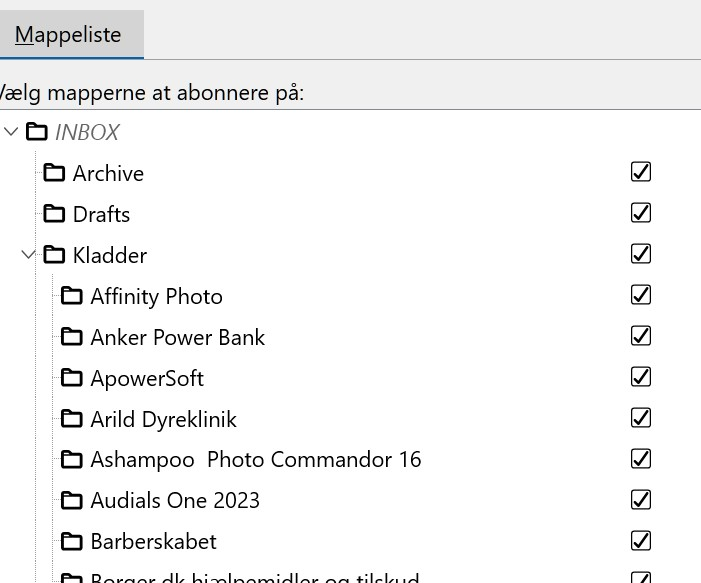
It is not the yellow folder, but the one just below the inbox that needs to be removed.
Why not the generic yellow folder? It has been created by the user, maybe indirectly via Account Settings > Copies & Folders ... All my IMAP accounts use purple system folders for drafts. But since you insist: deselect the "Drafts" folder in your folder list. Are you happy now?
由 Mapenzi 於 修改
Don't worry now :-) Yes, it probably came when I copied from outlook. If all the drafts in the folder could be copied / moved to the other one, it would be ok for me to delete it. However, I haven't been able to see a place where I can copy the drafts to the other one and I'm unsure if I will lose all the drafts if I just delete the yellow folder.
Were you able to deselect the Drafts folder in the folder list and is the purple Kladder folder no longer displayed in the folder pane?
If you mean can I delete the yellow folder, the answer is yes, and the purple one should still be there but is empty. I haven't deleted the yellow one though. I don't know if the drafts in it are updated in the purple one, that's why I haven't deleted it. Sorry, I don't quite understand what you mean.
No, you misunderstood me. I asked whether in the folder list (shown in your screen shot) you can uncheck ("unsubscribe") the folder "Drafts" (image) This "Drafts" folder in the folder list corresponds to the purple system folder "Kladden" in the folder pane! In the meantime I have seen that your yellow "Kladden" folder contains many subfolders, so its simpler to continue to work with it.
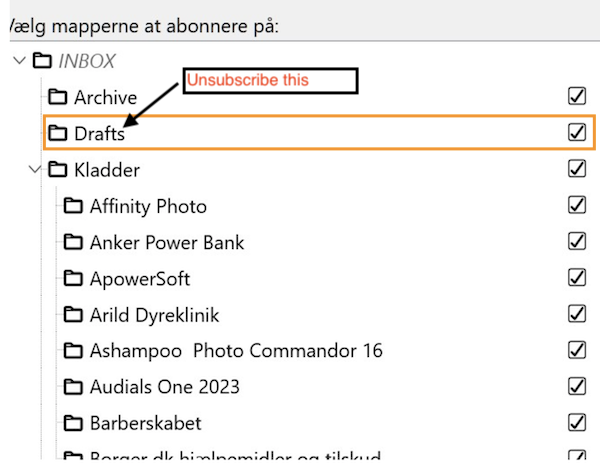
Okay, yes, I misunderstood, yes, I can deselect it and since I can't copy or move the subfolders, it's a good idea to keep it and then delete the orange one. However, the folder is still as before.
Bruno Nissen said
Okay, yes, I misunderstood, yes, I can deselect it and since I can't copy or move the subfolders, it's a good idea to keep it and then delete the orange one.
Now I'm getting confused. Why would you now delete the orange (I called it "yellow" before) one? From the beginning you told me that you wanted do keep it because of the importance for you of its subfolders.
Bruno Nissen said
However, the folder is still as before.
Which one? Did you try to unsubscribe the folder "Drafts" and it is still displayed in the folder pane? Did you click on the OK button before closing the folder list? Maybe you should show a new screen shot....
Yes the check mark is removed, if I select update the check mark comes back, the same thing happens if I press ok and check if the check mark is removed. It is the purple folder that should be removed. Thank you for your great patience.
That is rather bizarre: After removing the check mark for the "Drafts" folder and a click on OK the purple "Kladder" folder should no longer be visible in the folder pane!
Can I ask to realise some easy tests to have further information: on what is going on: write a new message from the account shown in your images and save it as a "draft". Then verify in which of the two Kladder folders it has been saved.
A second test would consist in a drag/copy action of the "Affinity Photo" subfolder from the orange Kladder folder into the purple Kladder folder.
Not quite sure what you mean. Probably because I have always used office which will soon be discontinued, Should I write in writer and save in drafts. I don't think there is any option to choose save as in drafts?? I can move the Affinity draft to the orange folder.
Ok just remembered if it's in Thunderbird I need to write a message and save it in draft. Unfortunately it saves it as a draft on my other email gmail. so I just have to find where to fix it.
Can see it is being saved under inbox and not under drafts even though drafts are checked
Bruno Nissen said
I can move the Affinity draft to the orange folder.
Our communication gets more and more confusing, that's not what I asked you. It's the contrary: I asked you whether you could copy (drag&drop) the "Affinity Photo" subfolder from the orange Kladder folder into the the purple Kladder folder.
Bruno Nissen said
Should I write in writer and save in drafts. I don't think there is any option to choose save as in drafts??
No, we are in Thunderbird since you have a problem with a duplicate drafts folder. So go to File > New > Message, write a short text and save the unsent email as "draft". The explore the two Kladder folders to know in which of the two folders your draft message has been saved.
Sorry... Yes, I can, no problem moving affinity between drafts. Yes, I wrote a new email and saved it as a draft, it is only received in the inbox and not in any of the drafts.
I beg your pardon but I cannot solve your problem this way. Each of your answers contains another unexpected surprise: the last one is that draft messages are saved in the Inbox folder and not in Drafts. I have some pieces of a puzzle but no idea of the picture as a whole. Are these duplicate drafts folders a very big problem for you or can you still work normally with Thunderbird and may consider the two Drafts folders as an aesthetic issue?