


Showing number of emails in a folder

A few days ago, I reset my Win 10 computer. I then had to reinstall Tbird. I had saved the Profile so that saved email, addresses, etc were quickly reinstalled. One feature that I like was the display of the number of emails saved in each folder. That didn’t return. The only number that appears is the number of unread emails in the Inbox.
I found a user who had the same problem 3 years ago. (https://support.mozilla.org/en-US/questions/1297303)
A solution was given: “View/Layout/Folder Pane Columns, then right-click any column button and select Total, Size, Unread”
Unfortunately, my version of Tbird (155.1.0) only shows View/Layout/Folder Pane – the word columns is absent. Any suggestion to cause the folder content numbers to appear following the names of the folders? Thanks.
所有回覆 (3)
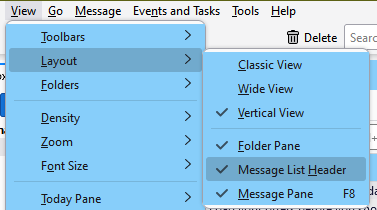
Make sure the Message List Header is enabled under View/Layout, then the number of messages in the selected folder is displayed (see picture).

選擇的解決方法
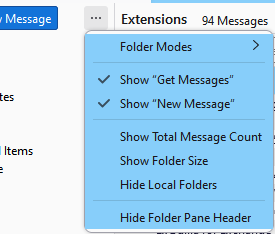
Another option: click the ... on the Folder Pane Header to show the message count (see picture).
First suggestion didn’t work but the second did! Thank you.