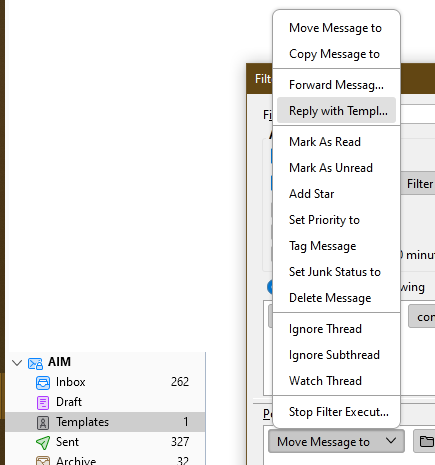
Reply with template option not shown in Message Filters

Hello, I wanted to set up a filter using "reply with template" action. But I don't see this action in the drop down menu, how do I make it appear? Or, alternatively, how else can I send an autogenerated reply e-mail to certain incoming messages?
Unfortunately, I cannot make a screenshot of a drop down menu, it disappears as soon as I press the screenshot key.
OS: Ubuntu 20.04 Thunderbird: 102.3.1 (64-bit)
Help is appreciated! BR
所有回覆 (2)
try the print screen button on your keyboard and paste into a graphic application and crop n save to png. Things like menus are always problematical will in user interface buttons because activating one closes the thing you are trying to capture.
I exists on windows.


The option doesn't appear in the menu until a template message is created in the Templates folder (see picture).