

此討論串已被封存。
如果您有需要幫助,請新增一個新問題

Solved
封存
Update issue

Just installed 102.3.0 (64-bit). Now my unified inbox shows no emails. If I go to the individual inboxes everything (about 30 emails) is still there. New emails don't show in the unified inbox only in individual ones.
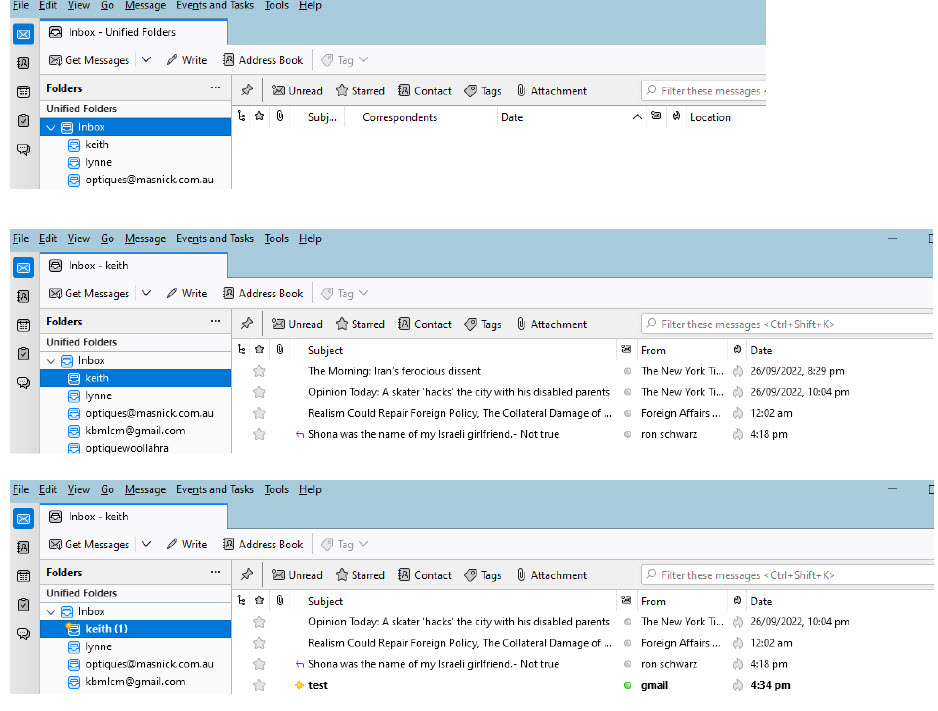
The image attached shows 1) The screen of the unified inbox before and after the test email 2) The screen of the last few emails in the inbox KEITH before the test email 3) The screen of the last few emails in the inbox KEITH after the test email
How do I fix it so that the unified inbox shows all the emails in the inboxes
Just installed 102.3.0 (64-bit). Now my unified inbox shows no emails. If I go to the individual inboxes everything (about 30 emails) is still there. New emails don't show in the unified inbox only in individual ones.
The image attached shows
1) The screen of the unified inbox before and after the test email
2) The screen of the last few emails in the inbox KEITH before the test email
3) The screen of the last few emails in the inbox KEITH after the test email
How do I fix it so that the unified inbox shows all the emails in the inboxes
所有回覆 (2)
- Right click on the 'Unified Inbox' and select 'Properties'
- Click on 'Choose' button
Check this:
- Are all the various account 'Inbox' folders checkboxes selected ?
- Select the account Inbox folder checkboxes that are not checked.
- click on 'OK'
- then click on 'Update'
由 Toad-Hall 於 修改
選擇的解決方法
They were all checked but I unchecked them and then rechecked them which solved the problem. Thanks