


How to disable automatic updates by managing ESR 68
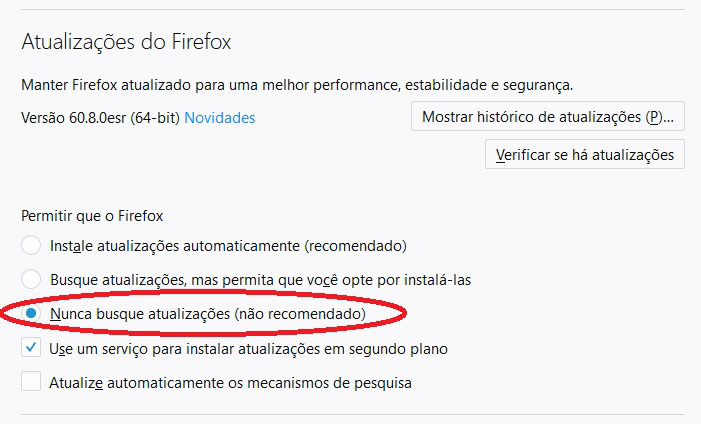
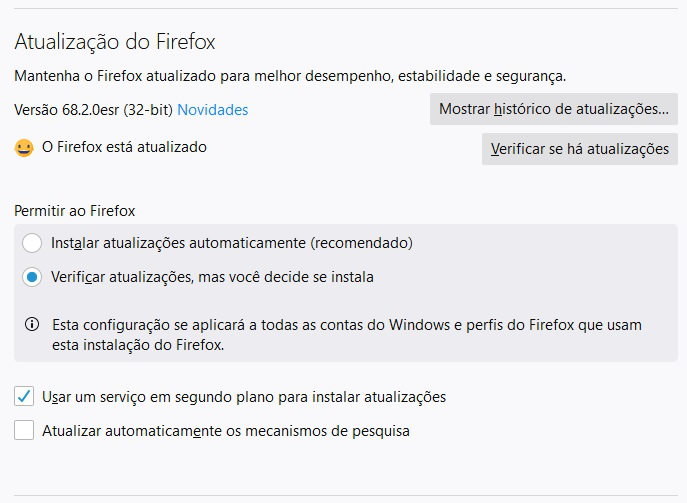
At: (https://support.mozilla.org/en-US/kb/firefox-esr-release-cycle): "System administrators can disable automatic updates through ESR management through your installation system. " However, as of the ESR 68 version, no police to disable automatic update has been effective. In fact, I believe this control is the need for corporate environments, that is, controlling their versions in production. Is there a solution? Thanks! Obs.: Annex follow differences between ESR 60 and ESR 68 versions.
所有回覆 (4)
選擇的解決方法
The option to disable updates no longer appears in the Firefox settings, since too many users were failing to update Firefox and exposing themselves to significant security and privacy risks.
Instead, updates can only be disabled by using the DisableAppUpdate with either Group Policy (Windows only) or a policies.json file (for all operating systems).
Hope this helps.
First of all, thank you for your attention and return; however, I have reviewed this proposal, as reported on Mozilla's own website (see police JSON - https://news.softpedia.com/news/how-to-disable-update-checks-in-mozilla-firefox-browser- 526438.shtml | policies.json file) in “DisableAppUpdate” (see: https://github.com/mozilla/policy-templates/blob/master/README.md#disableappupdate); however, it is not effective for ESR 68. This alternative only works until version 60; that is, the orientation is literally out of phase.
The Compatibility listed on the documentation is the minimum version. It says Firefox 60 and Firefox 60 ESR because it works on versions newer than 60. It will work on Firefox 68 ESR.
Are you using GPO or policies.json ?