

此討論串已被封存。
如果您有需要幫助,請新增一個新問題

封存
Can't see target folder when drag/drop messages

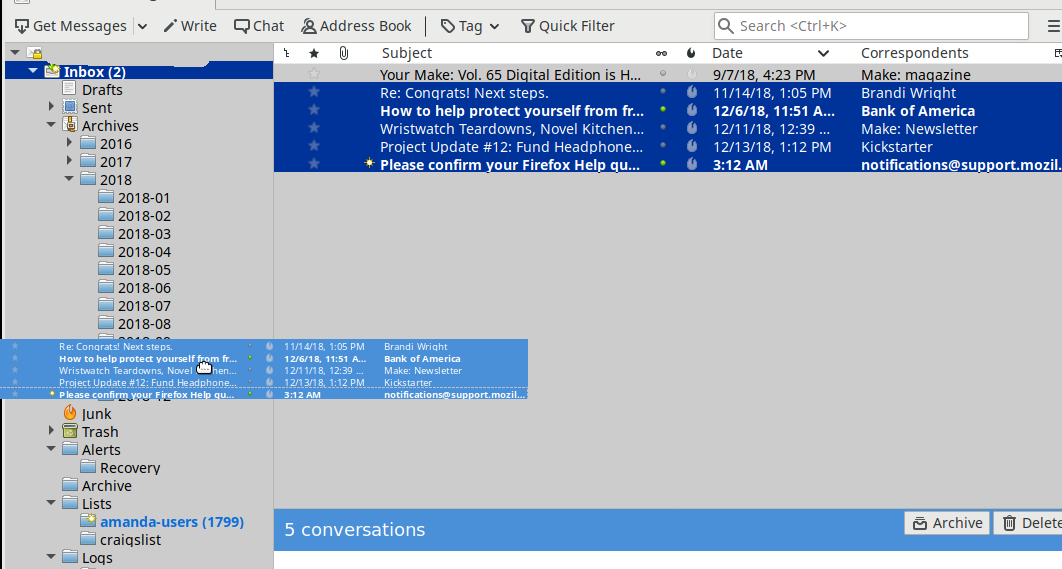
Recent change making it hard to drag/drop messages to folders, looking for the setting to fix this. Picture makes it obvious, when dragging several messages, the object shown while dragging is too big, can't see which folder mouse pointer is over. What setting changes the object shown when dragging?
Already aware one could use the right-click->Move; that would take several seconds to pick a folder after very carefully maneuvering through the folder list versus half a second drag/drop.
Version 60.2.1 via Ubuntu 18.04 using Xfce4.
Recent change making it hard to drag/drop messages to folders, looking for the setting to fix this.
Picture makes it obvious, when dragging several messages, the object shown while dragging is too big, can't see which folder mouse pointer is over. What setting changes the object shown when dragging?
Already aware one could use the right-click->Move; that would take several seconds to pick a folder after very carefully maneuvering through the folder list versus half a second drag/drop.
Version 60.2.1 via Ubuntu 18.04 using Xfce4.
所有回覆 (2)
Image as mentioned.
由 old_pine_user 於 修改
Thanks very much. Odd Google search failed to show this.