


Mails composed as HTML is sent as plain text if it does not contain any formatting

Since one of the lase TB versions HTML mails are sent as plain text, but only if no formatting is applied. This is a problem because for plain text mails I configured line wrap. So lines are wrapped unexpectedly. A suitable workaround is to add a bold space character, but sometimes I forget.
This is the header of such a mail:
User-Agent: Mozilla/5.0 (Windows NT 6.1; WOW64; rv:52.0) Gecko/20100101
Thunderbird/52.5.0
Content-Type: text/plain; charset="utf-8" Content-Transfer-Encoding: quoted-printable Content-Language: de-DE MIME-Version: 1.0
所有回覆 (2)
選擇的解決方法
What setting have you got under your 'Send options' ?
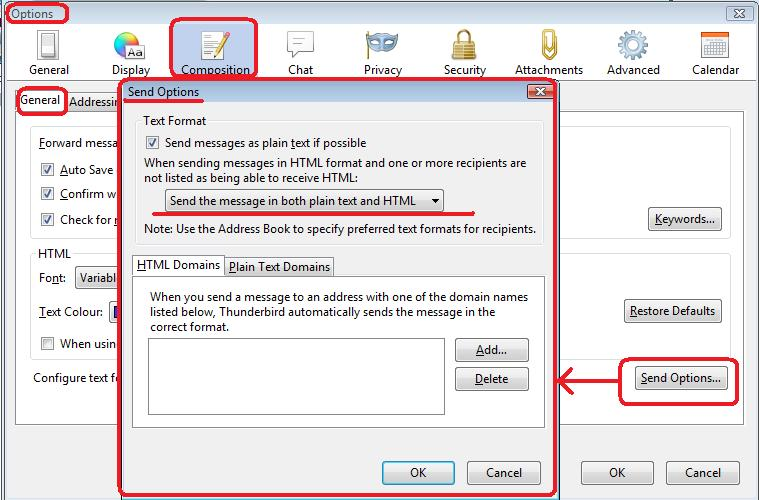
Menu icon > Options > Options > Composition > 'General' tab click on 'Send Options' button. See image below.
Please post image of your settings.
Thanks a lot!
Unselecting "send message as plain text if possible" solves my problem.
I suppose is a new option with a non backward compatible default setting (selected). I never noticed it before and did not observe messages being sent as plain text when composing as HTML.