All of my emails in my Inbox only dated prior to 6/6/17 are corrupted and unreadable. How do I recover them?

All of the emails in my Inbox only dated prior to 6/6/17 have been corrupted and are unreadable. No other folder appears to be impacted. The following is a small example of what I see. I have not made any system upgrades nor added any software programs. How can I get my emails restored? Thanks for your help:
/4/?T=3DMjk0OTA5MTE%3AMDItYjE3MTQ2LWUyOGI4ZmZmMzM5NTRlZjA5N2RlNmI4ZTlkMzUwZ=D
所有回覆 (4)
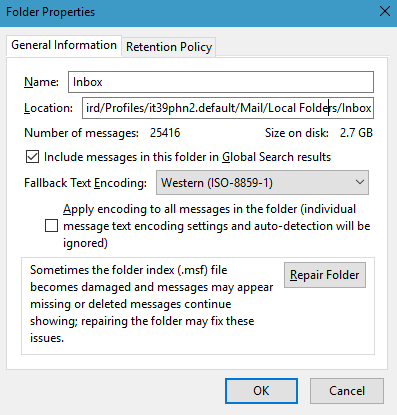
right click the inbox folder Select properties and then repair
Worked just fine, thank you.
Matt said
right click the inbox folder Select properties and then repair
When I click on Properties for the Inbox, Repair is not an option in version 52.3.0. Where is it now?
When I select properties, I get the following Dialog.

This dialog has been in Thunderbird unchanged for most of it's existence. Although the first time I recall using it was version 3. This image was taken from a Daily trunk (alpha software) build of V56 which I use. So if the button is not there, I suggest you try restarting with add-ons disabled from the help menu. Because the repair button is a fundamental part of the base program.