


Firefox update
After the last update, I am missing the “Minimize” and “Close” buttons on Firefox on my Microsoft desktop computer. Cannot close the app when finished. Anyone know how I can get them back?
所有回复 (5)
Hi Barb,
As a workaround, you can close Firefox by clicking the menu button and selecting Exit (or by pressing Ctrl+Shift+Q).
Regarding the issue: could you please attach a screenshot to help us better understand what's happening?
at the red arrow on the attached photo you'll note that there are no little symbols (minimize, maximize, close) that are usually in the upper right-hand side. Consequently, I am limited in the functionality of this program. Any help would be welcome.
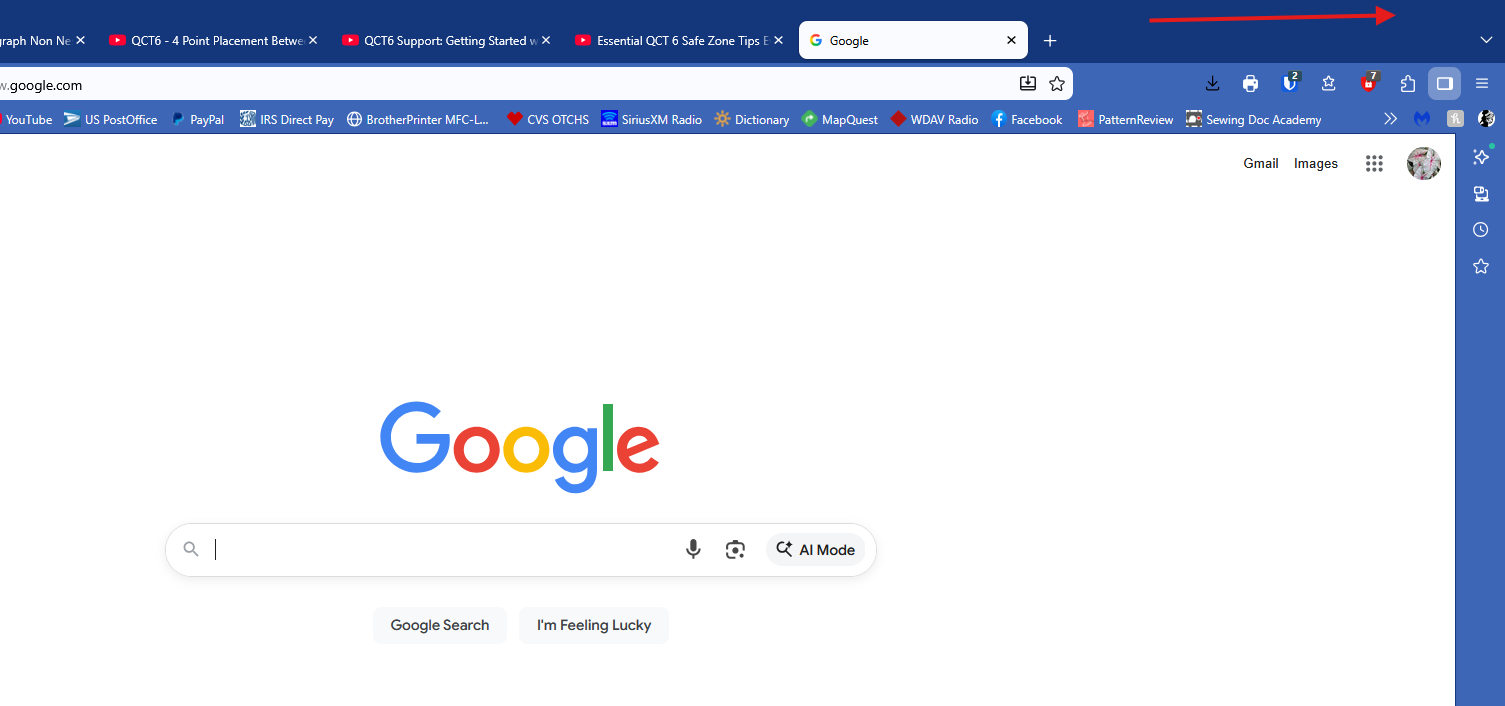
Oh, thank you for sharing a screenshot. That's weird. Could you please try running Firefox in Troubleshoot Mode and see if the problem persists in order to exclude potential add-on / hardware acceleration influence?
Also, are there any other apps on your PC that behave in a similar way?
I opened in Troubleshoot Mode and the controls are back! I didn't have this problem in any other program.
Great! If the problem did not occur in Troubleshoot Mode, the likely cause is an extension, theme or hardware acceleration. Please see this article for further troubleshooting steps.
Looking forward to your update on how the troubleshooting goes!